Experiencing issues? Report them.
Recently active
Hey! Since today, some of my components are no longer displayed correctly in some frames. The strange thing about it is that it only affects some of them (even if it is the same component ) and it is displayed correctly again after clicking on the component a little. However, it does not seem to be saved and after a reload it looks the same again. As can be seen in the screenshot, the layout is messed up, but the breadcrumb, although it is the same, is displayed differently. But when I copy and paste the frame, everything is displayed correctly and is still ok even after a reload. I have the latest version and have already deleted my cache, restarted, etc. Can someone help me or has at least similar problems? Thanks in advance bug components team-libraries
Gettin
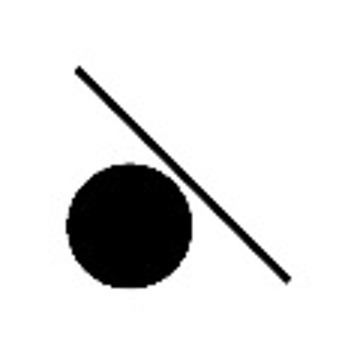
I’ve created an image of 2 interlocking rings using Ellipses, Vectors, Rectangles, Subtraction, Strokes, and Fills. But when I select the whole thing and apply a Union, I get an unexpected result. Thoughts on what I’m doing wrong or is this a bug in Figma? Here’s an image from the project: Here’s the project file:Figma – 18 Nov 24
Hi all, I’ve raised a bug with Figma as the Pin Libraries to board (dock) option has disappeared from FigJam but is still highlighted in their guidance here https://help.figma.com/hc/en-us/articles/1500004290841-Use-stickers-and-libraries-in-FigJam#Pin_libraries_to_board I know there was a lot of backlash on the inability to dock/pin in Figma and I imagine the issue is one for FigJam too. Has anyone else had this issue and any ideas on how to use stickers/plugins etc without the awful widget frame that covers half your FigJam board?
I have a navigation drawer with a switch component (I’m using the Material M3 component library) and I added an interaction to ‘Set variable mode’ on Click. It doesn’t work. When I add the variable mode to Mouse enter / Mouse leave in the switch component then it changes the variable mode correctly. The same interaction works when I add it to Click in a button component. So it looks like a bug to me.
Continuing the discussion from Doesn't see the padding in responsive Presentation mode.: Shouldn’t this be normal?
Every time I try to Review Updates, the modal loads forever.
This started happening recently, and I am getting alerts for lots of font styles missing, such as all but “SemiBold” for Open Sans for example. Only happens on my mac, both on Mac desktop and web clients, but not on Windows. Popular google fonts don’t show up in font picker, and lots of Google Fonts I used are suddenly marked as “Installed by you” instead with only few styles like SemiBold available. However, it’s not in Mac’s font book so I don’t see any possible local conflicts. Open Sans works in Adobe Illustrator as intended. Anyone knows what’s going on? Where are those “installed by you” coming from?
I’m loving that I can now resize columns in the variable editor. However, there are some issues with this feature, specifically with the final column. Problem #1: Cannot resize last column Open a variable collection with numerous modes (enough that will require scrolling to the final mode column). Try and resize the last column Problem #2: Final column fills available space I have to resize the Variable editor dialog to best view variable definitions for a specific collection (making it wider). Switching to a variable collection that has only one mode column forces trailing elements in the final column to be aligned to the right edge of the dialog (nowhere near the column value).
I cannot Shift + Ctrl + LClick to create a new variable with the target color. By the way, I love this new redesigned Eyedropper, which allows me to copy the color variables. 🥰
New eyedropper functionality enables users to get around variable scoping. I’ve got 5 variables scoped explicitly to a single use. When using the color selection dialog to search for compatible color variables, things are exposed as expected. However, using the eyedropper can circumvent my scopes. I’m able to apply a color variable that normally wouldn’t be available if I searched for it manually.
Hi, If I click Hide FIgma UI in preview mode, some of the actions of the Figma UI are still usable, even though the top bar is invsibile. For example if I hover the PHONE button in the top of my app, I get the Figma tooltip asking me if I wanna follow one of my colleagues.
Hello! We recreated our Component Library with Modes and Variables. Unfortunately when I wanna use my components in working file (Libraries are added to File) some components aren’t appearing by switching the modes. It seems to have issues with nested components and changing properties with modes when a component variant is “reloaded/lazy loaded”. Works only fine for the first mode. It’s a massive issue now since we aren’t able to work properly. First I thought it has to do with hidden component (we are using _parts oftentimes) but even after publishing the part component it doesn’t work. Are there anybody with the same issue and a solution? Seems like a bug for me Edit: I detached the breakpoint property and set it manually on “basic” now it’s showing. So I assume it has to do with the property variable Edit2: It works with the browser bar. the difference: theres no nested component
Hello Figma Team, I am reaching out to provide feedback on a recent update. Please note that this email was translated with the help of GPT, so I apologize in advance if some sentences are a bit unclear. I’ve encountered an issue with the recent changes in how the ‘variable’ property is handled for objects. The new update has made my workflow more cumbersome. Let me provide an example to explain: Let’s assume there is a text variable ‘A’, defined as ‘AA’ in ‘Mode1’ and ‘Aa’ in ‘Mode2’. In the previous version of Figma, if this variable was applied to text objects ‘C’ and ‘B’, I could easily update the variable for both objects simultaneously by selecting them together, regardless of the mode. However, in the latest update, if objects with different modes of the same variable are selected, it is no longer possible to modify the variable in bulk. This change has caused some issues in my workflow. I manage multilingual text for designed GUIs using Figma’s variable feature. To streamline t
Hi there, I have an issue with a gradient which is connected to tokens on the one hand, but on the other hand, it’s not visible in Dev Mode. It should be a white (A) to transparent (B) gradient. Gradient in the file (tokenised): A: “White Token” to B: “Transparent Token” But in Dev Mode: A: #fff to B: #fff Cheers! PS: I can’t attach screenshots.
So I’ve got a tab navigation bar which has horizontal scroll on and I have interactions where selecting a specific tab makes the bar scroll to the selected tab and change screens. However, in the prototype, if you scroll and then press a tab, the scroll position keeps moving in the direction of the previous scroll, leaving a obvious empty space, which shouldn’t be there and if try scrolling will remove it. What I want is to just have the bar scroll to the set position without leaving the empty space. If I enable “reset scroll position” the end result is what I want, but it instead of leaving empty space, it makes the tabs jump and it just looks buggy. You can view the file here: https://www.figma.com/design/mkEsPCWHQkXiYyn0DIkwWu/Horizontal-Scroll-Bug-(Copy)?node-id=0-1&node-type=canvas&t=Wzmff91dfSlOcb88-0 Hopefully the video explains it better; Preserve scroll: Reset scroll: Is there a way to have an interactive scrolling element change scroll between screens in line
When toggling visibility of frames, it seems Figma forgets to update the eye icon: In this record, you can see the “+” icon on the canvas toggling, but the eye icon doesn’t switch between the open/closed eye. As you can see, it happens with frames only - I toggled the visibility of another layer in this recording, where you can see the open/closed eye switching. It’s a small, cosmetic bug, but it’s quite confusing if the layer you’re toggling isn’t in the viewport at the moment.
Please search for existing topics before posting! Press 🔍 at the upper right to search.
Hello, I just noticed this possible UI3 bug while setting up a prototype in Figma: I was looking for which device would match the Desktop or Wireframe frame selected in the Design panel, but when I tried scrolling down to view more of the available devices, either there’s nothing after the Macintosh (???) part or this is the end of the list and it’s just not rendering properly.
When presenting a Prototype, the option Fit Width doesn’t seem to be working as expected. When presenting in a bigger display the artboard doesn’t stretch, it doesn’t fit to the width of the screen. I suppose it is to protect pixel stretching but that is far more less to happen or to be a problem then the usefulness of it working correctly. I use to work in lower resolutions to save resources (local and server wise). But then when I have to present my work it’s framed on the sides because it doesn’t stretch. Thank you
Recentemente estou percebendo alguns bugs ao decorrer do meu trabalho, bugs que não existiam antes. Componentes SVG se quebrando sem motivo. Componentes de input, ao pegar o componente filho e alterar o texto da segunda variante, quando voltamos para o default o texto alterado na segunda variante volta ao padrão do componente local pai. Isso não acontecia antes.
Hello, This issue has been already raised in here: Interactive component bug when prototyping with overlays but received no responses and was closed. However, the issue still persists, my case is exactly the same as described in the original topic, meaning: Components (i.e. Buttons) with interactive states (default, hover, press) work well when used on prototypes that have a simple on Click interaction paired with Navigate to... option; However, when the same component is used in local prototype but assigned a transition of Open Overlay or Scroll to... it does not work as expected; Can someone from @figma confirm it’s a known bug and what would be the ETA on resolving that?
Hey guys, The RETURN TO INSTANCE feature, which is so very useful, doesn’t show up any more. But thank you so much for the useless UI3, we really appreciate it.
1. Describe the bug/issue you’re running into? Option-drag a locked layer results in duplicating the locked layer. 2. Are you able to consistently reproduce it? If so what are the steps? Yes. Any locked layer. 3. Share a screenshot, recording, console log, link to the file, etc. 4. Is the issue only happening in desktop app or a specific browser , or both? Desktop app. 5. What OS/version and/or browser/version are you using? MacOS 11.2.3
I want to export frames in a file into a single PDF. The containers are frames, not groups. They export individually just fine. When I go to File> Export frames to PDF, I get an error that says “There are no top level frames on the current page to export”.
Already have an account? Login
Enter your E-mail address. We'll send you an e-mail with instructions to reset your password.