

Ash.Sharifi
May 6, 2021

Override auto layout direction on the instances

  • May 6, 2021
  • 59 replies
  • 5795 views

Hello Figma!

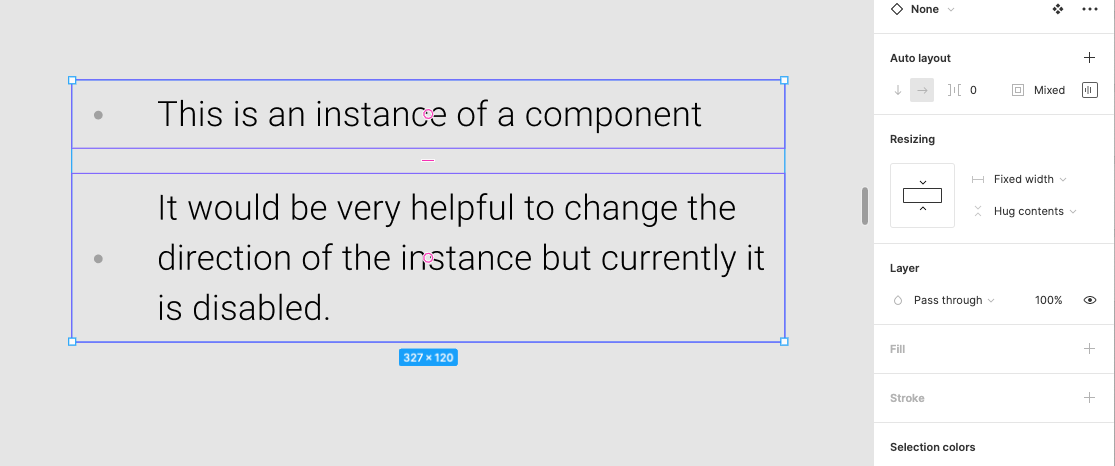
I can not change the direction of the Autolayout on the instances of a component. I can not understand why such a great feature is disabled on the instances and why not allow us to overwrite it?

There are so many incidents that I would have wished to be able to change the direction of the Autolayout in the instances of the component but right now I have to create multiple variants. 😦
Pinned Reply By djv

Hey All, thank you for your continued feedback! 

Right now, you cannot directly override an auto layout direction on a component instance in Figma because the layout direction (horizontal or vertical) is locked to the Main Component. But there are temporary solutions to allow you to change the auto layout direction:


  • Use Component Variants: Create separate horizontal and vertical variants inside your main component, then switch between them using a variant property dropdown in the right sidebar on your instance.
  • Detach the Instance: Right-click the instance and choose Detach instance to break the link, enabling you to freely change the auto layout direction on the resulting frame.

Hope this helps clarify and gives you a couple of new options to try! If there are any promising updates from the team on when or if this can be implemented, we’ll be sure to provide an update. 

59 replies

Ash.Sharifi
May 6, 2021

Here is an screenshot
image

Michal11
January 19, 2022

Can’t believe nobody even commented on this. Can’t think of a reason why it’s disabled, please make this a feature.

February 22, 2022

It would be great to have this option.

Ash.Sharifi
March 22, 2022

I have to create a useless variant for every time I like to change the direction of the Autolayout. This effort could be saved if Figma allows the instance auto-layout direction overwrite.

As you can see in the below screenshot, I had to create a direction variant to be able to change the direction of the instance but the downside of this workaround is that I have multiple source of truth for the same component.

Ivan36
April 24, 2022

I agree with you guys, will be awesome to have this override enabled =(

Ash.Sharifi
May 11, 2022

I thought we would be enabled to override the instances after watching the Figcon yesterday. It is such a tiny feature request but it has a lot of impact on my design workflow.

Antonio_Pezzella
August 16, 2022

Hi guys, how ya doing?

I have the same problems with auto-layout to create responsive components and change the direction of the desktop, for example, thinking about this problem and not creating unnecessary components, I´m creating the content for mobile and for desktop hiding one of the groups. Make sense?

Zagami
September 8, 2022

+1
I wonder why you cannot rearrange elements if the autolayout is/is part of a component. It would save lots of time and clicks, having to switch between the component and the design you’re currently working on.

Averyy
September 16, 2022

This should definitely be supported. Like a button group will be horizontal on desktop and on mobile will be vertical. So i need to make a variant just for this?

I could swear this was working fine before and its been removed but maybe my memory is wrong.

Zagami
November 1, 2022

I only started working in figma since January this year, but I too recall that this was possible and then changed with one of the last big updates.