

Keven_Lupien
January 21, 2021

Persistent color picker (when unpinned from right panel)

  • January 21, 2021
  • 58 replies
  • 5479 views

There have been many times where I’m trying to compare the color values between two or more objects. However, every time I select another object the color panel disappears so I have to click on the swatch again and try to remember the values from the previous object. Sometimes I’ll just take a screenshot of the color picker values and paste them back into Figma but that’s not fun at all.

One possible solution would be to make the color picker remain visible if the user ‘unpins’ it (ie. drags it away from the right panel). Then they could select the next object to see the color values and then close the picker when they’re done.
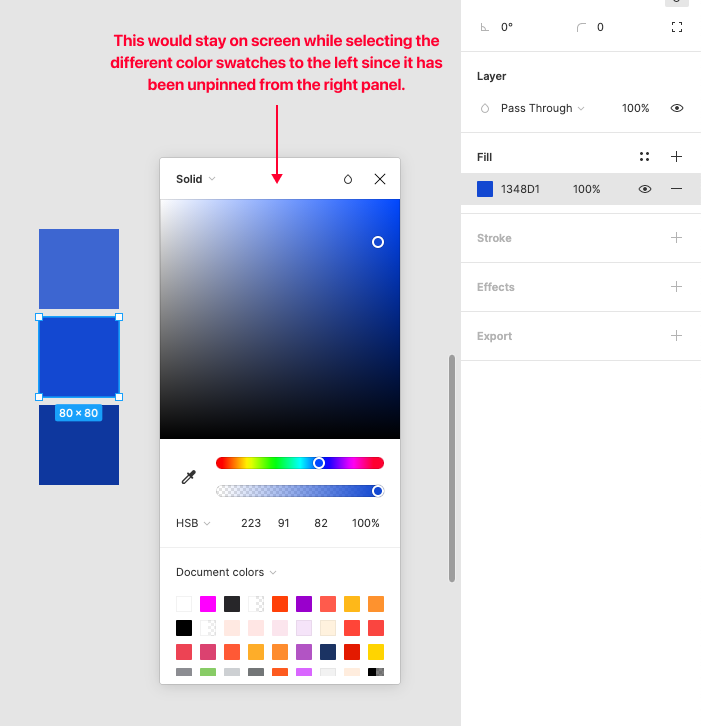
Pinned Reply By djv

Hey All, thank you so much for your continued feedback on this! 

I completely understand how implementing this capability would improve your workflows. To be transparent, while this is on the team’s radar, they haven’t made much progress since working on the color picker updates that shipped last year. It was scoped and discussed, but pinning the picker open turned out to be a bigger technical lift than that work could absorb, so it was ultimately not included.

I don’t have an exact timeline to share, but I’ll be sure to come back to this thread if/when we have a more concrete update. Please keep adding your specific workflows; concrete examples of where this costs you time are the most useful thing for us to carry forward.

58 replies

Bruno_Lelles
December 21, 2022

Sometimes it is frustrating make some bad workflows in Figma, it is great the bigger releases, but there is a lot of serious workflows and usability issues.

I think plugins shouldn’t be used as crutches to those issues.

Look at the work that is needed to change a color within a style, and after editing these you have to do it all over again, there should be at least shortcuts as a palliative.

smarko
January 3, 2023

Just adding a vote to have the color picker persistently stay open, or have a user preference for the behavior.

angyixin
New Participant
January 6, 2023

+1 to a persistent color picker. it is a pain to click multiple times just to see the HSB values.

February 16, 2023

Would be very useful yes,… I need this too

Keven_Lupien
February 16, 2023

It’s been a couple years now so I’m not sure this is going to happen. I know it would be great to have it as a native feature but at this point maybe someone will create a plugin. I’ve come across one that’s specific to HSL but I like using HSB so something that allows a user to choose would be nice.

Antoine_Plu
February 17, 2023

+1 on this idea.
It is still accurate, and even more know that we have the Style Picker persistent as we wish with the Color Picker.

Russell_Navin
New Participant
February 21, 2023

+1 This would make working with colours a lot easier.

February 23, 2023

I would like this as well but also with the type styles palette. Super annoying to ahve to scroll through my styles every time. I don’t see why you cant just keep them open or select the size you want an leave it that way. Possibly the only thing I’d like to see come over from adobe products other than the pen tool from illustrator.

Keven_Lupien
March 6, 2023

Working on a color palette and it’s so tedious and hard to compare color values without this option. Has anyone come across a plugin for this? I found this but it doesn’t update the color when I select an item: Better Color Picker | Figma Community

Keven_Lupien
March 29, 2023

Damn, I was hoping this was going to be on the list of Little Big Updates just released.