
Answer

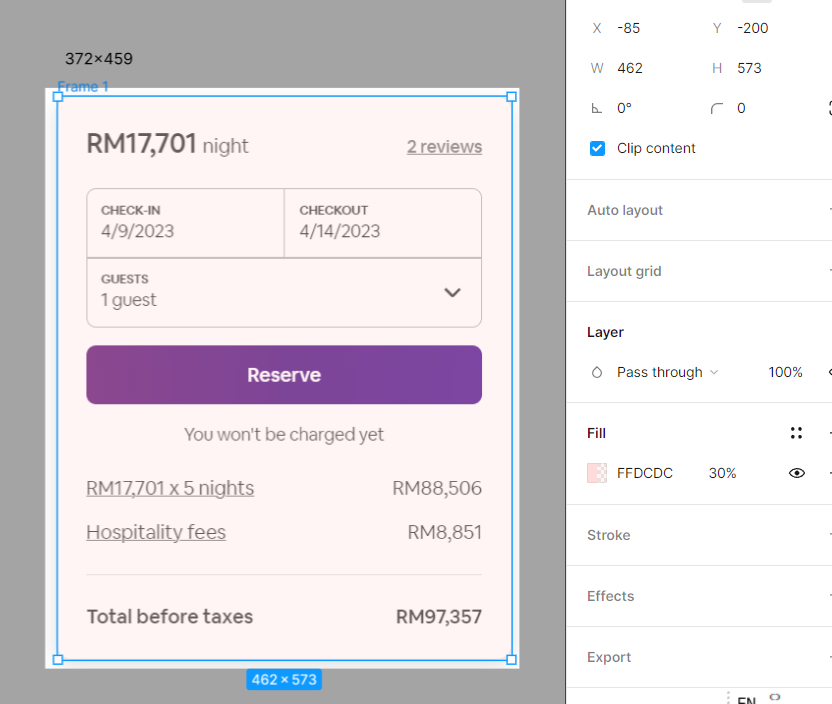
Different size when I paste the screenshot in window?

  • March 24, 2023
  • 6 replies
  • 2527 views

CP_Yeo

I still couldn’t figure out how to do this even I read the questions from community. It does not help to solve.

I would like to know if there is plugin to ease this problem?
Actual size is only 372459, but figma size is 462573, how figma processed though?

Best answer by tank666

This topic has been closed for replies.

6 replies

tank666
  • Answer
  • March 24, 2023

Diego_Pemberthy

hii CP_Yeo. I found the solution. in SO Windows 11… if you have 2 or more monitors… You need to select the monitor with minimun resolution. (( for example I have a laptop (1920x1080pixels ) and a second monitor (4k, 3840 x2160pixels)

you need to select in Configuration of windows 11:
System > Display , the monitor with lower resolution (in my case is the laptop screen (1920x1080).
With this I solved my problem of different sizes when doing print screen and that it stuck in figma with different sizes. I hope you can solve it.


Muhammad_Mehdi

@tank666 Hey Sir could you help me with this


CP_Yeo
  • Author
  • September 9, 2023

How to set the page scale though?


tank666
  • September 9, 2023

bartvox
  • September 14, 2023

Under View → Interface Scale, you might have your Figma UI set to a bigger size, which will also make your designs bigger! I just had this issue myself.