Shelene_Lee
February 24, 2021

Show Font Weight in Inspect panel

  • February 24, 2021
  • 94 replies
  • 26847 views

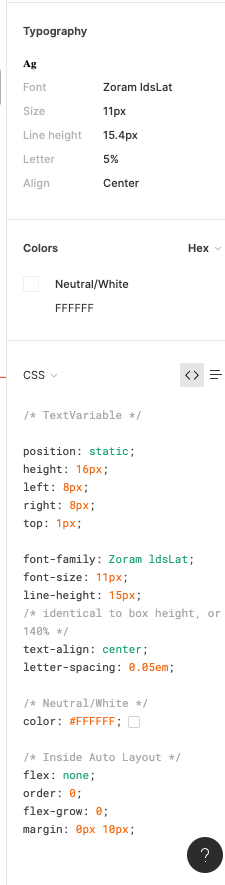
When inspecting the following component, I can click on the font to see the font weight and style in the inspect panel. When my dev clicks on the same item, he does not have all the CSS information that I have in the inspect panel, specifically he is missing font weight and font style. He does not have the ability to see the different font weights, which is unacceptable. Is there some way to fix this?

Component with my inspect panel:
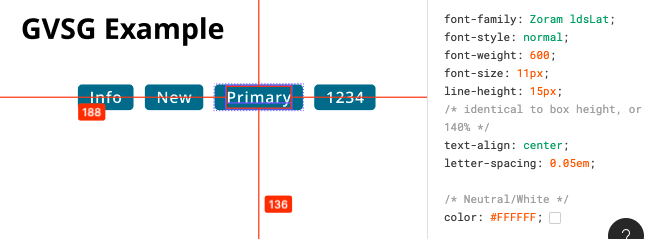
Screen Shot 2021-02-24 at 10.12.33 AM

My (designer) Inspect panel:

Developer Inspect Panel:

✏️ Note from the moderator

There is a way to see the actual font weight, but it’s hidden and inconvenient: Show Font Weight in Inspect panel - #5 by Gleb

94 replies

Gleb
Power Member
February 27, 2021

100% would love this fixed. It’s so strange.

Filip_Wroblewski
March 31, 2021

It seems that the developers are frequently seeing incorrect font-weight in the inspect panel.
Not sure what this problem is dependant on as it was present with different fonts, weights and files.

Example:

Tiago1
March 31, 2021

Exactly same problem here.
I noted when I was editing the font files to merge the families.

Gleb
Power Member
April 5, 2021

I just remembered that the developers can view the correct font weight in the CSS Table view in the Inspect tab:

CSS table view Inspect tab, Font style: Medium

Jonathan_Arnold
April 14, 2021

interesting. but it seems like a figma bug that the correct values aren’t visible in the other places, right?

Tiago1
May 26, 2021

Really nobody cares about this bug.
This is causing serious issues inside my team.

h.rude
June 11, 2021

I’m using poppins as font face, downloaded from google fonts and it comes with a lot of styles. Thin, ExtraLight, Light, Regular, Medium, SemiBold, Bold, ExtraBold and Black. But when checking the inspect mode, it only shows “normal” and the font weight changes. But this leads to confusion regarding the handoff to Web Development. Because using “regular” with the shown font weight leads to strange outcome.
Is there something I can do? Or is this a bug?

Chris21
June 30, 2021

This has caused issues for me as well. Lots of confusion due to this bug.

Anna_Os
July 5, 2021

The same problem

Fliqle
July 7, 2021

Hello. We have our own Mail Sans font installed. When using the Medium font, in different files, the font-weight in the inspector is different. In some files it is 400, in others it is 500. And the location of the item in the settings is also different. Can you help and suggest how to fix it?