Shelene_Lee
February 24, 2021

Show Font Weight in Inspect panel

  • February 24, 2021
  • 94 replies
  • 26847 views

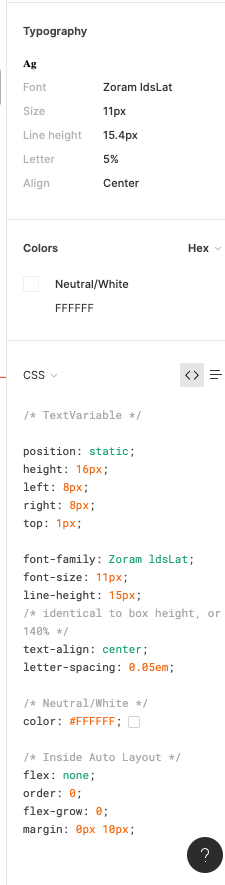
When inspecting the following component, I can click on the font to see the font weight and style in the inspect panel. When my dev clicks on the same item, he does not have all the CSS information that I have in the inspect panel, specifically he is missing font weight and font style. He does not have the ability to see the different font weights, which is unacceptable. Is there some way to fix this?

Component with my inspect panel:
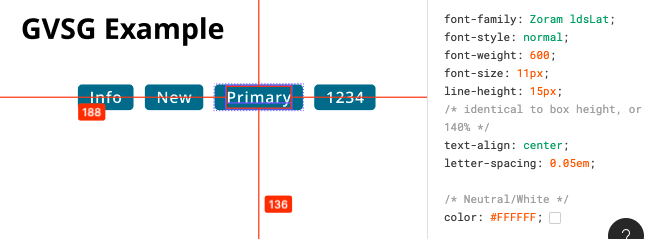
Screen Shot 2021-02-24 at 10.12.33 AM

My (designer) Inspect panel:

Developer Inspect Panel:

✏️ Note from the moderator

There is a way to see the actual font weight, but it’s hidden and inconvenient: Show Font Weight in Inspect panel - #5 by Gleb

94 replies

Logan
August 18, 2021

We are also experiencing the issue where developers are not seeing the correct font-weight when using the inspect panel. You can see that the font-weight is listed as “normal” which will not render the proper style of the font (bold) if used.

Inspect in Code View
Screen Shot 2021-08-18 at 11.01.53 AM

Inspect in Table View
Screen Shot 2021-08-18 at 11.03.25 AM

mmcdaniel
August 20, 2021

Yeah I don’t know! It’s also weird that in the code view it’ll show “identical to … 120%” but then show 101% on the duplicate rule shown in the table view.

image

This also shows up with different font sizes. e.g., 14/20 showed different percentages and they still didn’t match.

Shuaiqi1_Wang
August 23, 2021

I think this is a serious problem. Using the same font file, the problem only occurs in MacOS.

Tiago1
August 31, 2021

No news?

linkus
September 3, 2021

I’m amazed this bug still was not fixed. We too have actually had to adjust our dev handoff process (which adds a lot of hours) to be able to work with this bug…

coolemur
September 3, 2021

Some details about this issue:

Figma shows:

Table view: Font style: Regular
Inspect view: font-weight: normal; (correct)
Typography: Weight 400 (correct)

Table view: Font style: Medium
Inspect view: font-weight: normal; (should be displayed as font-weight: 500)
Typography: Weight 400 (should be displayed as Weight 500)

According to Font Weight and Contrast: (just google “font weight regular in points”):

font-weight === typeface weight

400, regular === Normal, Regular
500 === Medium

Conclusion: Figma doesn’t detect medium fonts correctly.

Tal_Engel
September 7, 2021

Same problem here!! Any idea when this will be fixed. Any comment by a Figma representative? This bug creates problems with handovers to our devs.

Figma team, please fix this !

_Hal
September 9, 2021

We also encounter this issue, the workaround is asking developers to install this font on their computers.

Mike_Peng
September 30, 2021

Same issue here, this is a very serious issue, please fix it.

Victor_Uvarov
October 5, 2021

Same problem here