

leopechansky
January 26, 2021

Customizable shortcuts

  • January 26, 2021
  • 203 replies
  • 51005 views

The main source of inspiration for this idea was to match the keyboard shortcuts themselves to different keyboard layouts. Right now, users who don’t use US keyboards have to memorize the location of the keys, rather than to use the actual character location to be able to use the shortcuts. Those involving this region are primarily the case:
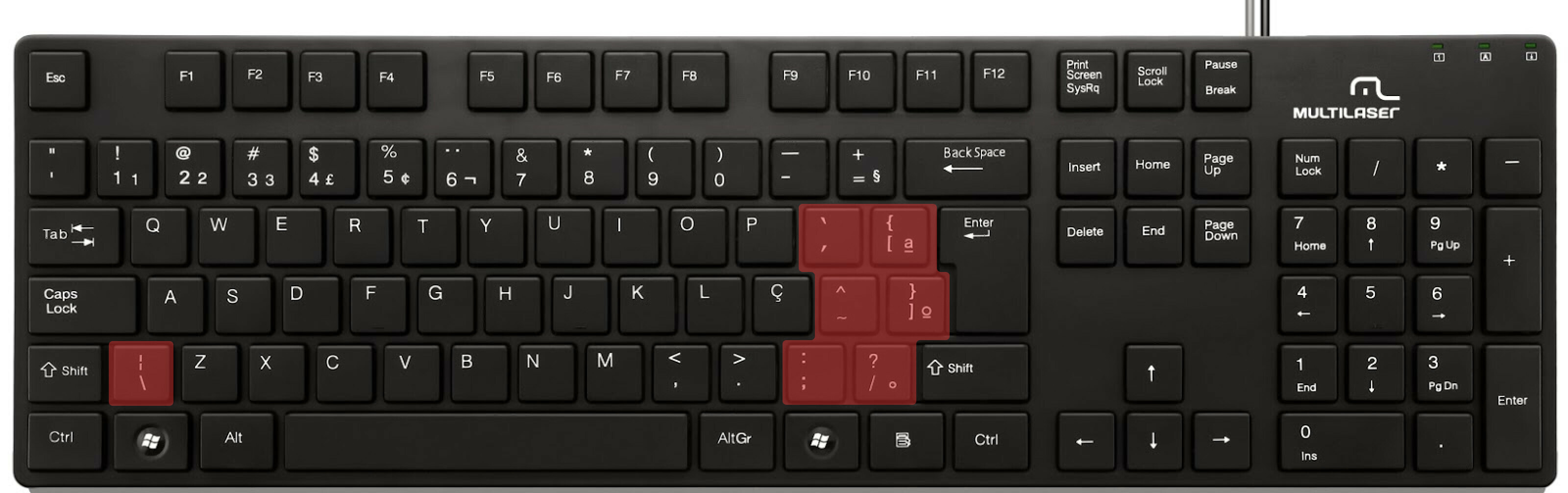

ABNT2 layout (Brazil).

And here’s an example of confusing shortcuts:
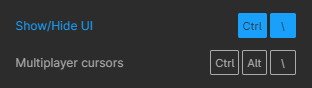
image

Although this problem could be solved by just rebinding the shortcuts to the actual character and not the location on the keyboard, I’ve noticed there are some other issues concerning key bindings.

On this forum post, a member of the community asked for help on backing one layer level with a different shortcut from what Figma has right now. This makes the user adapt their workflow to the tool, and not the other way around — and that hinders efficiency. It would be nice if the tool itself provided some sort of customization on this regard.

Although being a workaround, Mac users can customize keyboard shortcuts by application, but it is a bit limited. It’s also not a possibility for Windows users.

I think this could be a game-changer, as i’ve seen people who refused to migrate from other tools to Figma because they couldn’t customize shortcuts. It would also give the user more control over the tool and their workflow.

What do you guys think about it?

203 replies

David5
May 11, 2021

oh ok. Thanks for this explanation. I didn’t realise “^” was interpreted as Control :’( :’(. I’m using french keyboard.

David5
May 11, 2021

Christian2
May 18, 2021

+1, please add german and other language keyboard layouts.

PixelSushiRobot
May 20, 2021

I’ve been using BetterTouchTool to solve my keyboard shortcuts problem on the Mac.

You can even fake text replacement (Mac’s text replacement doesn’t work inside Figma).

Craig1
May 29, 2021
  1. Describe the problem your experiencing and how your idea helps solve this
    The ability to add custom keyboard shortcuts would make this tool SO much more customizable

  2. Add as much context as possible (screenshots, Figma files, mockups, etc.)
    Different designers have different ways of working. Why not give users the option to tailor their keyboard shortcuts to their workflow? (e.g. If I’m constantly center aligning objects, why not give me the ability to make that command more ergonomic for me?)

  3. Ask questions to bring the community into the conversation
    (e.g. Does anyone else experience this? Is anyone using a plugin or workaround to help solve this?, etc.
    Would this be useful to others?

bigfudge
New Participant
June 8, 2021

EDIT: Got it!
Great workaround, saves me shitloads of time.

Solution to my problem:
I didn’t see the “send shortcut” input field when setting up the trigger to my new BTT shortcut. So I just need to figure out how to press some of the strange US keyboard keys.
For example the vertical line | which ist ⌥ + 7 on my german keyboard, so I have to send ⌘ + ⌥ + 7 and then the left Side Panel will be shown or hidden.

ORIGINAL POST:
I also have BTT but how did you manage to override those default shortcuts in figma?
I’m in the shortcuts meu in BTT and add figma as the app I want to assign shortcuts to, the I choose new shortcut for example ⌘ + I as this doesn’t work on my Macbook Pro Keyboard. So I will add ⌘ + I and then I have to add an action that is bound to said trigger. But how? BTT just shows standard BTT actions…

PixelSushiRobot
June 8, 2021

Glad it works out for you. You can basically use whatever shortcuts you want under Config. Then under Assigned Action, choose Trigger Menubar Menu-Item. This allows you to just type in exact menu item you want to trigger.

Gunther_Genser
June 14, 2021

+1, creating custom shortcuts is not an acceptable workaround

Rebecca_Kremer
June 17, 2021

May try cmd + ö and cmd + ä for “Bring forward” and “Send backward” on german keyboard 😁

Bassel
June 17, 2021

Unfortunately it doesn’t work on Windows.