
vsathishkumar
New Member
July 8, 2022

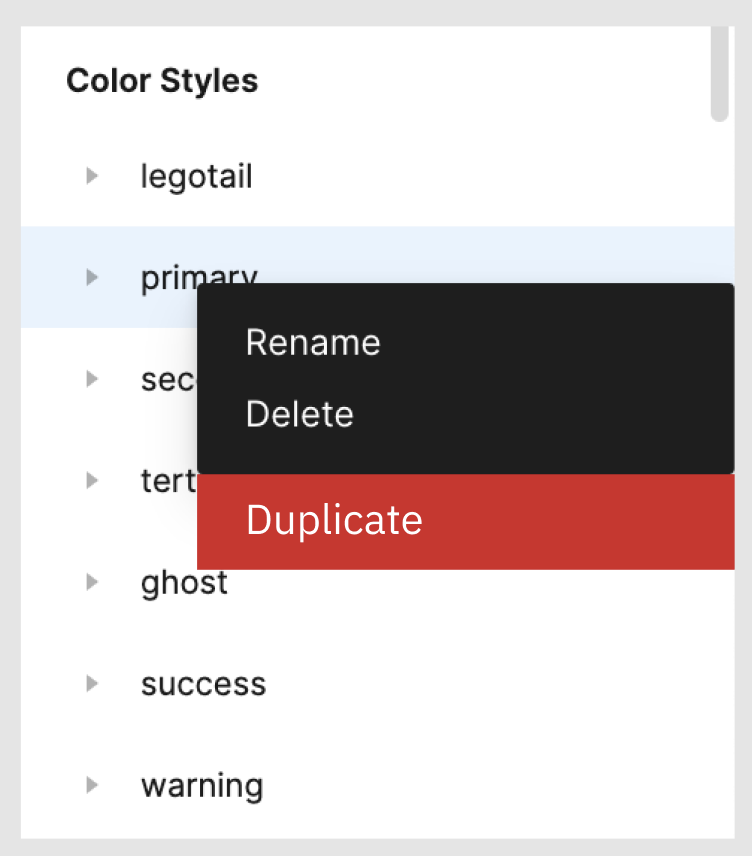
Option to duplicate/copy styles, not just cut them

  • July 8, 2022
  • 50 replies
  • 4884 views

If there is an option to duplicate the Text Styles / Color Styles folder then it makes it easy when creating design systems. Attached is a screenshot of the idea.

50 replies

Alan_Gornick
July 15, 2022

I’m needing this exact thing so much right now. It would help a ton.

Jake15
October 1, 2022

Would be great to duplicate and create a master style.

Antonio_Brandao
November 22, 2022

This would be a maaaaajor time saver.

jt_dimartile
November 24, 2022

This would be amazingly helpful

Jeet_Bakhai
November 26, 2022

it is the most essential thing!

Adrian25
January 25, 2023

This would be a great feature. In the mean time, here you have a work around:

  1. Put all the styles you want to copy into a folder and then cut those from your file.
  2. Undo the cut, so you don’t lose the original styles.
  3. Go to a new file and paste them.
  4. Create a text layer and apply any of the pasted styles, so Figma allows you to rename the wrapping folders.
  5. Rename the wrapping folder and any other folders you want to duplicate.
  6. Cut them again and paste them in the original file.
  7. Rearrange and delete wrapping folder, if required.

Hope that was helpful. Take care! 😊

dennsi
Active Member
February 28, 2023

Thank you so much for this tip! Saved me much time.

Ranjith_R
New Member
March 10, 2023

is there any plugin for renaming the layers based on color palette naming?

dennsi
Active Member
March 10, 2023

I use the tip from @Adrian25 and the Batch Styler Plugin to quickly rename or change the styles:
https://www.figma.com/community/plugin/818203235789864127/Batch-Styler

Ranjith_R
New Member
March 10, 2023

This is not

i mean
if there is a plugin available that can automatically rename layers based on their corresponding color palette names?