

sebastien.giroux
Active Member
March 19, 2021

Multiple independent strokes

  • March 19, 2021
  • 115 replies
  • 29543 views

You can currently set multiple stroke colours to an object, but they will share the same properties (thickness, position, etc.).

My idea is that you should be able to set all stroke properties on each stroke:
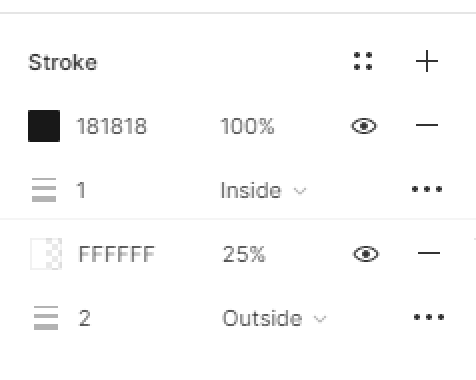
image

Make sense or am I missing something?

115 replies

Greg_Huntoon
January 27, 2022

I’d love this, and would also like to see the ability to have each use library styles. So, like both of the examples below…

Charley
January 31, 2022

Yes to this!

Sergiu_Vacarescu
February 2, 2022

Hi all,

Hope this helps keep things consistent with what can be done in CSS and FiGMA.
I ran into the same problem and because over the years I’ve migrated from Adobe to Sketch and in the past 2 years FiGMA I was looking for the same multiple strokes option.

The best way I found to solve it was to substitute the extra strokes with effects that have everything set to 0 except for the spread:

The way to simulate this would be:

  • inside stroke: inner shadow
  • centred stroke: 1/2 inner shadow + 1/2 drop shadow
  • outside stroke: drop shadow

Please see the below screenshot for the inside stroke case.

Hope this help, for now at least.

MarkoM
February 2, 2022

Nifty trick, but does not work with no fill shapes. My use case is a simple ghost (outline border - no fill/transparent) button in a focus state.

This simple (and most common requirement when button UI is in question), require 2 additional elements to be layered inside of a frame to achieve a remotely reusable component, and it’s still not reusable in 100% auto-layout way) because it requires manual resizing of a nested element.

If anyone has a more elegant solution for this use case, I am open to suggestions.

Stefan_Cioroiu
February 21, 2022

+1

We really need this. We have a focus state for most of our components that is an outside stroke. We ended up creating frame in frame in frame… to be able to do it. It’s a bit tricky to work with in terms of resizing constraints and all.

Osman
March 31, 2022

+1

Need this. It is pretty normal to have variants of components with multiple strokes.

Marcin12
April 22, 2022

Hi. My solution for this is just add stroke and four shadows with: x:1, x:-1, y:1, y:-1. 0 Blur.

Hope this will help : )

PabloToulouse
June 6, 2022

What I like the most is the ability to set up a style for both strokes at once which is the case in your proposal @sebastien.giroux. Love that!

Otto_Tasnadi
July 11, 2022

this is a must-have 🙂

Marcel_Bechler
July 12, 2022

Coming from Sketch, this is a must-have!