

sebastien.giroux
Active Member
March 19, 2021

Multiple independent strokes

  • March 19, 2021
  • 115 replies
  • 29543 views

You can currently set multiple stroke colours to an object, but they will share the same properties (thickness, position, etc.).

My idea is that you should be able to set all stroke properties on each stroke:
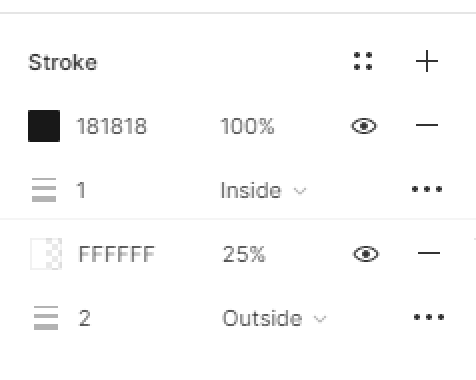
image

Make sense or am I missing something?

115 replies

andredinis
New Participant
March 4, 2023

Still waiting for this, nothing to add

Ramida_Juengpaisal1
March 11, 2023

Still need this too! would be nice to have a proper solution than using the shadow for the strokes.

Arthur_Lambillotte
March 17, 2023

+1
Coming from Sketch, I was honestly surprised how limited multiple strokes are in Figma. Hope this will be implemented soon. 🤞

Elliott_Andrew
New Participant
March 27, 2023

Still waiting for this, Figma!!!

ThomasJ
New Member
March 29, 2023

The recent updates to Figma were great, but the software is still missing basic support for styling multiple different borders/strokes one the same element.

Currently, we need to create a bunch of nesting to apply different styles to each side of a border, which makes handoff impossible because developers need to go through layers and layers of nested groups to get each border definition. It’s also unnatural when it comes to how CSS can handle borders. We already offer multiple box-shadow definitions on the same shape under the Effect panel, why can’t we have the same for border?

Here’s a quick mockup:

djv
Figmate
Community Support
March 29, 2023

Thanks for your feedback and the idea, @ThomasJ!

We’ve moved it to a similar topic thread. Our team monitors the forums for topics with the most feedback and votes to prioritize accordingly, so it’s best to keep similar ideas consolidated.

Andy_Antonio_Abreu_Hernandez
April 1, 2023

Trying to convert a button to component properties and the focus variant (auto layout with a stroke and the component inside it is giving me troubles, the selecting matching layers won’t select the icons in that variant and i can’t make component properties out of them.

I believe having a feature like this one would be able to easily make this a non issue.

Alex_Greer
April 4, 2023

+1 I find myself wishing for this often

Robith_Enha
May 18, 2023

Easy,

Either you use multiple inner shadows, which are fake strokes, or you use multiple frames to create real strokes.

  1. apply a stroke to a frame, say, 10 px black.
  2. frame that frame to create an outer frame. don’t forget to clip content.
  3. apply a stroke to that outer frame, say, 8 px red.

You’ll get 8px red stroke and underneath it 10 px black.

add more outer frames to get more strokes.

MMM
July 20, 2023

and add to this gap between strokes