

Remi_Fayolle
March 8, 2021

Interaction between components

  • March 8, 2021
  • 46 replies
  • 16688 views

Hello

I would love that one component interaction can impact another component

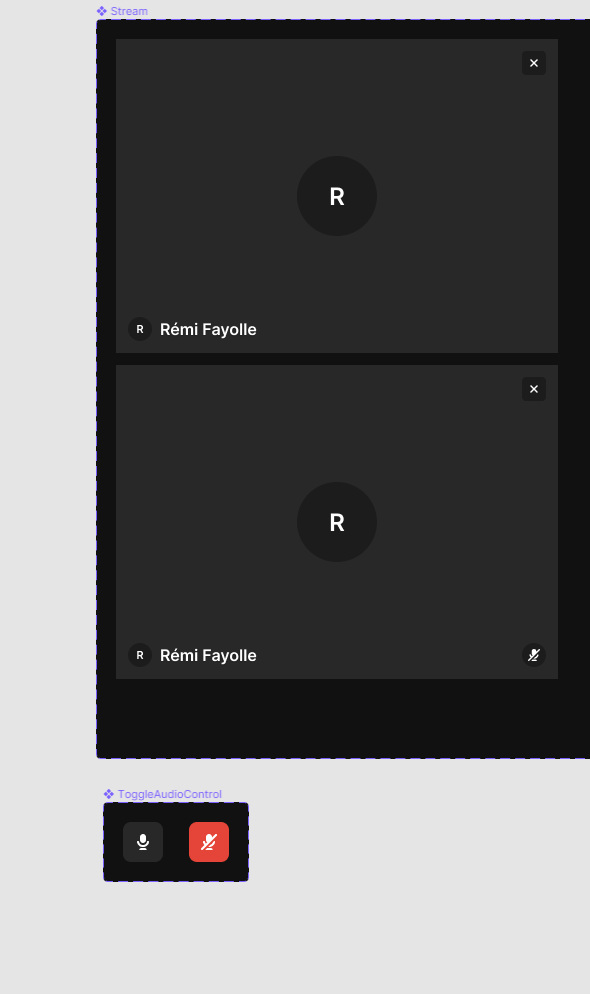
Example : i’m working for a video communication tool. I would like that when i mute microphone, it changes variant of the stream to indicate that microphone is muted

I have two components : Stream and ToggleMicrophone. If i have microphone in state muted i would like that stream has muted indicator state
46 replies

Josh
Former Community Manager
March 8, 2021

This should be possible with interactive components (currently in beta) https://help.figma.com/hc/en-us/articles/360061175334-Create-interactive-components-with-variants

Remi_Fayolle
March 8, 2021

Note: The Change to action can only be used on variants in a component set. It’s not possible to use this action between two separate components or top-level frames.

It would be possible if both components were part of one variant this is not the case.

I want to be able to change state of the stream when i click on the mic toggle button

Gleb
Power Member
March 9, 2021

So to clarify, you want basically what interactive components allow, but with regular components instead of variants, right?

Remi_Fayolle
March 18, 2021

I would like that to be able to change variant state from another component.
If i click on a button i can switch another component variant from A to B.

Not sure if I am clear

Amberto_Brasil
March 20, 2021

That would be really useful. The ideal would be to simply allow interactions between pages, independent of it being a component or not. The only difference is that components propagate their interactions to their instances.

Allowing to change the state of another component, which is essential, would not be enough, the components would need to be implemented in the same file and in the same page, which defeats the purpose of pages in the first place. It is sad that every neat feature Figma has for organize and keep your design system neat is lost when prototyping.

The workaround I am using to simulate non-local interactions, is to implement container components, that combine the change of state in multiple child components. It has some drawbacks that are not obvious at first, but may be enough for what you are trying to achieve right now.

Figma – 20 Mar 21
Marissa_Cui
March 23, 2021

Agreed this would be really useful!

Glen_Lipka
October 8, 2021

I really need this right now

Glen_Lipka
February 16, 2022

A perfect example of why this is crucial.

  1. I have a modal as an overlay - I use it on dozens of pages.
  2. It has a drop down box in a form which opens another overlay (the options of the combobox.)
  3. Depending on what they click on, I want to add a bunch of secondary fields.

Currently, there is no way to do this without eliminating the drop down overlay which would ruin the form experience.
Example:

The experience should be on this control:
image

Change to shouldn’t assume “THIS” component. There should be one extra field which asks “which component”. Specifically, it is going to be the component that opened up the menu. The modal.

I run into this problem 4 times a week.

Ben_Snyder
February 28, 2022

This would enable much more dynamic prototypes to be built quicker. I struggle with this constantly, especially in building navigation. I have a nav that expands/collapses and since each frame of a prototype is effectively it’s own state of the application, I have to create 2x the number of screens to account for if the user has the nav element expanded or collapsed.

Instead, I want to build a navigation “controller” and a page “viewer” that are separate where the nav can control the view and they have independent states/behaviors.

Fabrice_Piel
April 22, 2022

Agreed, Big need for this feature. Less non local simulations (time and screens consuming), more dynamic prototyping. <3