

Jim_Muirhead
April 5, 2021

Frame selection dropdown in the Interaction details modal is too narrow

  • April 5, 2021
  • 19 replies
  • 2733 views

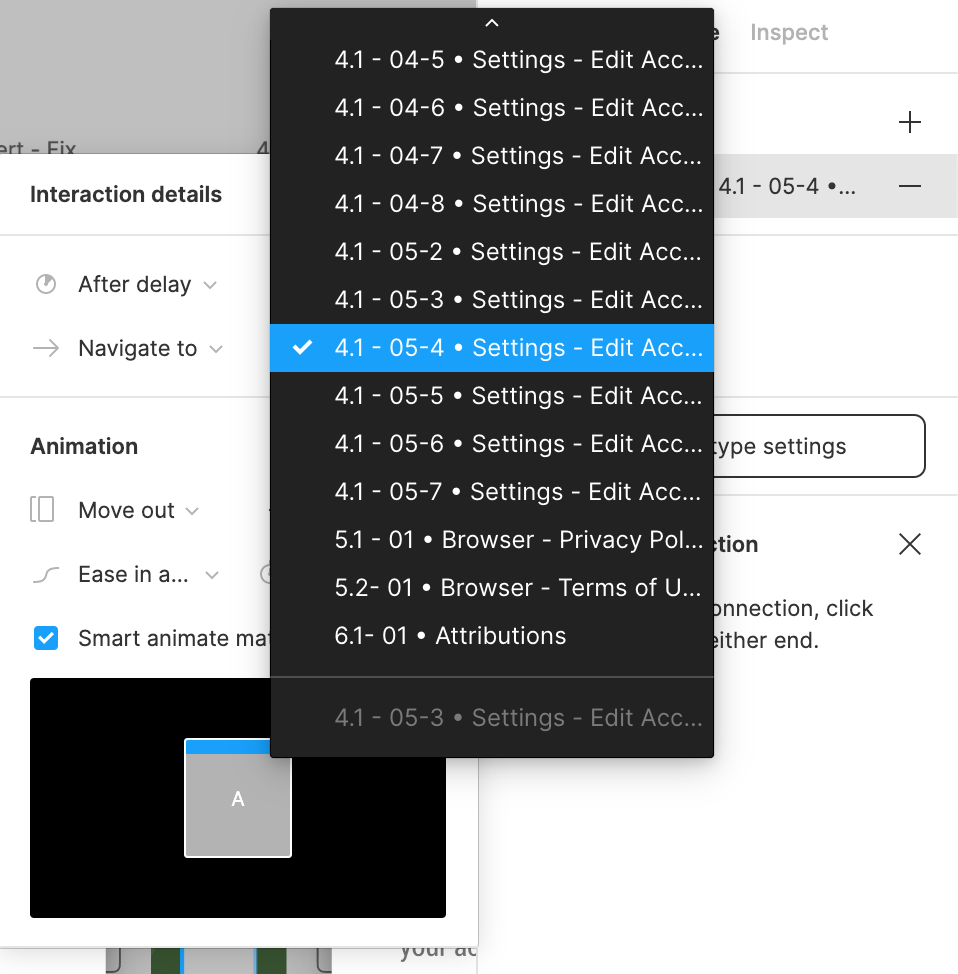
When I’m in the Prototype dialog (see attached screenshot) and want to select a Frame to navigate to, the menu that pops up truncates the names of top-level frames. It would make my life simpler if this menu auto-sized its width so I could see the entire name of all top-level frames on the page as I use a naming system that is quite lengthy, but useful to me.
19 replies

Jason_Merrill
New Member
December 13, 2022

I would love to see a fix on the width of the property dropdowns within the component panel on the right. If the label is even somewhat lengthy, it get’s cut off (see image).

Screenshot 2022-12-13 at 10.39.41 AM

tank666
December 13, 2022
UX/UI designer. Figma expert. Creator and developer of plugins and widgets for Figma and FigJam. Check out my resources in Figma Community: figma.com/@tank
Peter_Holmes
June 15, 2023

I am having this issue too- just started after I copied a page. All of a sudden the window got chopped into about a third and I can barely read the names.

Screenshot 2023-06-15 at 10.03.57 AM

Jacopo_Grosso
June 16, 2023

Screenshot 2023-06-16 174624

I have the same width like in your screen, I don’t know, maybe is a problem that affects everyone.

Collin_Schneider
June 16, 2023

This needs to be fixed asap.

Arunabh_Chaudhary
New Member
January 4, 2024

This surely needs to be fixed. It is very hard to navigate to the right Frame if the names are long.
image

ClassyUX
New Participant
June 8, 2024

Why is it June of 2024, people have been complaining about this broken feature for 3+ years, and Figma ignores their users? Why do software companies act like this? This is so common throughout modern software companies. The design team at Figma is too busy trying to roll out all the “New AI Features!” They ignore basic usability issues that completely break their customer’s workflow.

When the only solution to this problem is to keep your object names short enough to avoid being truncated, it is not a proper solution.

I don’t run into this problem with Sketch, but this has been a major issue with my productivity in Figma.

Fabrice
June 20, 2024

Totally agree. Very annoying.

Tobias_Arrehn1
New Member
February 27, 2025

This is still not fixed. First comments about this issue was several years ago and not even a reply from any devloper as far as I can find.


Figma crew: Can we have an time estimation on when this issue will be solved? 

It’s very frustrating not knowing what you select because you can’t see the full names.