

malik_d
Mar 28, 2024 12:37 PM UTC

Auto reverse auto-layout order of display

Auto layout is cool. Thanks Figma!
However, to change the display order, one has to manually change the order of each item in the Layer section, which can be annoying when dealing with too many items in the layout.

A solution would be to add three layout buttons, right below the current ones, that do just that: reverse the order of display.
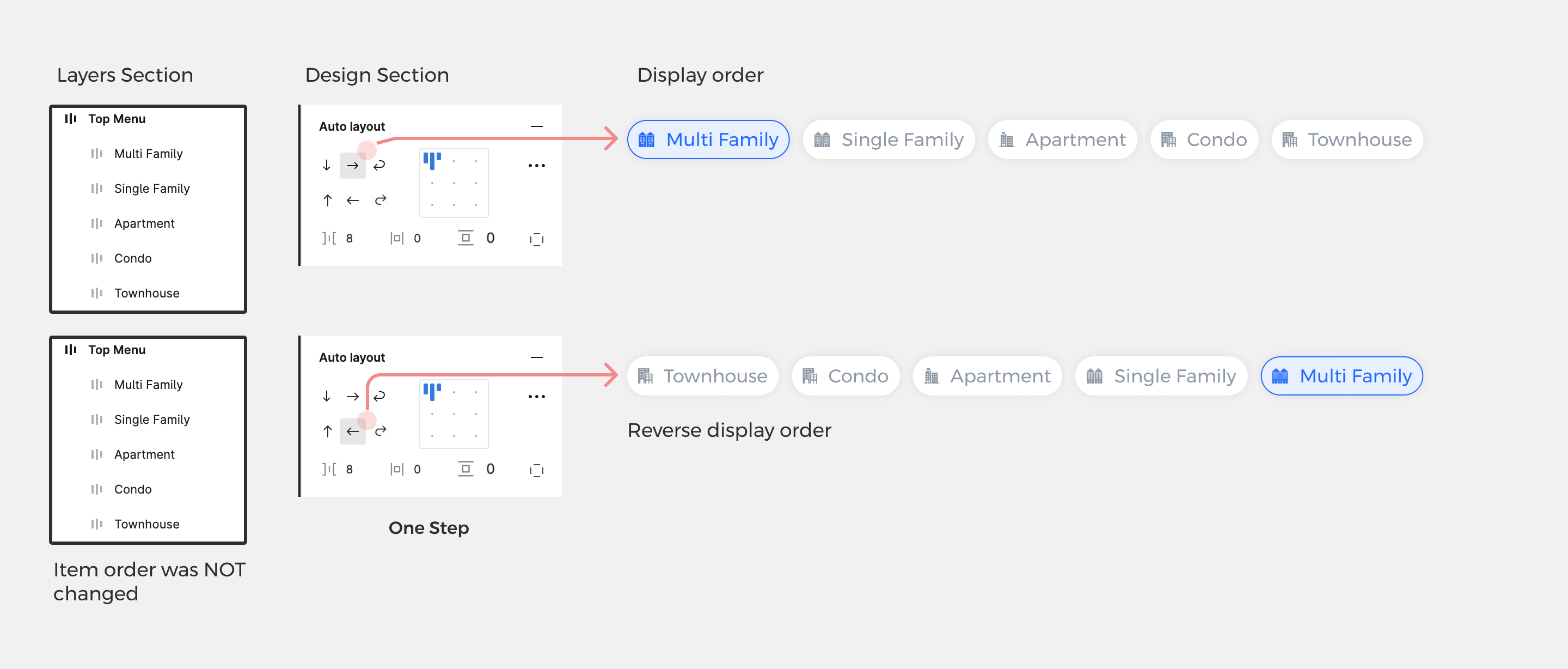
Much love. I hope this helps!
Names of the button and much more on it on my personal blog on Medium: New Figma Auto-Layout Feature. The Problem | by Malik D | Mar, 2024 | Medium

5 replies

Jean17
Dec 19, 2024 4:01 PM UTC

Having the possibility to switch between auto-layout styles via Variables would be amazing as well

Rory_Byrne
New Member
May 20, 2025 3:50 AM UTC

Agree. Being able to set this like flexbox would be useful

Mueller_Bernhard_SCW_FIXY3
New Member
Jul 29, 2025 11:34 AM UTC

This would help… actually now!

Markus_Schmon
New Member
Nov 27, 2025 10:00 AM UTC

You can achieve something like that by mirroring the entire element and then replacing the items with their non-mirrored counterparts.

Unfortunately, this doesn't work with components that have both mirrored and non-mirrored variants. When switching variants, the items are mirrored.

So yes, a "reverse item order" function would be great for both axes (left→right to right→left and top→bottom to bottom→top).

Jasper Koenen
New Member
Jul 7, 2026 9:18 AM UTC

You can achieve something like that by mirroring the entire element and then replacing the items with their non-mirrored counterparts.

Unfortunately, this doesn't work with components that have both mirrored and non-mirrored variants. When switching variants, the items are mirrored.

So yes, a "reverse item order" function would be great for both axes (left→right to right→left and top→bottom to bottom→top).

Thanks dude! You saved me 30mins of work