

Pinton
Feb 8, 2022 3:58 AM UTC
Solved

The Figma Mobile app shows large images very blurrily

For example, I took a screenshot on my phone and imported it into Figma. This screenshot can be clearly displayed in the Figma App for Mac, as well as on other Macs. It can be ruled out as a network problem.
But when I saw it in the Figma Mobile App, it was very blurry. It’s pretty fuzzy both in Prototype and Mirror.



So I tried to find the cause of the problem, and I found it through a series of experiments. When the long edge of the image is less than 1024px, the image will be clear. But when the size is larger than 1024px, the image becomes more blurry than the smaller image.
Maybe Figma made a size limit? Above this threshold, low-quality images will be displayed.
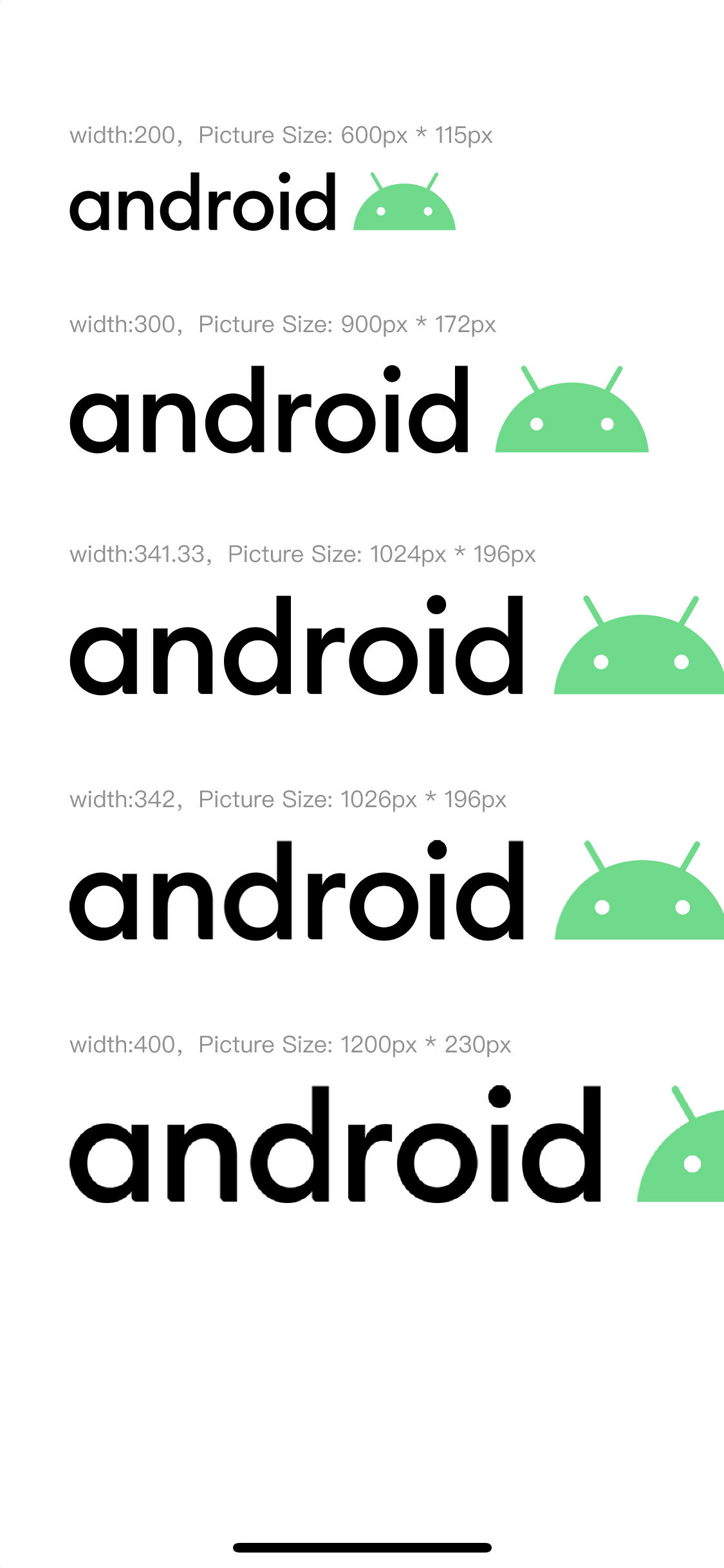
Although I write it in the Mobile Apps category, there may be an issue with the server. Because my iPhone uses the latest App, but Android phones have been using the old version of App, but they both have this problem.

This topic has been closed for replies.
Marcela_Hippe
Sep 12, 2022 8:56 PM UTC

I had the same annoying problem and solved it by using Insert Big Image plugin.

29 replies

Alexander_Hahn
Jun 14, 2022 8:06 PM UTC

Same here ☹

Jakub_Svrcek
Jun 20, 2022 1:54 PM UTC

Same problem here

Litus
New Member
Jul 8, 2022 11:20 AM UTC

same problem. I see the issue has been around since Feb…

jessie1
Active Member
Aug 9, 2022 1:52 PM UTC

Same issue…

Max_Bardus1
Aug 11, 2022 6:30 PM UTC

same problem - Figma Mirror App - iPhone 13 Pro

Michael_Gubik
Aug 20, 2022 9:39 AM UTC

Same problem. @Figma please fix this bug

Anthony_Moore
New Member
Aug 31, 2022 12:11 PM UTC

This solved my problem. I took a screenshot on my iPad, loaded it into Figma no problem at all. Viewed the same screenshot on Figma Mirror on the iPad, blurred and pixelated. So I saved the screenshot in Figma but as a Jpg, loaded it back in and tested it again on the iPad and all fine. So maybe PNG is the issue. But thanks @Alexey_Ivanovsky for the find, life saver 🙂

Marcela_Hippe
Sep 12, 2022 8:56 PM UTC

I had the same annoying problem and solved it by using Insert Big Image plugin.

Pax
Sep 20, 2022 1:02 PM UTC

I had a problem with Figma mirror on the iPad. I tried the plugin mentioned above but it didn’t work. The solution I found to be working is to:

  1. Export the image in PDF,
  2. Convert PDF to PNG (after this the image was still blurry and pixelated),
  3. Convert PNG to JPG.

After this final step, the image got better quality.

John_Ghadimi
Oct 13, 2022 12:19 AM UTC

I was grappling with this as well. The InsertBigImage plugin didn’t do anything for me. I ended up using the Photoshop Save As Web with the JPEG Low setting. That did the trick for me. It’s still “clean” enough for prototype purposes, and now loads fine in mobile.