

Jovana_Zivkovic1
October 5, 2023
Solved

Interactions with smart animate not working as expected when position is fixed and document is scrolled down

  • October 5, 2023
  • 6 replies
  • 754 views

Hi guys,

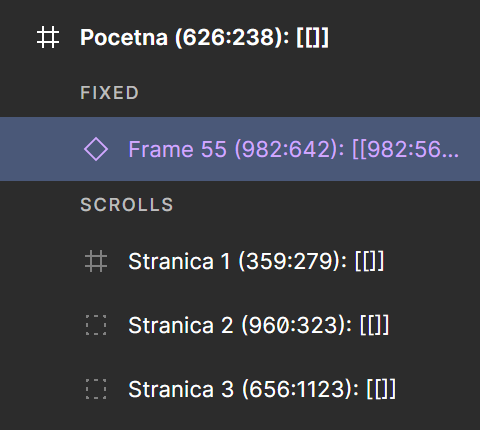
I noticed that the sticky menu is not working properly. The smart animation menu at the top of the page when extended works well on the first page, but when I scroll down the menu starts to bug only when the smart animation is triggered. 😭😭
I tried some things but nothing seems to work.

Figma – 30 Nov 22

If someone has time to check and suggest an idea to solve this problem I would be over the moon.

Thank you 🤗
This topic has been closed for replies.
Best answer by tank666

I checked your file again and didn’t see that you wrapped the instance in a frame.
instance

Please wrap the “Frame 55” instance in a frame.

6 replies

Gayani_S
Figmate
Community Support
October 12, 2023

Hey there, I’ve just checked your prototype and it looks like it is working. Could you send me a screen recording showing where it looks buggy for you?

Jovana_Zivkovic1
November 1, 2023

Hi Gayani_S,

This is what I see. Thank you for taking the time to check out this.

tank666
November 2, 2023
UX/UI designer. Figma expert. Creator and developer of plugins and widgets for Figma and FigJam. Check out my resources in Figma Community: figma.com/@tank
Jovana_Zivkovic1
November 3, 2023

I already did that. It is a fixed frame but when scrolling first button is not working properly. 😑

tank666
tank666Answer
November 3, 2023

I checked your file again and didn’t see that you wrapped the instance in a frame.
instance

Please wrap the “Frame 55” instance in a frame.

UX/UI designer. Figma expert. Creator and developer of plugins and widgets for Figma and FigJam. Check out my resources in Figma Community: figma.com/@tank
Jovana_Zivkovic1
November 4, 2023

Yes, you were right. It’s working! I wrote frame 55 but didn’t make it. Thank you. 🫣 🤗
Can you explain why is it working with frame and not with instance?