

Sympathy
June 11, 2024
Solved

Upgraded to macOS 15, Figma not working properly

  • June 11, 2024
  • 29 replies
  • 3032 views

Hi everyone,

I recently upgraded my operating system to macOS 15 and have encountered some issues with Figma:

  1. After the upgrade, when I open a Figma design file, the page becomes unresponsive. I’ve tried using Chrome, Safari, and the Figma desktop app, but only Safari can open the file normally.

  2. The design files use the “PingFang SC” font. However, after the OS upgrade, it shows a font error and I’m unable to replace the font. This issue did not occur prior to the upgrade.
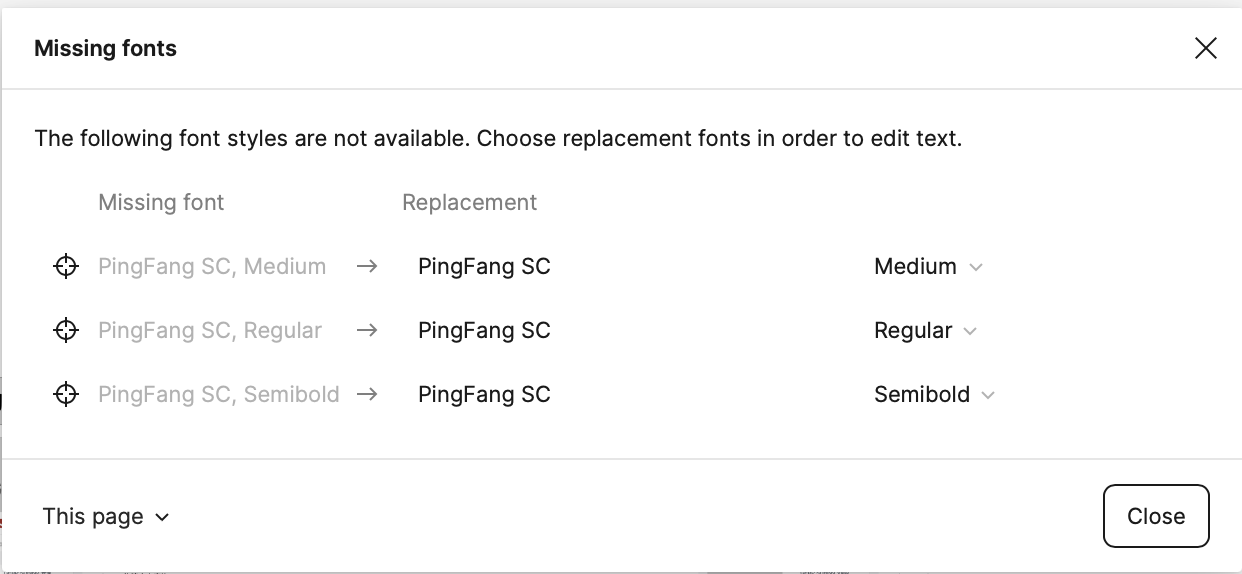
Has anyone else experienced similar problems after upgrading to macOS 15? Any insights or potential solutions would be greatly appreciated. I’m wondering if this is a compatibility issue between Figma and the latest macOS version.

Thanks in advance for any help or suggestions!

This topic has been closed for replies.
Best answer by Sympathy

Issue resolved - updating the Command Line Tools fixed the compatibility problems with Figma on macOS 15. Pages are responsive again and the font error is gone.

——————
Update - unfortunately, the issue resurfaced. Here’s what I did to resolve it:

  1. Clear Figma cache: In the Figma menu, go to “Help” - “Troubleshooting” - “Clear Cache and Restart”. This step clears Figma’s cached data.
  2. Restart the Mac system: I chose to shut down completely and then manually restart. I’m not sure if a normal restart would also work.

After restarting the system and opening Figma again, everything was back to normal.

29 replies

Sympathy
SympathyAuthorAnswer
June 11, 2024

Issue resolved - updating the Command Line Tools fixed the compatibility problems with Figma on macOS 15. Pages are responsive again and the font error is gone.

——————
Update - unfortunately, the issue resurfaced. Here’s what I did to resolve it:

  1. Clear Figma cache: In the Figma menu, go to “Help” - “Troubleshooting” - “Clear Cache and Restart”. This step clears Figma’s cached data.
  2. Restart the Mac system: I chose to shut down completely and then manually restart. I’m not sure if a normal restart would also work.

After restarting the system and opening Figma again, everything was back to normal.

aGuang
New Member
June 11, 2024

你好,我更新了命令行工具后,问题依然存在,请问具体应该如何操作?期待你的答复,谢谢🙏

Celine_
Figmate
Community Support
June 11, 2024

Hey @Sympathy , glad to hear you have found a fix and for letting us know your workaround!

@aGuang , can you force-quit and reopen Figma after updating the Command Line Tools to see if that helps?

Do you see the missing font warning by any chance? If so, you need to Manage Missing Fonts. Please check this article for the workarounds.

As stated there the most common reasons for missing fonts are:

  • Missing installed fonts: collaborators are using a local font, which you don’t have installed.
  • Conflicting versions: collaborators are using a different (older or newer) version of the font.
  • Missing font styles: Either the style was missing from a download, or you are using a different version of the font which doesn’t include that weight or style.

If you have this font already installed on your computer, you’ll need to either use our Desktop App or follow the instructions to Access local fonts on your computer to use local fonts in the browser.

If the issue still occurs, I suggest you to reach out directly to the support team here so they can investigate it further.
Please also mention the steps you have done, the specs (desktop /browser) and if it affects your browser, desktop app or both. Thank you!

aGuang
New Member
June 12, 2024

Thank you for your response, I will try to resolve it according to your method.

Sympathy
SympathyAuthor
June 12, 2024

有试过重启系统吗,命令行更新不会自动重启,如果没有的话可以重启下系统试试

angusyahn
June 14, 2024

我也遇到的相同的问题,更新命令行重启后还是存在这个问题

River_Kang
June 15, 2024

I’ve encountered the same bug.
Update the command line or restart computer still not working.

Even I changed it to another font, Figma will stuck anyway.

River_Kang
June 15, 2024

It seems Figma has font compatible issue on macOS 15.

kairyo
New Participant
June 17, 2024

I also encountered the same problem. How exactly do you update the command line tools to fix it? I’m not quite sure about the procedure. Thank you so much for your reply and help!

Celine_
Figmate
Community Support
June 17, 2024

Hey everyone,
Thanks for flagging this. Can you also try to clear out the cache to see if that helps?

You can follow the steps in this article:

Figma Learn - Help Center

If this still doesn’t help, as explained, please reach out directly to the support team here . Our technical team can investigate it further the root issue on your end. Thank you!