Justin_Stagge
October 3, 2023
Question

Prototype is slow but file is small

  • October 3, 2023
  • 26 replies
  • 3758 views

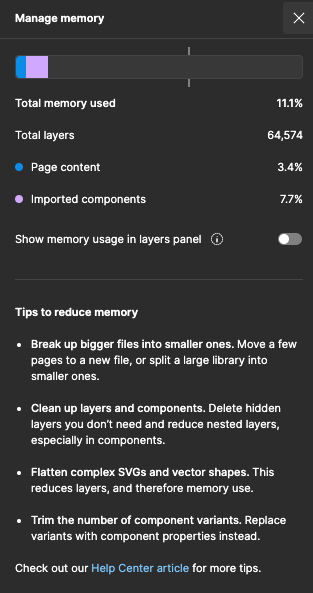
I have a prototype with a lot of connections but overall the file is small (11%).
Although the prototype lags, loads slowly, and triggers the ‘unable to load…’ browser notification.

  • There are no images within the file
  • Most animations are ‘smart animate’

This topic has been closed for replies.

26 replies

Celine_
Figmate
Community Support
October 4, 2023

Hi Justin,
If you haven’t already checked our article to troubleshoot the memory usage, please read our tips here: https://help.figma.com/hc/en-us/articles/360040528173-Reduce-memory-usage-in-files#reduce

If this doesn’t help, please try clearing your cache and cookies in your browser, and then try opening your file again.

If you’re using the desktop version, here’s how to clear the desktop app cache on a Mac:

  1. Quit the Figma desktop app
  2. Open Terminal.app and enter the following command: rm -rf "$HOME/Library/Application Support/Figma/"{Desktop,DesktopProfile}
  3. Try opening the desktop app again

On Windows:

  1. Close the Figma desktop app
  2. Open the Start menu, and paste in this, followed by enter: %APPDATA%\Figma
  3. In the window that opens, delete the Desktop and DesktopProfile folders if they exist
  4. Launch the desktop app again

Feel also free to share a screenshot of what you are seeing on your end when you are trying to load the Prototype. Thank you!

Juble_Mathew
January 3, 2024

Tried this. Still not working. Prototype is lagging. Total memory took for the project is just 8.3%.

Celine_
Figmate
Community Support
January 3, 2024

Hey @Juble_Mathew , if you are still experiencing issue, I’d recommend you to reach out directly to the support team here
Be sure to use your Figma account email, include a link to the file, and share it with support-share@figma.com so they can take a closer look. Thank you!

Ana_Pirenjak
New Member
January 18, 2024

I’m experiencing the same issue, and it doesn’t seem to make a difference whether there are images or not. The lag is incredibly frustrating, making it unusable for anyone accessing the file on any device or browser. I came across some suggestions from 2022 to remove unnecessary frames and set all transitions to instant. However, it raises the question of the purpose of autolayout and transitions if I have to remove everything for the prototype to function. I’m really frustrated and ashamed to present the prototype to my clients because, as it stands, there’s nothing to show since it doesn’t work properly no matter what I do.

If anyone finds a solution, please share.

March 19, 2024

What’s the status of this question? I’m also experiencing this problem on a file that has max 10% memory usage.

y_toku
Figmate
Community Support
March 21, 2024

Hi @Pieter ,

Thanks for reaching out. If you’ve already tried this troubleshooting step:

Could you please reach out to support team so they can look into further?

Thanks for your patience!
Toku

March 21, 2024

Hi Toku, thank you for your reaction.

I’ve completed all the steps outlined in your first repost. However, I can’t do the step suggested in the second repost because I work at a government organization, I am unable to share designs or files without proper consent, not even with the Figma support team. Therefore I doubt they can assist me effectively without access to my specific files. If I’m wrong please let me know.

Additionally, I like to keep the discussion in the open. This would allow others to benefit from the solution as well.

Notes regarding the issue itself,
I believe it’s not related to the graphics card driver like other users suggested. I’ve observed that my prototypes protoptype is slow on both a MacBook Pro M3 and a Windows HP laptop (i5/8GB), in the desktop app and in a browser (Chrome).

Initially, everything runs slow. But when I have gone through all the steps, it functions normally at a normal speed. However, upon restarting, it becomes slow again, requiring me to repeat all the steps before it functions normally.
This can be particularly inconvenient during presentations, as I must pre-prepare all the steps and any disruptions result in a tedious process of starting over.

Jackie_Lampard
March 27, 2024

I am having the same issue and its really problematic when user testing. The user interview requires them to demo their interaction with the prototype but with heavy lag it skews the experience. When a new frame loads if i give it a few minutes ill be able to see hovers and interact until the next frame and then its slow again. My file is 12% memory.

April 5, 2024

I investigated further. In my case, the problem isn’t complex components or actions. It’s opening an simple overlay.

When I open the inspector I’m designing as an overlay, the prototype slows to a halt. Everything works like it’s being loaded on a Commodore 64. 🙄

When I set the action to “Navigate to” everything works fine, only now I can’t show how the inspector looks in the grander scheme of the design. I could copy a page design as background, but then I can’t show how it looks/loads in other places within the design.

But @y_toku, the problem lies with opening an overlay. Maybe you can look into it? I did not have this issue a couple of months ago.

Staffan_Carnlof
New Member
April 5, 2024

I have exactly the same problem!

Memory usage in the file is at 6%, and the first time I run interactions in the prototype, it’s very slow and laggy, but once I’ve triggered everything once, it runs smoothly as usual. I have many large live components with “change to” variants, but I haven’t experienced this slowness before on my previous computer.

MacOS Sonoma 14.2.1, Chrome Version 123.0.6312.105

My previous computer was a MacBook Pro (15-inch, 2019) Chip Core i7 2.7 GHz, 64 GB memory, AMD Radeon Pro 5500M 8 GB.

My new computer is a MacBook Pro (16-inch, 2023) Chip M3 Max, 32GB memory, integrated graphics card.