

Kristian_Larsen
March 24, 2021
Question

Prototype freezing - removing mouse enter variant change resolved the issue

  • March 24, 2021
  • 41 replies
  • 5765 views

Suddenly today I noticed that my prototypes started freezing.
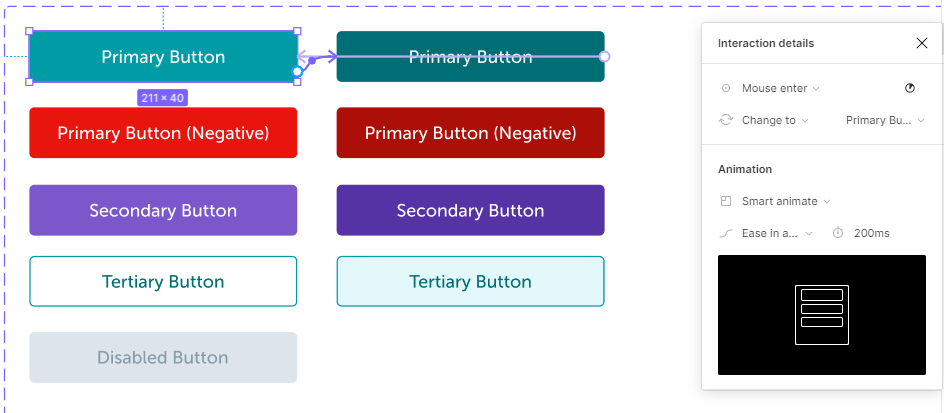
After some investigation I found that by removing the “Mouse Enter” variant change that I used for the hover effect on my buttons, the prototypes started working correctly again.

I’m not sure if this was the cause but it did resolve the issue. (note these had been previously working)

Image below to show how I had the buttons setup using the “Mouse Enter” and Mouse Leave" triggers to switch between the two variants.
This topic has been closed for replies.

41 replies

Fred_Tinsel
Active Member
March 26, 2021

Unfortunately I will add a layer…
it’s not only the prototypes that freeze.
Some actions or some plug-ins also freeze the app in editor mode.
I spotted this trouble with “Similayer”, or “Select Layers”
and once when editing a complex vector shape in a mask.

Harald_Skogland
Active Member
March 29, 2021

Same issue.

Cees_van_Dok
March 29, 2021

I have the same problem for a number of days as well. Changed some of the event types on interactive components - but I keep having the issue. It would be helpful if someone from Figma can confirm there’s a problem.

Krystian_Kubicki_Shiji
New Participant
March 29, 2021

Any updates guys? Prototypes right now in beta are not usable at all. They are freezing all the time, so I can’t test component states properly. Do anyone from figma teams know what happens? @Rogie_King @Gleb @adispezio

Rebrov_Alexei_CWM-NR
March 29, 2021

Similar problem with all prototypes even with Figma Playground components:
After event On Mouse Leave triggered clicking on any button to navigate to another page will freeze the prototype: Figma

Andrew_Chan
Figmate
Figmate
March 29, 2021

Hey all - a fix will be going out for this today. Sorry for the disruption, and thanks for being patient - I’ll keep this thread updated.

J.D_Compton
New Member
March 30, 2021

Thanks @Andrew_Chan! I know you guys are after this. After testing, from the new load in on Windows and rebooting, still getting the same errors. Just wanted to update!

Harald_Skogland
Active Member
March 30, 2021

Appreciate the fast update but the same as @J.D_Compton unfortunately. They work fine at first and then something seems to trigger that freezes all interactions in preview.

Rebrov_Alexei_CWM-NR
March 30, 2021

still same problem. Here is your inhouse prototype. Hover over “Select Toppings…” and click button Next >. The prototype will freeze @Andrew_Chan

Figma – 15 Mar 21
Rogie_King
Figmate
Designer Advocate
March 30, 2021

@Andrew_Chan should the fix be pushed out? I’m seeing this file still freezing.