June 28, 2023
Solved

Unable to switch variable modes

  • June 28, 2023
  • 28 replies
  • 7853 views

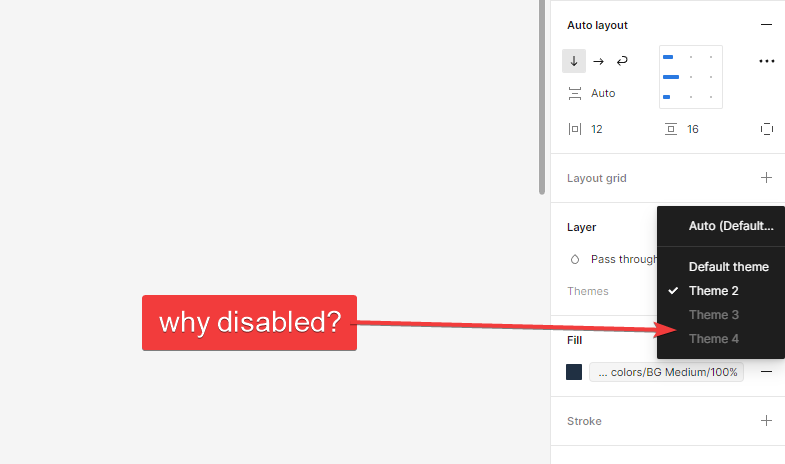
I set 4 color themes (variable modes) for my design in local variables but when I’m trying to switch them, 3 color themes are greyed out in the dropdown. Is it a bug or I’ve done something wrong?

This topic has been closed for replies.
Best answer by Josh

Hey all this could be due to the variables in your selection being on different versions with one version having access to fewer modes than the other one. If you update everything (variable collections, and make sure components using variables are published with the latest variable version), then all modes should become available for use.

Hope this helps. 🙂

28 replies

apretov
Active Member
August 1, 2023

I just created new mode but I can’t apply it on frames containing components, when I remove components from the frame, the mode becomes available. Tokens, components and interfaces are in differnt files
image

jackbrind
August 2, 2023

After submitting a bug to Figma, I have been told by one of their Technical Quality Specialists that it has been raised with the Figma Engineering team so they are actively investigating it.
It is in beta so I guess these things are expected.

Paul65
August 3, 2023

Hey folks, I’ve had this issue as well and starting to investigate to what extent switching modes work element by element. I found that while libraries are connected, and all component properties are linked to variables; it doesn’t mean all libraries have been updated with the new variable changes.

I order to fix all issues, I had to update all libraries manually, then move on to my main library and import the updates. From there, the main library has new updates available, which can be distributed to files which in the end require to be able to change in mode.

Hopefully this helps.

Paul65
August 3, 2023

Aka @Figma: It would be conducive to know which libraries aren’t in sync whenever updates have been submitted.

jackbrind
August 8, 2023

After speaking with one of Figma’s Technical Quality Specialists, it is an issue with out-of-sync libraries. It may be due to using the Tokens Studio plugin and syncing tokens with Figma but in any case, I have had to manually go through every component and make sure that all of the variables are correct. In some cases, the variable was linked to a previous version.

To identify the issue these were my steps:

  1. Create a section, give it a background variable to access the modes on the layer and provide it with the mode that has the issue (in my case, Dark mode).

  2. Bring in the component, or UI that has the issue and you should immediately see the components that are problematic (in my case, TextInput backgrounds)

  1. In the below screenshot, you can see that when selecting background/component/default in the selection colours panel, the variable is not highlighted in the library pop-out because it is not in the current version. All I have to do is connect it (at the UI or component source) to the correct variable and the issue is resolved.

As you can see, the issue is now resolved and the TextInput now looks correct in dark mode.

I agree with @Paul65 that it would be good if Figma could better indicate where variables are linked to a library that is no longer available (i.e. an older version) as this was very hard to identify. Further to that, I don’t really understand why modes that have issues are greyed out because setting the mode on the section and then dragging UI in is a hacky workaround. I think it would be good if modes were never greyed out so we could see where the issues are and with an indicator on the issues, it would be easy to fix.

Paul65
August 8, 2023

@jackbrind Thank you for elaborating on this. I totally agree with removing the disabled state and figure the inconveniences yourself. That would be way more intuitive.

jamiegraydesign
September 8, 2023

Figma is so hilariously bad. fix this. let us force-update all variables to fix this. if it breaks things, that’s okay. better that than the whole ass tool being broken because of some clunky implementation on y’all’s end.

PenPot here we come.

Neatpixels
New Member
September 9, 2023

Figured out what was causing this situation in my files.

This seems to occur when I have a library component which contains sub components which are hidden from publishing with a “.” Prefix.

If you use the parent component in your file and detach it you are left with the “.sub_component” this causes them to be out of sync and disables the mode switching.

If you select your root frame and look at the styles applied and see duplicates this is an indication you have things out of sync.

Hope this helps 😬

Isaac_Fagerli
September 18, 2023

We’re having trouble with this too. It seems to be related to nesting components. Figma derps out completely with this. It doesn’t even show me the correct name for the mode (Light mode), just “mode 1”.


October 10, 2023

I am still facing this issue.
I created the variables for my first theme, and after a while I added a second theme.
Now I can’t change the theme because it looks disabled.
What is the point of creating variables and modes if I will have to change everything manually?