

Sections to hug content
Hello, I just came across this weird thing.
I have a file where i use three sections to organize the components that are due to be reviewed, the approved ones and the discarded ones.
Those sections would grow and shrink pretty much like an autolayout frame, so when i drop an item into them a blue line helper would tell me that i will place the new object in between the existing objects. Then upon dropping the section will acomodate the new content.
Today i created a new file and created the same sections again. but then there is no longer an option to set them to “hug” content.
Here’s a file you can play with:
Figma – 3 Mar 24Also when looking to section specifications i see the hugging one it is actually set to hug:
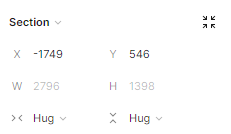
And the non hugging one, don’t even try to show an option for it:
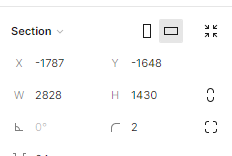
Can you help me sort this out?
Did i ran into a helpfull bug?
Because i think i wuold love to have support for autoadjustable sections.
Thanks in advance.
