

Rosie1
New Member
March 25, 2023
Solved

Prototype "on click" disabled

  • March 25, 2023
  • 8 replies
  • 26419 views

I see that this has been an issue before but I couldn’t find a resolution in the previous post from 2021.
Creating a new connection in prototype mode and the ‘on click’ option is grayed out. It doesn’t happen on every connection, just randomly but sometimes on the same type of element. For example: on certain buttons I cannot create an ‘on click’ connection between the button itself and the next screen but I can create an ‘on click’ from the button text. In another instance I have a gallery page that is entirely images and I want to create an ‘on click’ connect from an image to the next screen which shows the image preview but I can’t and on this gallery page every connection I try, from any image on the page, defaults to ‘on drag’ with ‘on click’ greyed out.
Does anyone know why this happens or how to fix it?
This topic has been closed for replies.
Best answer by Nellya

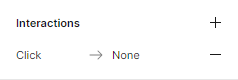
Make sure you didn’t already use it in interactions panel on the right
Скриншот 26-03-2023 145839

8 replies

Nellya
NellyaAnswer
Power Member
March 26, 2023

Make sure you didn’t already use it in interactions panel on the right
Скриншот 26-03-2023 145839

Rosie1
Rosie1Author
New Member
March 27, 2023

I’m not exactly sure what you mean. Did I already create the same connection with an ‘on click’? No.

Rosie1
Rosie1Author
New Member
March 27, 2023

Oops! I just saw what you meant, thank you!

May 2, 2023

on the prototype panel on the right please check if you have used multiple interactions and delete unused interaction by clicking on minus ’ - ’ this will enable the onclick option or you can also tweak the onclick interaction in the right panel

May 8, 2023

I do have similar issue, I can not find the “on click” option in prototype, I did download the beta version; same problem.

Did anyone faced the same thing? And HOW to fix it?

Serena_Hudson
March 16, 2024

Hey everyone, this troubled me for awhile. Thanks for the help.

Here’s what I did:

  1. Click the connection that has the “on click” disabled or grey
  2. Check the prototype panel on the right, click the [ - ] sign next to each option, including “on click”
  3. It should now be available to you to use
Carlos_Viciana
May 14, 2024

thanks @Serena_Hudson, it solves the issue. Do you know how can we avoid this behaviour from repeating int he future?

Seba_Sepulveda
New Member
May 20, 2024

in the options of prototype, if you change the device, and select a mobile screen the optionclick disapear and and show tap.