

Chris_Seymour
January 12, 2024
Solved

This interaction will not be triggered as interactions on instances are triggered before inherited internal interactions

  • January 12, 2024
  • 33 replies
  • 6654 views

I’m getting a warning message appear on all of my components with interactions. I’m able to re-produce it by creating a basic text component with 2 variants and a hover state change. Can someone share any insight into why this is happening? Screenshot and message below.

“The interaction will not be triggered as interactions on instances are triggered before inherited internal interactions”
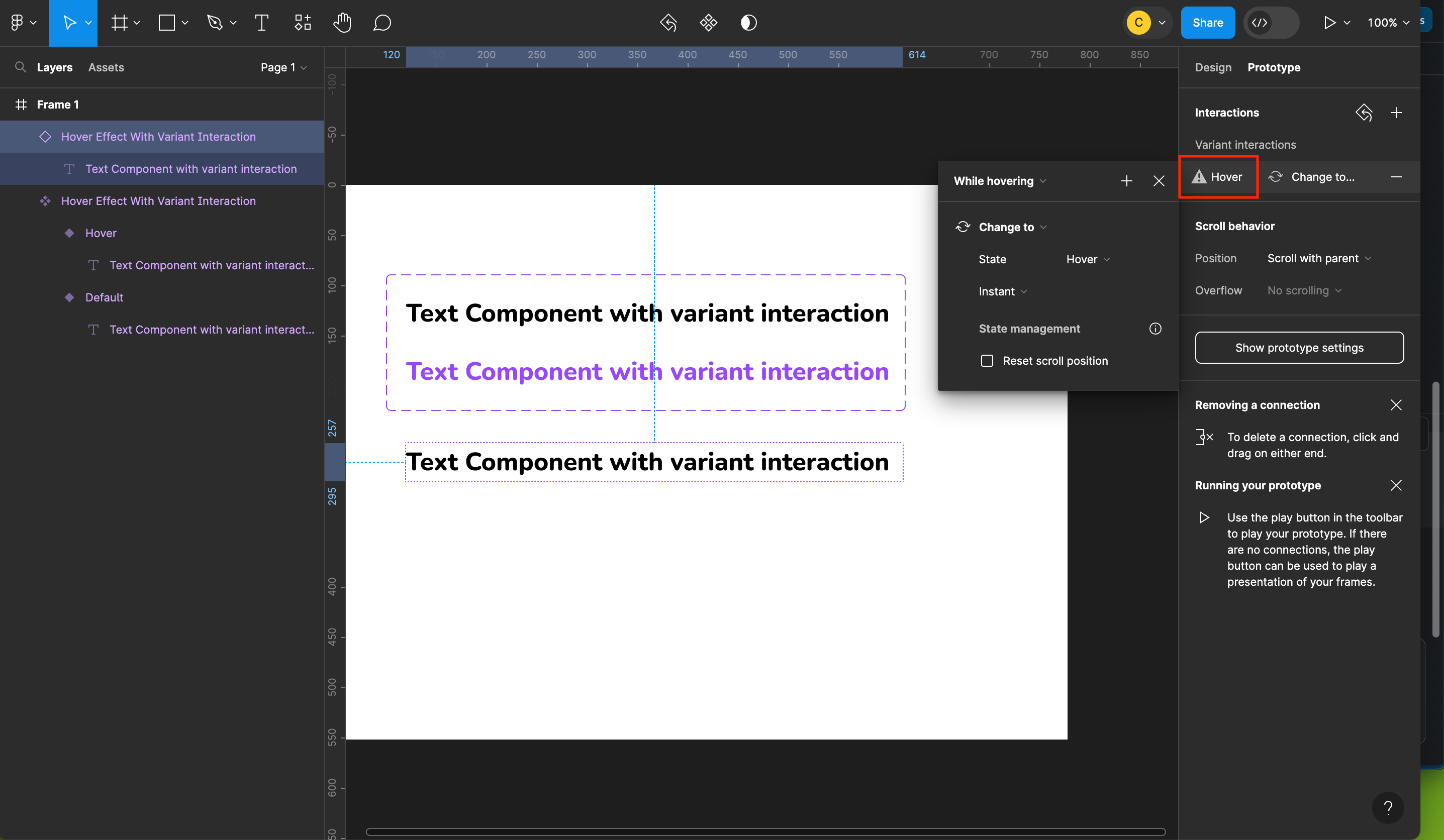
This topic has been closed for replies.
Best answer by Celine_

Hey Simon, thanks for details! This looks like a long standing bug that our engineering team is aware. It would be great if you can reach out to the support team with a copy of your file, so we can double check and investigate it further by filling a form here: https://help.figma.com/hc/en-us/requests/new.

Be sure to use your Figma account email, include a link to the file, and share it with support-share@figma.com so they can take a closer look. Thank you!

33 replies

gregmodor
January 12, 2024

I have a component that has 6 options.
Between the variants I added animation “After delay - 1ms, Smart animate”.

When I try to add the first option to the main frame to test the animation, I get an error (the one in the title) and the animation doesn’t work.

When I tried to add another component with the “While hovering” animation, it got the same error, but the hovering animation worked.

I tried reloading the application, deleting the project and creating a new one. But nothing helped.

Perhaps someone knows how to fix it?

Frederic_Fornini
Active Member
January 12, 2024

Hello, i have the same issue here, prototypes that used to be working perfectly, don’t work anymore because of this change.

Celine_
Figmate
Community Support
January 12, 2024

Hi everyone!
This type of error message is generally shown when Figma detects that there is a conflict between the interactions you have set on your main component variants and the interactions set directly on your component instances. Figma will prioritize the interaction on the instance over the interaction set on your component variant.

In order to investigate further, we would like our technical team to have a deeper look at it. Please reach directly to us with a copy of your file by filling out a form here: https://help.figma.com/hc/en-us/requests/new
Be sure to use your Figma account email, include a link to the file, and share it with support-share@figma.com so they can take a closer look. And please, also add your screenshot/recording video so we can try to replicate it. Thank you!

Frederic_Fornini
Active Member
January 12, 2024

To develop a bit more on the topic.
Here’s the link within the component, everything looks fine in term of interaction.

As soon as i turn it into an instance i have this warning.
It’s hard to wrap my head around this, has i don’t see any other way to change a button state (beside using variables).


j.willetts
New Member
January 12, 2024

I’m having this same issue today - I’m not applying any new interactions to the instance, just expecting the component to do the interactions set in the master component…

Frederic_Fornini
Active Member
January 12, 2024

@Celine_Figma i can’t share the actual file i’m having problems with at the moment (client NDA). I’ll see if i can cook an example.

Anyway as stated before, inside the component everything is fine, as soon as it becomes an instance, the warning appears. Even when it’s a standalone element not included in any artboard. (which is the example above with the screen capture.)

January 12, 2024

This is happening to me too today.

Mike24
January 12, 2024

Also getting this error for the first time.

Sam_Coney
January 12, 2024

I’ve also been getting this message for the first time today and the context for it seems false.

New bug in the software maybe?

@Figma - Can this be raised as a ticket to look into?

ksn
Figmate
Community Support
January 12, 2024

Hey all! Can you all take a look to see if this is still a problem? Our engineering team pushed out a fix, and this shouldn’t be happening anymore.