

Chris_Seymour
January 12, 2024
Solved

This interaction will not be triggered as interactions on instances are triggered before inherited internal interactions

  • January 12, 2024
  • 33 replies
  • 6654 views

I’m getting a warning message appear on all of my components with interactions. I’m able to re-produce it by creating a basic text component with 2 variants and a hover state change. Can someone share any insight into why this is happening? Screenshot and message below.

“The interaction will not be triggered as interactions on instances are triggered before inherited internal interactions”
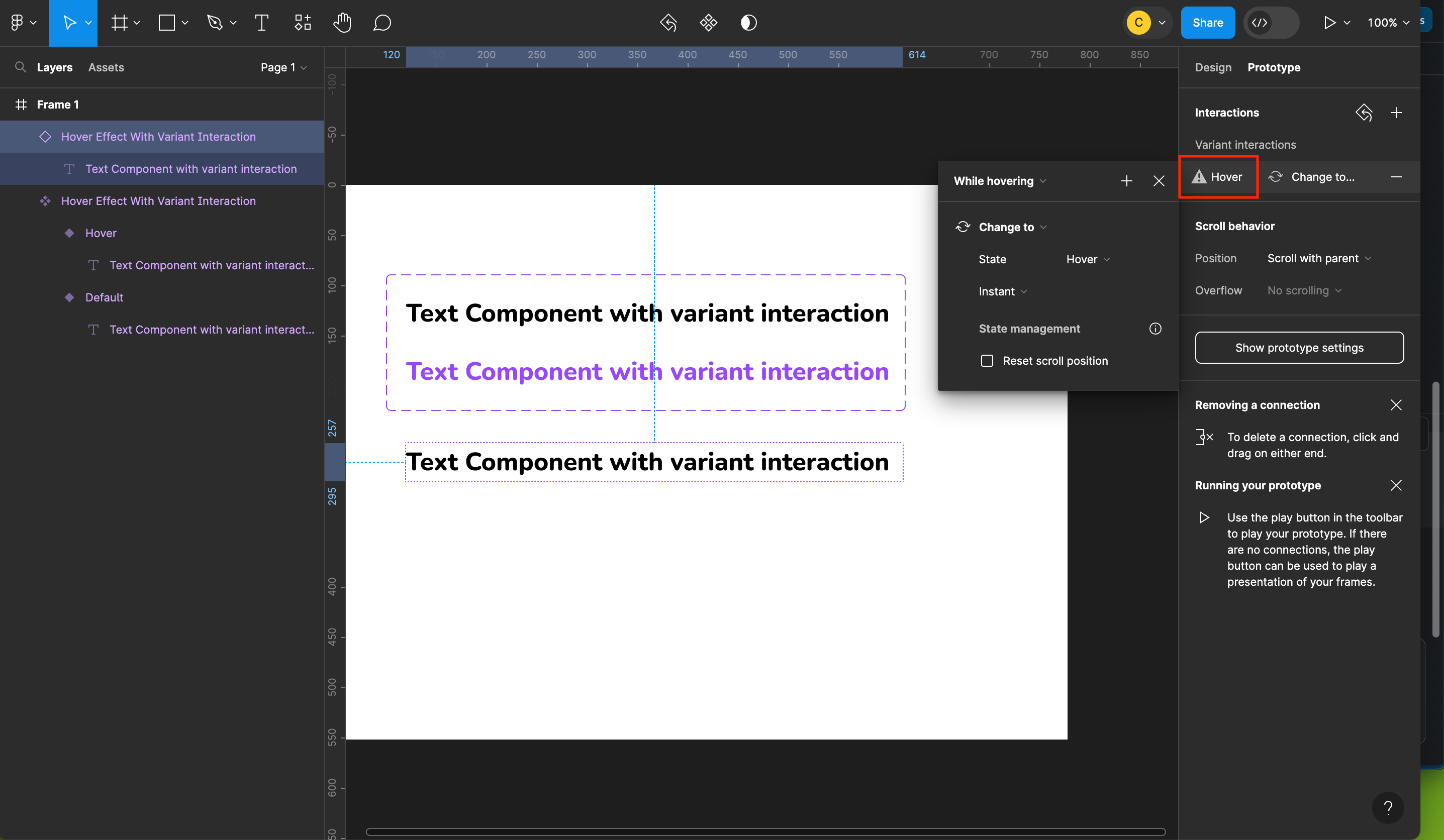

This topic has been closed for replies.
Best answer by Celine_

Hey Simon, thanks for details! This looks like a long standing bug that our engineering team is aware. It would be great if you can reach out to the support team with a copy of your file, so we can double check and investigate it further by filling a form here: https://help.figma.com/hc/en-us/requests/new.

Be sure to use your Figma account email, include a link to the file, and share it with support-share@figma.com so they can take a closer look. Thank you!

33 replies

Frederic_Fornini
Active Member
January 12, 2024

@ksn i don’t see the warning anymore, that’s a first.
It seems to be working, thanx for the quick fix !

I still have a problem on one of my components but i’ll investigate.

ksn
Figmate
Community Support
January 12, 2024

Great! Thank you – yeah feel free to drop your findings here when you have a min 😁

bigfudge
New Participant
January 15, 2024

Still experience this on a simple Checkbox interaction. I didn’t create it myself, it’s a component in the SAP design system file, but I don’t see why this shouldn’t work bc the component isn’t created any other way I would create it.

It’s a nested checkbox component in a page template. I don’t see any reason why this shouldn’t work. If I detach the page template component I can set the interaction. ¯_(ツ)_/¯

Celine_
Figmate
Community Support
January 15, 2024

Hi @bigfudge! This seems odd, thanks for flagging this. Would you mind reaching out directly to the support team with a copy of your file here: https://help.figma.com/hc/en-us/requests/new
This will help us to invesigate further and try to replicate the issue. Thank you!

bigfudge
New Participant
January 15, 2024

Hi @Celine_Figma thx for the prompt reply. As it’s an open lib (SAP Fiori) you first have to downoad and import for yourself, I don’t know if my file helps as it is bound to a published lib of said design system within my organization.

Celine_
Figmate
Community Support
January 15, 2024

The best option will be to share the affected file directly to the support team. You can send directly a link to the file, and share it with support-share@figma.com by inviting them directly as an editor so they can take a closer look. (this won’t affect your billing at all).
Be sure also to use your Figma account email, and a quick screenshot/video recording, this will help us to better visualise your issue. Thank you

bigfudge
New Participant
January 15, 2024

Ok, send it out. Thx

January 15, 2024

I have also this alerts showing in my buttons hover interaction, but when in Prototype mode it works perfectly fine. I guess that, as my button has a instance property of “click”, while the hover property is from the parent, Figma is trying to say me that the hover won’t work because first is the instance interaction, and as this one is a click interaction, the “hover” won’t show up.
To be honest, this is not a problem for me as I said earlier, because my component still works. But obviously, it is a issue because if this is the case, then Figma is showing me false information in the UI, wich can be a problem later on.

Celine_
Figmate
Community Support
January 16, 2024

Hey everyone,
Thank you for your patience while our engineers worked on resolving the issue you reported. We are pleased to inform you that the fix has been successfully released!

Please refresh Figma to ensure that you are using the fixed version. If you continue to experience the issue, please let us know by reaching out directly to the support team with a copy of your file so we can investigate further here: https://help.figma.com/hc/en-us/requests/new

Be sure to use your Figma account email, include a link to the file, and share it with support-share@figma.com so they can take a closer look.

We apologize for any inconvenience this issue may have caused you. Thank you!

bigfudge
New Participant
January 17, 2024

The Warning is gone now, thanks for the quick turnaround here.

I don’t know if it’s another issue that’s addressed in a different context, but now The option to choose from when adding an interaction “on klick change to…” just shows the Properties for the surrounding component instance, not the component I need to change properties for. In this case a datepicker component inside a page component.

See Screenshot of actual option available:


and options for properties expected:

Any idea @Celine_Figma