

Alborz_Heydaryan1
August 27, 2021

Make text follow a path or a circle

  • August 27, 2021
  • 44 replies
  • 39553 views

I’m trying to create the text effect in this image. The odometer’s text wraps around the circle very nicely.
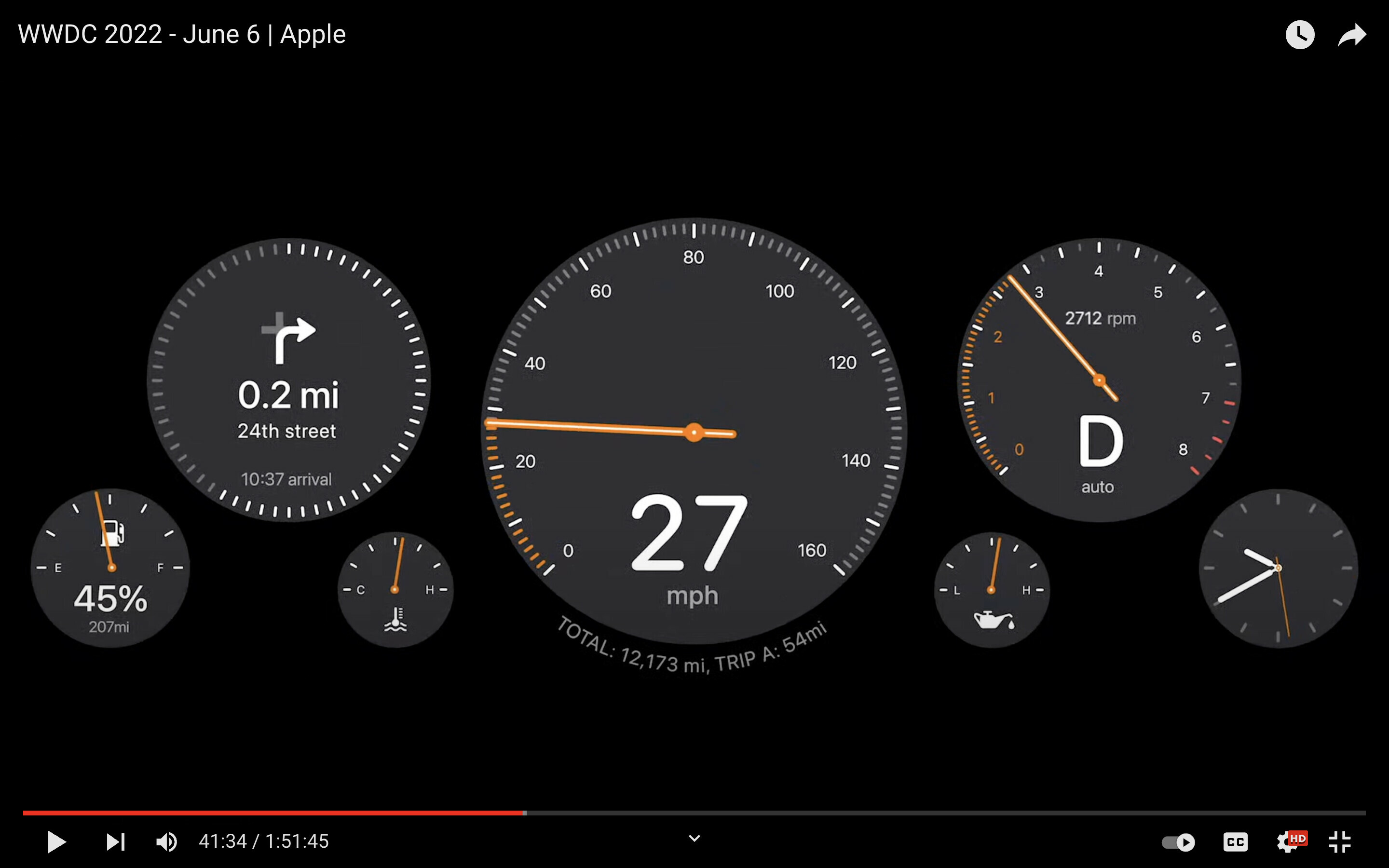
Imgur

Right now I have to use a plugin, but I lose the ability to edit the text afterwards and there is no preview so I have to try a few times to get the text to wrap nicely.

Sketch had a feature where if you dragged a text on top of a path it would snap to it and would follow the path. A similar feature (perhaps with a better implementation) would be very welcome on Figma.

Pinned Reply By djv

Hey All, sorry for the confusion here! 

We officially launched the native Text on a path tool as part of the Figma Draw release on May 7, 2025 during the Config 2025 conference last year. 
 

You can create text layers that follow the path of a vector object, such as a shape or brush stroke. Use this to create text that flows along curves, circles, or other custom shapes.

To type text on a path:

  1. Select the  Text on a path tool from the toolbar.
  2. Hover your cursor over the path of a vector object until the  text on a path cursor appears.
  3. Click to add a new text layer and start typing.


As you type, the text layer will wrap around the chosen path. You can use the blue handle to determine where the text layer begins. To switch the text layer to the other side of the path, select Flip text orientation In the Typography section of the right sidebar. Hope this helps clarify! 

44 replies

fff
August 27, 2021

Would like to see this feature in some future version:
float text around paths

September 6, 2022

This topic was automatically closed 90 days after the last reply. New replies are no longer allowed.

xMOx
Active Member
December 14, 2022

Having text on path option will reduce the amount of copying and pasting custom designs from illustrator and will open more creative options when designing graphics on Figma.

RER
April 7, 2023

Text on a Path / Curved Text → Editable after creation

djv
Figmate
Community Support
April 7, 2023

Thanks for the idea!

We’ve merged it with two other similar feature requests from the past to gauge overall interest from the community.

September 22, 2023

Hey Figma Team,

Hope you’re all doing fabulously creative! 🎨 We’ve got a sizzling hot suggestion that’s been on designers’ minds – “Text on Path.” Yes, you heard it right, just like Adobe Illustrator!

What’s the Buzz? Adobe Illustrator has been flaunting this feature for years, and it’s about time Figma struts its stuff with some Text on Path magic! 🪄

Why It’s a Game Changer:

  1. Flow Like Never Before: Text on Path lets designers weave text seamlessly along any curve, turning ordinary shapes into extraordinary designs.
  2. Creative Freedom: Expand your artistic horizons! Whether it’s designing logos, banners, or eye-catching headlines, Text on Path empowers you to create dynamic and visually appealing text arrangements.
  3. Consistency Is Key: Achieve pixel-perfect consistency in your text placement, ensuring your designs look polished and professional.

How It Could Work:

  1. Select Your Path: Simply draw or select a path (be it a line, shape, or custom curve).
  2. Type Away: Type your text and watch it beautifully adapt to the selected path, adjusting font size and spacing automatically.
  3. Fine-Tune Control: Give designers the power to adjust text position, spacing, and orientation along the path. Imagine the possibilities!

Why We Need It:

  • Stay Competitive: To remain the go-to design tool, Figma needs to offer features that match or exceed industry standards.
  • Workflow Efficiency: Save precious design time by eliminating the need for manual text manipulation.
  • Keep Creativity Flowing: Text on Path will encourage even more innovative and imaginative designs, driving user engagement.

Let’s Paint the Town with Text on Path! Imagine the delightful surprises designers could create with this feature – from swooping, elegant text wrapping around a logo to funky, curved text in posters. 🎉

So, Figma Team, how about turning this suggestion into a reality? Let’s give designers the superpower they deserve and make Figma shine even brighter! 🌟

Thanks for considering our suggestion, and keep up the fantastic work!

Cheers to a more fabulous Figma future!

Warmly, Idan Gezerster AKA Xc

djv
Figmate
Community Support
September 22, 2023

Hey @Xc1, thanks for the feedback!

We’ve merged your topic with an existing, similar feature request. We’ll pass this along to our team and continue to track interest from the community using the Votes.

Alx
September 23, 2023

@Alborz_Heydaryan1 , thanks for suggesting this already!
This is also something that I ran into on a daily basis, I normally do it manually, but it would be nice if Figma natively offered the option to do this.

Davud_K
New Member
November 21, 2023

Hi. I have stopped using Photoshop and Illustrator almost entirely since I discovered Figma. However, there is one thing that I cannot do which is absolutely necessary when trying to design logos or illustrations and that is the ability to write text over a circular or curved path.

In Photoshop this is done simply by selecting the text tool and then clicking on the stroke of a path or shape. It would be extremely handy to have a feature similar to this.

Thank you for your continuous support to the design community!

Emin_Kapetanovic
November 21, 2023

Agree! It would be super helpful to have this one in future updates.