

halkiona
June 30, 2023
Question

Drag direction up and down using variables and conditionals

  • June 30, 2023
  • 19 replies
  • 4929 views

Hi,

I’m trying to create a temperature picker and recent variables launch hugely simplified the process. I previously has to create a variant for each temperature. I just created a conditional to increase and decrease the temperature. However, I can still only drag the value in one direction only, in this case increase only.
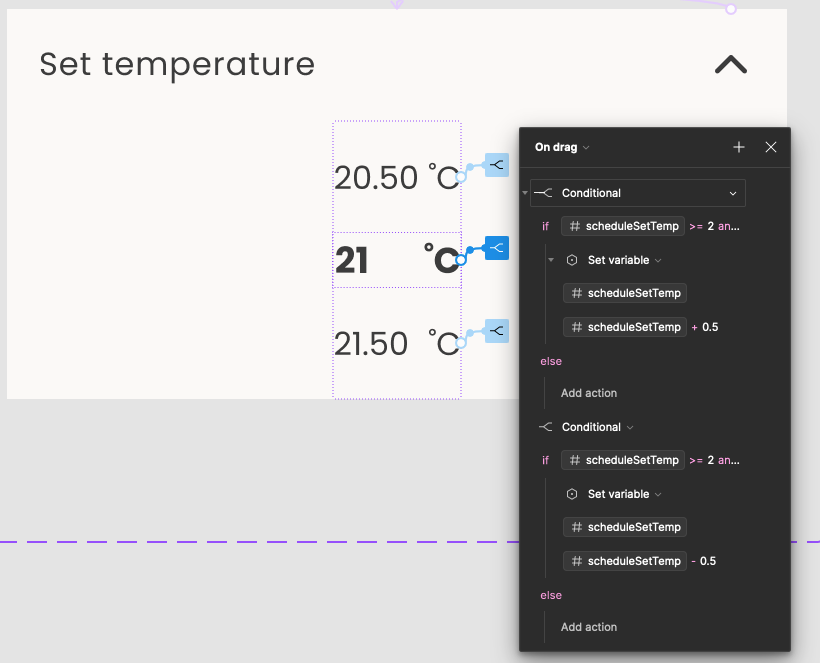
I added two drag interactions one for toggling the temperature up and one for toggling it down but the second one doesn’t work. Is there a way to set drag direction when using conditionals? If anyone has an idea, please let me know.

Thanks

This topic has been closed for replies.

19 replies

tank666
June 30, 2023

To be able to drag in different directions, your component must have a draggable object that must extend beyond the component’s bounds.

Just follow this guide:

  1. Create a number variable;
  2. Create a component set containing 2 variants (Minus, Plus);
  3. Apply the variable from step 1 to the text layer of both variants;
  4. Create a rectangle that is 3px higher than your variant’s height;
  5. Put it in each variant;
  6. Set this rectangle to the following coordinates:
    • Minus variant:
      X = 0, Y = -1;

    • Plus variant:
      X = 0, Y = -2;

  7. Add 2 interactions to the rectangles with the “On drag” trigger:
    • Minus variant:
      On drag 1 › Set variable to decrease;
      On drag 2 › Set variable to increase and Change to Plus variant;

    • Plus variant:
      On drag 1 › Set variable to decrease and Change to Minus variant;
      On drag 2 › Set variable to increase.

UX/UI designer. Figma expert. Creator and developer of plugins and widgets for Figma and FigJam. Check out my resources in Figma Community: figma.com/@tank
halkiona
halkionaAuthor
July 3, 2023

Thanks @tank666 for sharing this idea. It works but it’s not exactly what I’m looking for.
When I drag up for example, the whole component duplicates and moves up change to a minus variant.

I even tried to create a component using the temperatures box only but then it doesn’t work for some reason. The component needs to be able to collapse and expand as well. I found that conditionals inside components when I change the variant. Not sure if that’s a bug or not.

tank666
July 3, 2023

What I described above should work like this:

And your case, if I understand correctly, should work as a scrollable list-wheel?

Then you will need 5 variables and 3 variants, each of which should contain 5 items.
Duplicate the file from the link below to explore the interactions in more detail.

Figma – 3 Jul 23
UX/UI designer. Figma expert. Creator and developer of plugins and widgets for Figma and FigJam. Check out my resources in Figma Community: figma.com/@tank
halkiona
halkionaAuthor
July 3, 2023

Perfect. That worked like a charm. Thanks so much for your help 😀

halkiona
halkionaAuthor
July 6, 2023

Do you have any idea how to make it go in a loop? E.g. from 0 to 30 and then again 0. I tried different conditionals but I’m struggling which variable to use as a condition <=0 and >30.

tank666
July 6, 2023

Write conditions for each variable in both Minus and Plus variant interactions.

For example:

UX/UI designer. Figma expert. Creator and developer of plugins and widgets for Figma and FigJam. Check out my resources in Figma Community: figma.com/@tank
halkiona
halkionaAuthor
July 7, 2023

I did what you said and it still goes below zero. Not sure why. Each conditional here has the same condition just for a different variable. And I did the same for Plus variant with minTemp and maxTemp reversed. minTemp is 0 and maxTemp is 30.

tank666
July 7, 2023

Could you share a link to the file?

UX/UI designer. Figma expert. Creator and developer of plugins and widgets for Figma and FigJam. Check out my resources in Figma Community: figma.com/@tank
halkiona
halkionaAuthor
July 7, 2023

Hi,
See the file here:

Figma

I noticed it’s working when the increments are by 1 degree but when I change it to 0.2 it doesn’t work. That is odd. Why should a decimal make any difference to a mathematical formula?

tank666
July 7, 2023

Unfortunately, there are no tools for debugging variables in the prototype. So I had to go a little deeper.

I think this is due to the way Figma handles decimal numbers. Here are the values of the variables that are obtained using the API:
variables

To fix your prototype, change the == operator in the conditions to <=, >=. Also, in the interaction conditions of the Minus variant, instead of the “minTemp” variable, use another variable or a value of 0.15 or something like that.

Since the variables are currently in beta, various bugs and shortcomings are possible. I suggest you to share your feedback on variables and advanced prototyping.

UX/UI designer. Figma expert. Creator and developer of plugins and widgets for Figma and FigJam. Check out my resources in Figma Community: figma.com/@tank