
Jiyoung
April 5, 2021

WebP support for animated prototyping and export

  • April 5, 2021
  • 89 replies
  • 14883 views

Would be awesome to support a Webp file when exporting images like Sketch. (without using any plug-ins)

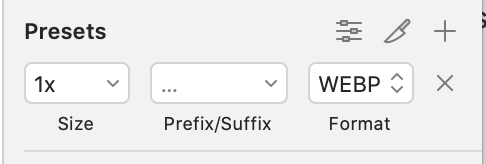
sketch_webp

89 replies

Gleb
Power Member
April 5, 2021

TinyImage plugin by @Hypermatic can export WebP: https://figma.fun/cgdBoT along with a lot of other useful features — no need to leave Figma and use external converter tools.

Jiyoung
JiyoungAuthor
April 6, 2021

Yes, the TinyImage plugin supports WebP but it’s not free. And wonder if Figma has a plan to support it as a default like Sketch.

simonschmidt
New Participant
May 19, 2021

… and presets. Its basic functionality missing here.

dimdan
June 16, 2021

WebP is an image file format from Google, and the preferred image format for Android. Figma doesn’t have this option, so what I usually do is export and SVG into Sketch and use that export option in Sketch. Supporting this export option will improve efficiency.

Does anyone else experience this? Is anyone using a plugin or workaround to help solve this?

Ida-Mina
June 24, 2021

I would love this option! There is a plugin from Figmatic “TinyImage for Figma” that I used successfully, but it requires a license after some free exports. I’ll try your workaround and see if I can do it with a plugin on Photoshop or Illustrator.

It would be really useful to have this option integrated into Figma.

Samuel_Anthony
July 11, 2021

This would seriously transform a lot of web designers’ workflow… please add this Figma 🙏

The plug-in Tiny Image is good and all, but paying monthly for an export format feels a little tough on the budget.

Mehas
August 9, 2021

This missing feature is preventing us from migrating from Sketch to Figma.

Thomas_Semmler
New Participant
August 27, 2021

The time has come, Figma. This is becoming essential.

Gabriel_Naranjo1
September 2, 2021

This is also very important to us.

We are currently exporting the images in PNG and using this tool to compress them.

The aforementioned tool allows for only one picture at a time, but the results are stellar and very small.

Jiyoung
JiyoungAuthor
September 2, 2021

Our team uses a 3rd party converting tool after exporting images in PNG in Figma: AnyWebP - Bulk convert all images to WebP (thanks to them).
It’s an extra step, but this seems to be the easiest way right now.
