

leopechansky
January 26, 2021

Customizable shortcuts

  • January 26, 2021
  • 203 replies
  • 51011 views

The main source of inspiration for this idea was to match the keyboard shortcuts themselves to different keyboard layouts. Right now, users who don’t use US keyboards have to memorize the location of the keys, rather than to use the actual character location to be able to use the shortcuts. Those involving this region are primarily the case:
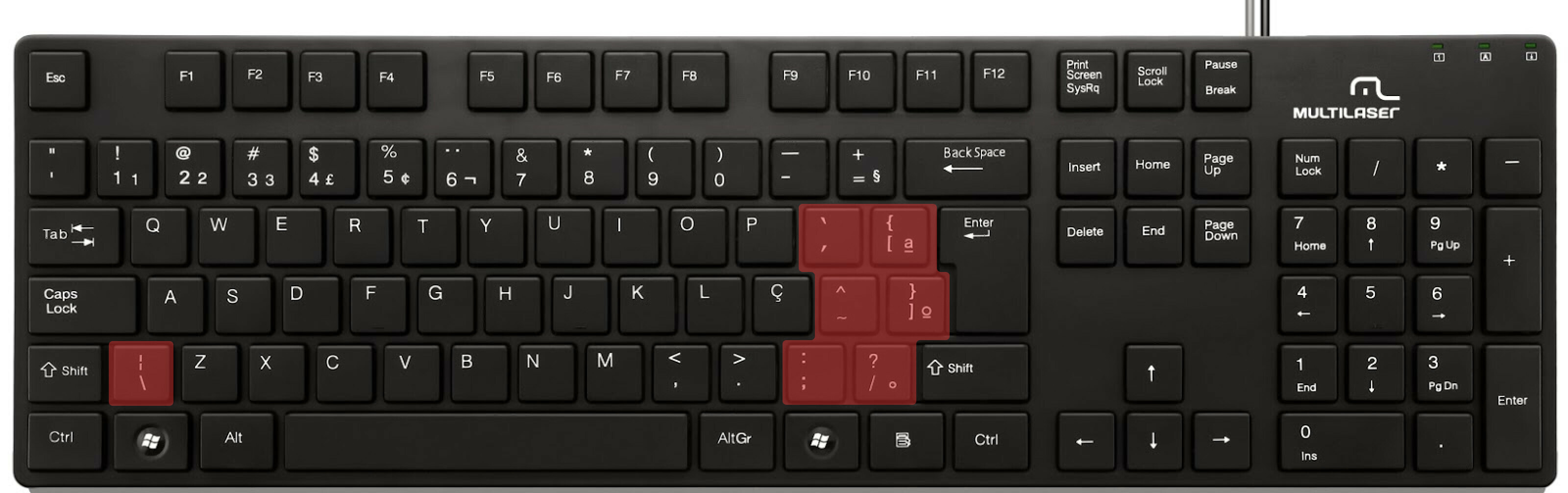

ABNT2 layout (Brazil).

And here’s an example of confusing shortcuts:
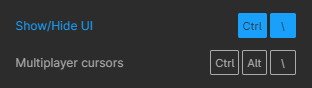
image

Although this problem could be solved by just rebinding the shortcuts to the actual character and not the location on the keyboard, I’ve noticed there are some other issues concerning key bindings.

On this forum post, a member of the community asked for help on backing one layer level with a different shortcut from what Figma has right now. This makes the user adapt their workflow to the tool, and not the other way around — and that hinders efficiency. It would be nice if the tool itself provided some sort of customization on this regard.

Although being a workaround, Mac users can customize keyboard shortcuts by application, but it is a bit limited. It’s also not a possibility for Windows users.

I think this could be a game-changer, as i’ve seen people who refused to migrate from other tools to Figma because they couldn’t customize shortcuts. It would also give the user more control over the tool and their workflow.

What do you guys think about it?

203 replies

cyrezeraser
New Participant
November 6, 2022

im also wondering, how is this not a priority to fix? usability 101

Libor
New Member
December 6, 2022

Please allow custom shortcuts. We designers use more graphic software in the same time, especialy in Adobe with some different shortcuts and we are used to them for decades…
I´d welcome “Tab” for hiding panels e.g. which is much faster.

New Participant
December 27, 2022

Still not working on a german keyboard (Keychron K4) german keyboard - English interface.
Drives me absolutely bonkers.

djv
Figmate
Community Support
January 19, 2023

Hey All,

Thank you for your feedback and we hear you!

We’ve updated this topic to a feature request, as it’s not actually a bug. Please note that we already have an existing thread for customizable shortcuts here:

Feel free to add your votes there, but please note that we intend to merge the replies under this thread with the existing topic in the next few days. With a single source of truth, our team will be able to better prioritize a new approach to shortcuts.

Ricardo_Desirat
New Participant
January 26, 2023

I think it wouldn’t be hard to make it work…?
I suppose shortcuts conflicts can be bad but if there is a “go to” conflict and a “change” or “cancel” option, it doesn’t seem too terrible.
Would love to see it implemented.

Ivan_Reyna
February 17, 2023

When trying to hit ctrl+TAB and ctrl+E and ctrl+A and i accidentally hit ctrl+Q which closes the workspace.

As a windows user, i don’t need or want a keyboard shortcut to close the app at all. That is what alt+F4 does if you want it.

Please allow us to disable this shortcut.

Kolodziej_Ashley
Active Member
March 7, 2023

I’d like to be able to map the command palette to Shift Command P, similar to Sublime Text. I never use the pixel preview, so the shortcut currently in that spot is of no use to me and I’m constantly accidentally activating it.

Philipp_Lehmann
New Participant
March 10, 2023

Please keep up with that 🙏
Swiss DE Keyboard doesn’t really work with some of the shortcuts.

Jay_Mehta
March 28, 2023

Figma doesn’t support ALT + F4 to close the program, however its a standard on Windows Programs.
Figma support informed me that instead of ALT + F4, we can use CTRL + Q to quit the app.
It works however its annoying to have special shortcuts just for one program.
So I am sharing the idea that Figma allows closing the app using ALT + F4 (as its expected from all apps in windows) instead of CTRL + Q.

To windows users: Am I only one who find this annoying or everyone is facing this?

Roman_Pohorecki
New Participant
April 2, 2023

Frequently, I break a text style only to manually reset it to Line Height: Auto.
A button or modifier+click would be a welcome shortcut.