

leopechansky
January 26, 2021

Customizable shortcuts

  • January 26, 2021
  • 203 replies
  • 51010 views

The main source of inspiration for this idea was to match the keyboard shortcuts themselves to different keyboard layouts. Right now, users who don’t use US keyboards have to memorize the location of the keys, rather than to use the actual character location to be able to use the shortcuts. Those involving this region are primarily the case:
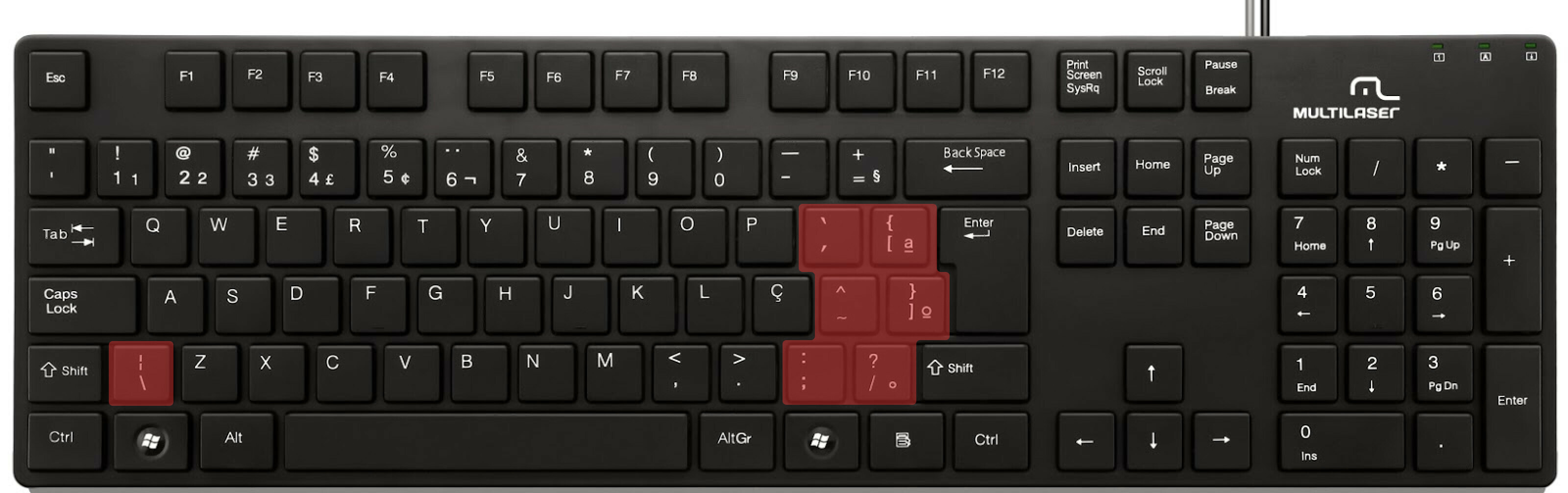

ABNT2 layout (Brazil).

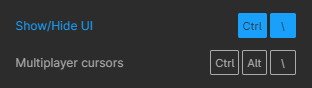
And here’s an example of confusing shortcuts:
image

Although this problem could be solved by just rebinding the shortcuts to the actual character and not the location on the keyboard, I’ve noticed there are some other issues concerning key bindings.

On this forum post, a member of the community asked for help on backing one layer level with a different shortcut from what Figma has right now. This makes the user adapt their workflow to the tool, and not the other way around — and that hinders efficiency. It would be nice if the tool itself provided some sort of customization on this regard.

Although being a workaround, Mac users can customize keyboard shortcuts by application, but it is a bit limited. It’s also not a possibility for Windows users.

I think this could be a game-changer, as i’ve seen people who refused to migrate from other tools to Figma because they couldn’t customize shortcuts. It would also give the user more control over the tool and their workflow.

What do you guys think about it?

203 replies

Maty
Active Member
June 29, 2022

Soooo 6 years after launch, and 429 votes later, no custom shortcuts?
Massive oversight, massive disappointment.

FigmaIsBad
July 5, 2022

Many FIGMAs do not have preset shortcuts, but they are very high -frequency operations for me, and more mouse operations are cumbersome. E.g:
apply boolean property
image

dekross
July 15, 2022

Seriously guys, get your act together and make the customizable shortcuts a priority. Figma is wonderful, but without the shortcuts it cannot count to be a professional app.

RubyComp
July 17, 2022

Yep, why Figma still have no Customizable shortcuts? I’m use this app a one year, but still cant use any shortcut. Because it’s extremely inconvenient.

Ricardo_Desirat
New Participant
July 28, 2022

Voted!
And I think it goes well with Shortcut search tool

JonoTRHC
July 29, 2022

There is a learning curve or just a bit of time and repetition required to master Figma’s keyboard shortcuts. The best place to start is the Help Menu > Keyboard Shortcuts (Control + Shift + ?):


This will show you which shortcuts you have already used and which ones you have yet to discover.

Beyond that, I use Keyboard Maestro (KM) to make Figma (and all other apps) do what I want via Keyboard. As a benefit, the KM shortcuts sync to all of my other Macs, so I don’t have to update System preferences on multiple Macs, or when I get a new Mac. KM does a ton of other useful things, such as scripted automations, but I primarily use it for shortcuts because I got tired of having to redo System Preferences in macOS.

In this screenshot, you can see my Figma shortcuts for the boolean shape options:

Patrick-Plaggenborg
Active Member
August 16, 2022

Thanks! That’s super helpful.

I never knew the Figma keyboard shortcuts window would display used shortcuts in blue. That’s quite a nifty feature.

Thanks for your suggestion on Keyboard Maestro. I’ve been doing something similar with Better Touch Tool for a while now, which allows me to override any shortcuts that can’t be set through the macOS System Preferences settings.

I guess both apps are pretty similar, but haven’t tried Keyboard Maestro as I’m now invested in BTT and it works for me.

Murt
September 15, 2022

Thanks for this Rubem.

spierce
October 14, 2022

And it looks like Figma changed the show/hide keyboard shortcut with the latest release. Would be nice to be able to change it back.

cyrezeraser
New Participant
November 6, 2022

+1, really need to be able to customize keyboard shortcuts. Shift+0 for zoom to 100%? can’t do that with one hand. I want to be able to change them to whatever I need so I can make it more ergonomic.