

Ability to crop multiple pictures into different frames once and for all

  • February 26, 2024
  • 3 replies
  • 628 views

Jeremy23

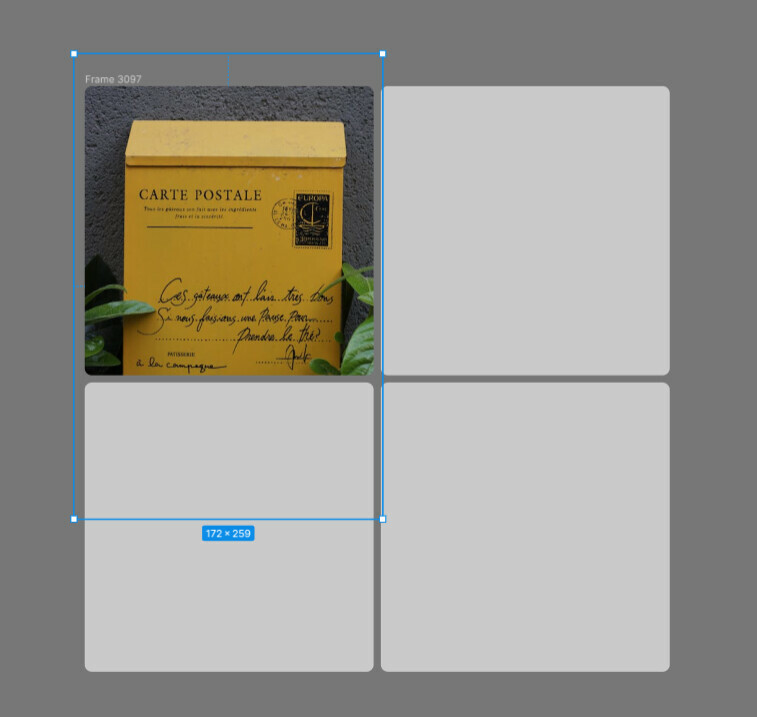
I know that you can crop one-by-one by using the picture crop feature in Figma. But that will be a very tedious work! I also know there’re planty plugins that can crop pictures. After doing the work, they’re automatically downsizing the picture and not keeping the original pixels.

It makes the developer’s measurement impossible:
3 replies

djv
Figmate
  • Community Support
  • February 27, 2024

Hey @Jeremy23, thanks for the feedback!

We’ll pass this onto the team for future consideration.


Jeremy23
  • Author
  • Active Member
  • February 28, 2024

🥰 🥰 🥰Thank you!


Teison_Edwards1

I found one trick to do this when I was trying to crop like 20 images at once. 

  1. Line all the images up
  2. Select all the all images and hit enter to see their anchor points
  3. Highlight all the anchor points on the side you want to crop. In my case this was all the bottoms of the images. 
  4. Align all the anchors to each other. For me I aligned the bottoms of these. 
  5. Drag all the anchor points up to the point you want. 
  6. Repeat for each side you need to crop. 

In my screenshot I wanted to crop the bottoms of all these off, and I’m just about to do step 4.