
Jun 13, 2024 10:58 AM UTC
Question

Making a component appear after a time delay with variable

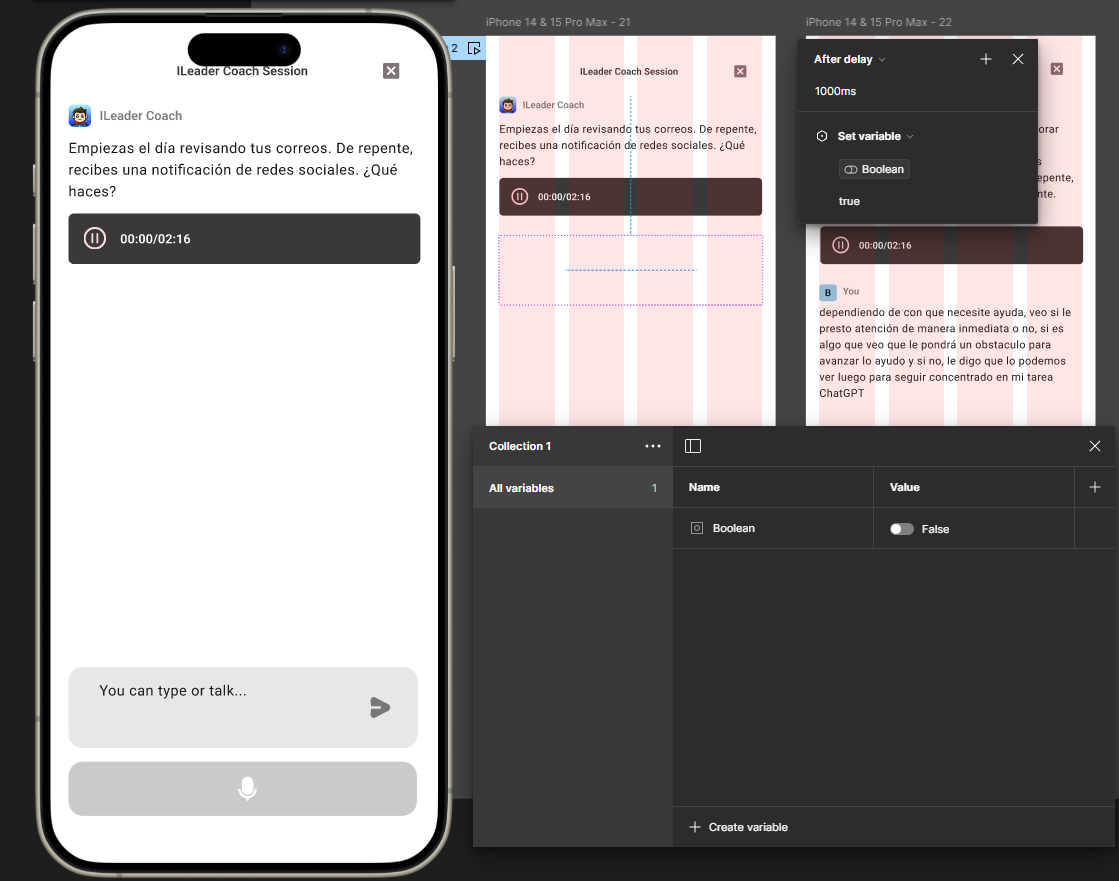
so, I don’t know what I’m doing wrong I’m unable to make this component appear after 1s delay with a boolean variable.

If I set the variable in the interaction from false to true it does work, but it doesn’t the work the other way.
This topic has been closed for replies.

2 replies

y_toku
Figmate
Community Support
Jun 17, 2024 4:53 AM UTC

Thanks for reaching out. Just to confirm, do you want it to toggle on and off every second, or should it toggle off when the boolean is true and vice versa?

If you’re looking to create a loop action, you can do this by creating ‘on’ and ‘off’ variants of the component and setting up interactions between them with a delay.

For the latter case, you can achieve this by using a conditional statement.

Hope this helps! Please let me know how that works.

Thanks,
Toku

IT13
New Member
Mar 9, 2025 3:50 PM UTC

Hi Toku

Thanks for the tip. 

Could you please describe the script to do this : ”If you’re looking to create a loop action, you can do this by creating ‘on’ and ‘off’ variants of the component and setting up interactions between them with a delay."


I am trying to do it the way I was doing it years ago on Axure but I can't find my way in the condition console.


What I would like to do is for instance :

-On click

--Set button to true 

--Change button variant to red button appears in red

--//Wait 500ms// that's the Axure way so I would assume //after delay 500 ms// un Figma

-Change button variant to green


So basically on click a button appears in red then after delay 500ms the button turns green.


Thanks 🙏 for your help mate, 

Max