

sekeidesign
Apr 7, 2021 2:53 PM UTC
Question

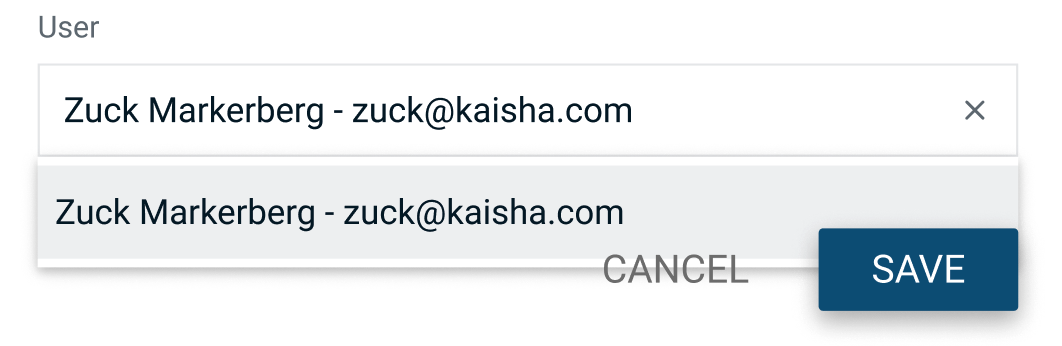
Is there any way to change the "z-index" of an auto-layout child?

I’m using auto-layout for this modal, just like I do for pretty much everything else, and I’m creating a modal, with a text field, and a dropdown.
The dropdown should float above the buttons, and I’d prefer to do this with auto-layout. (I know I could use an overlay, it would be nice to control the z-index somehow though)
This topic has been closed for replies.

35 replies

Jc_Martel
Apr 7, 2021 3:03 PM UTC

There is unfortunately no way to do so as of today. You would have to remove auto-layout entirely or maybe use variants of a component without autol-layout?

Check this other post too:
https://forum.figma.com/t/auto-layout-reverses-the-order-of-my-layers/1190

Chris_northswiss
Jun 14, 2021 9:34 PM UTC

I’ve also just come across this same issue. Would be nice to be able to override the z behaviour.

Slava_Bronevitskiy
Active Member
Aug 18, 2021 2:35 PM UTC

Same problem. Can’t build prototypes without adjustable z-index

impactby.design?ref=nI
Harun_Alikadic1
New Participant
Aug 30, 2021 9:07 AM UTC

Still no override for this? If I do not use auto-layout I cannot have component elements “Fill container”. So I cannot have possibility to scale manually component instances. But, if I use auto-layout my helper tooltip stays on the lower z-index. Is there maybe a way to reverse the ordering in the auto-layout or force the z-index like in html (like “z-index: 10001 !important;”)?

Slava_Bronevitskiy
Active Member
Aug 31, 2021 11:15 AM UTC

I’ve submitted a feature request recently.

Can we keep upvoting and resubmitting until @anon21722796 accepts the importance of this and replies “We have added this to our roadmap”?

impactby.design?ref=nI
Craig_Garner
New Participant
Oct 19, 2021 10:38 PM UTC

Agreed, this is an essential feature that Auto Layout should support. Any word from @Figma_support?

Arjun_Mehta
Oct 21, 2021 8:57 PM UTC

Also encountering this issue. We want to componentize dropdown as an input state, but the order of layers is getting in our way. Seems like such a huge limitation!!

Anna_Willoughby
Dec 10, 2021 12:32 AM UTC

This is such a kludgy way to handle auto layout… please fix this it’s making things so unnecessarily difficult

Bobby_Spiecher
Dec 13, 2021 11:49 PM UTC

I’ve done this. It’s a wonky solution, but it works. If your object is at the top of the auto layout order in layers, move it to the bottom. Flip the entire group (that has auto layout applied) vertically (Object>Flip Vertically, or ‘Shift + V’). Then flip each individual item in the auto layout order in layers vertically so that everything is displayed right side up. You may need to do some additional layer sorting for the other items. But now, you’ll notice the z-index ordering is reversed so that things overlap the way you want them to. If this is in a component and you want to avoid things flipping in your designs, group everything in a container group and move your auto layout to the container.

Lotty_Cheshire
Dec 14, 2021 9:15 AM UTC

This worked 🙌