
August 15, 2023
Solved

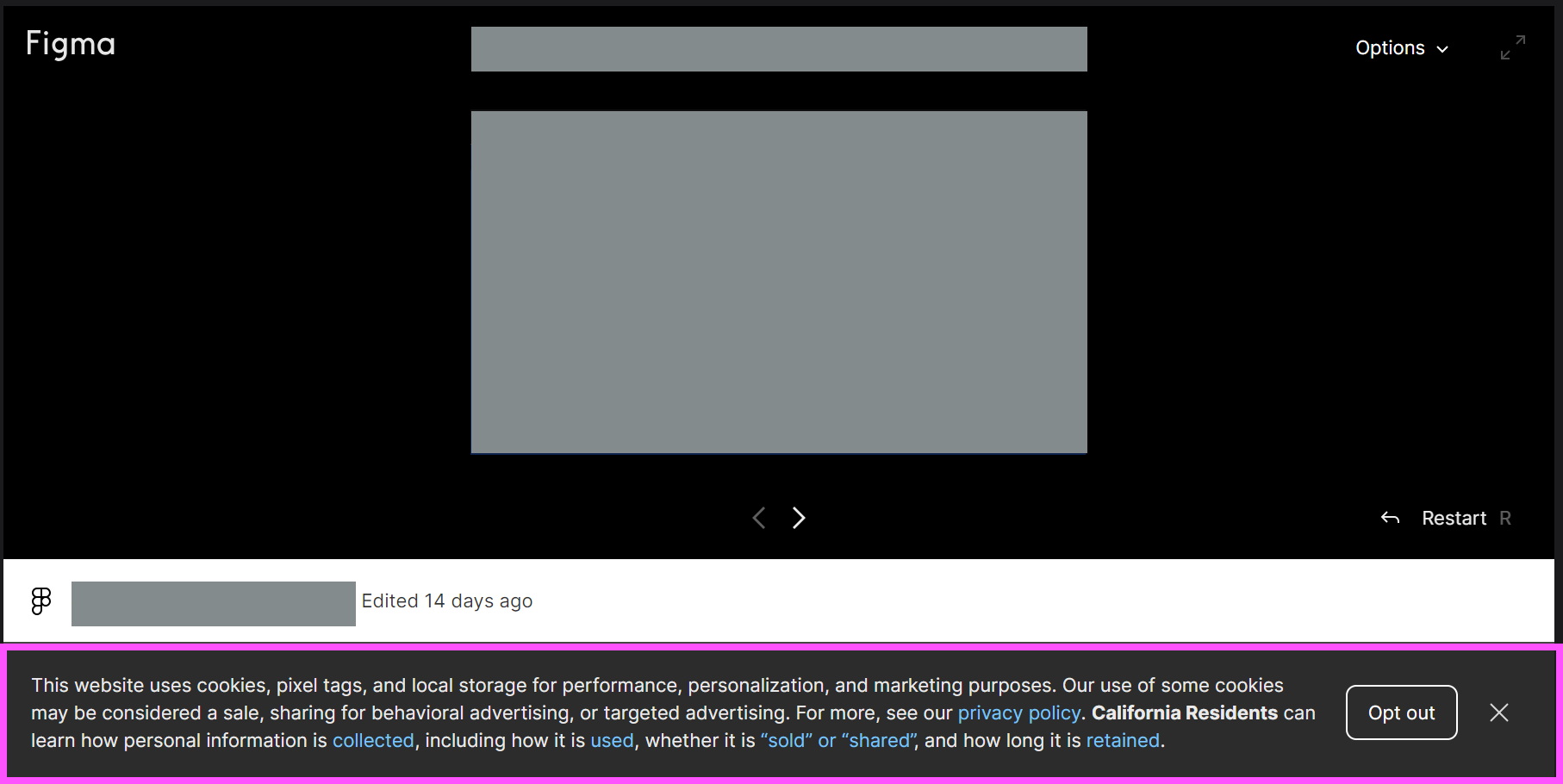
How to remove cookie banner from embedded prototypes?

  • August 15, 2023
  • 48 replies
  • 2597 views

Hey all, wondering how to solve this issue.

We created prototypes to embed in our dev docs site, so there are multiple prototypes on a page and different pages. Every prototype has this cookie banner (highlighted in pink), even when I’ve already accepted it once. How can we remove this? Can it be shown only once?

Thank you!

Denise
This topic has been closed for replies.
Best answer by djv

Hey All, sorry for the lack of update!

Our team has confirmed that this is a bug, but we’re having difficulty reproducing it, which is delaying the fix.

If you’re able to consistently reproduce, can you please share the following?

  • What device was the user using and what was the OS version?
  • What browser were they using? Does the same issue happen in all browsers?
  • Were they logged into Figma at the time or logged out?
  • Does the issue still happen for them now if they close and re-open the prototype?

We’ll then pass this info onto our team with hopes of getting a fix implemented as soon as possible.

48 replies

March 25, 2024

@dvaliao Hey, has there been any progress with this?

y_toku
Figmate
Community Support
March 27, 2024

I’m afraid our product team sill needs more information to replicate the issue properly. Do you keep seeing like you shared?

March 27, 2024

Hi, yes still experiencing the issue as I shared.To replicate. 1. Open a browser session that you are not signed into Figma with 2. Embed a Figma prototype on a web page. 3. You will see that the cookies popup appears. 4. Click any option on the popup which will make it go away. 5. Click anywhere on the page outside of the prototype 6. Interact with the prototype again and the cookie popup will re-appear

Anne13
April 10, 2024

I am having the same issue in Firefox with prototypes embedded on Lyssna (UsabilityHub). Every time I open a prototype via Lyssna in Firefox on mobile, I get a cookie popup even if I already rejected cookies before (for the same or another prototype).

Device: Mobile, Samsung Galaxy S10e, Android 12 with One UI version 4.1
Browser: Firefox 124.2.0 (Build #2016012559). In Google Chrome the popup does not appear.
Signed in to Figma.com: No (and not signed in on Chrome either, where I didn’t get the popup, so that isn’t the determining factor)

Edit: I’m even getting TWO popups each time, so after I press Reject, the popup re-appears and I have to dismiss it a second time. This happens consistently.

April 18, 2024

Checked our prototypes and they no longer have Accept Cookie banner.

Maresch
May 6, 2024

I’m also getting reappearing cookie banners every single time Figma embeds load, especially when embedding them into desktop apps like Notion or Pitch.

MacBook Air Apple M1, macOS 14.4 (23E214)

y_toku
Figmate
Community Support
May 7, 2024

Thanks for sharing the details! I passed the information onto our internal team. Unfortunately, there isn’t a quick solution at the moment. We will let you know once we have any updates.

Thanks,
Toku

Aaron_Ang1
June 4, 2024

I just wanted to follow up on this thread as I’m still experiencing the same issue. The cookie consent banner continues to appear in my prototypes.

@y_toku Could you please provide an update on this matter? Has there been any progress in finding a solution to remove or disable the cookie consent banner in Figma prototypes? Many users, including myself, would greatly appreciate any insights or workarounds you can offer.

June 4, 2024

Hi all, I actually stopped seeing the banner for a while but now it’s back. Would love some updates on when / how this issue can be fixed. If you would like a walkthrough on the site where this is happening so you can see the issue in action, happy to do that.

Thank you!

June 11, 2024

Same here

When im logged in there is no cookie banner, when logged out cookie banner is back and comes back after every refresh of the page where the view is embedded in, even when clicked on allow.

users of the my website allows get the banner on the embedded element. ( no accounts )

tried edge and chrome brouwser, both with same outcome.
tried on private workspace and company workspace, both with same outcome.

Maybe if you try to reproduce, try loggin out of your account, maybe that might give you the option to reproduce it.

Mike
