

Borovennikov_Nikolay
Apr 23, 2021 7:05 AM UTC
Question

How can I export to PDF with transparency?

When I export any objects from Figma to PNG, the result files have the same transparent areas as in original objects. But not in PDF - transparent areas always replace with white color areas!

Exporting from Figma, you can see the transparent area around the icon:
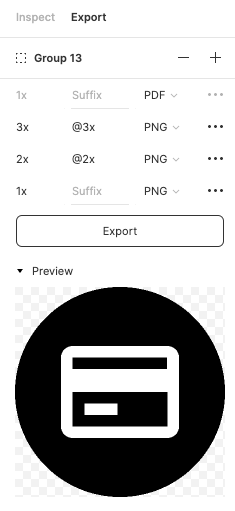
Result (png), transparency saved:

111

Result (pdf) transparency was replaced with white color:
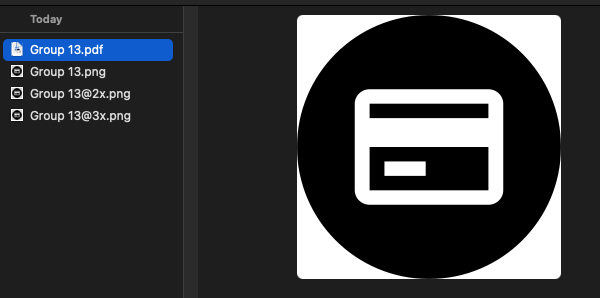
222

This topic has been closed for replies.

13 replies

Noah1i8
May 4, 2021 6:46 PM UTC

Having the same issue

faiz_raza
Oct 9, 2021 11:51 AM UTC

Yes, I’m facing the same issue. Can someone please help on this?

Daniele_Sandri
Oct 15, 2021 4:34 AM UTC

Same problem here! Please help

Manyu
Dec 13, 2021 7:31 AM UTC

PDF is a vector friendly format, so it should support transparent background. This is an issue that has been bugging me too, since I’m unable to provide the PDF assets to developers. It would be great if this is addressed.

mattaningram
New Participant
Jan 4, 2022 10:11 PM UTC

Same issue here, can’t export PDF with transparent background, always ends up white.

Danielle_Ancrile
Jan 10, 2022 9:09 PM UTC

Same issue! Did anyone figure this out? Is there a work around?

McKinley
Feb 21, 2022 9:58 PM UTC

Has this been answered anywhere? I’m creating a presentation with rounded corners on each frame, but Figma keeps filling in the transparent corners with a white background when I export as a PDF.

Ross_Legacy
Feb 24, 2022 7:51 PM UTC

How is this issue not addressed yet? Seems pretty critical to iOS development. Does anyone know of workarounds or plugins?

Sylvia1
Jun 9, 2022 5:55 PM UTC

Having the same issue. I need PDF assets for an iOS tab bar, but they keep exporting with a white background despite showing a transparent background in the preview prior to export from Figma.

Sylvia1
Jun 13, 2022 4:45 PM UTC

I may have found a solution to this. There is a checkbox “Show in exports” in the Fill section of the design panel that only shows up when you make the asset exportable (by clicking the + in the export panel). If that “Show in exports” box is checked, even if the fill is hidden (or possibly non-existent), then the PDF appears with a bg color upon export.

Oddly, when I view the exported PDF in Preview, it’s still appearing with a white bg, but when it is implemented in code (in my case, it’s being added to an iOS tab bar), then the bg DOESN’T SHOW!