

Answer

Help! Tooltips in a scrolling list - cannot get them to display on top

  • May 31, 2024
  • 2 replies
  • 201 views

SLT-UX

Been struggling with getting tooltips to show up on hover over an icon, inside of a scrolling list with autolayout.
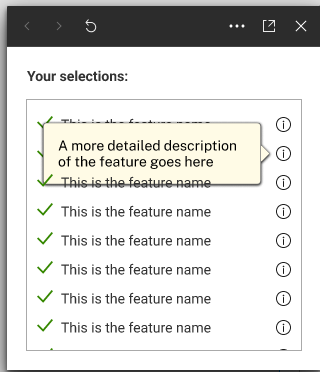
image

As you can see the tooltip shows behind the next item below.

I can switch to “First on top” but all that does is reverse the issue (the tooltip shows behind the item above).

How to get those tooltips to show up on top??

Here’s the working file you can copy and play around with.

Thanks in advance!

Best answer by SLT-UX

I figured it out… The solution is to use an overlay (as opposed to a variant).

Hope this helps anyone looking to do something like this.

This topic has been closed for replies.

2 replies

SLT-UX
  • Author
  • Active Member
  • May 31, 2024

Update: I tried using absolute positioning in various places, but it didn’t work.

I’m starting to think that autolayout is the problem. But the list should be an autolayout (ideally)…

Anyone has any ideas?


SLT-UX
  • Author
  • Active Member
  • Answer
  • June 1, 2024

I figured it out… The solution is to use an overlay (as opposed to a variant).

Hope this helps anyone looking to do something like this.