

Anna Malinina
New Member
May 16, 2025
Question

Figma doesn't see external JS file

  • May 16, 2025
  • 4 replies
  • 238 views

Hello!
I’m trying to create plugin for Figma. I use React + ESbuilder. I have src and dist folders.
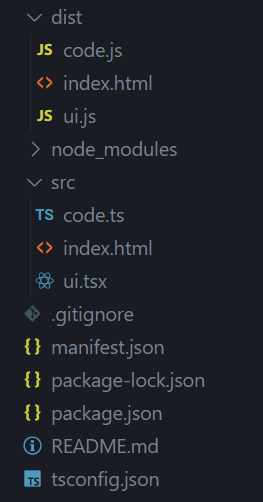
 

My index.html contains:

<div id="root"></div>
<script src="ui.js"></script>

The problem is that plugin doesn’t see (or what?) ui.js. When I start plugin I see only empty screen.

If I write JS code exactly in script tag — it works. But with external file it doesn’t work. 

There are no errors anywhere.

What should I do to solve this?

This topic has been closed for replies.

4 replies

Rafitheartsy
New Member
May 22, 2025

I’m also having the same problem, my external ui.js is not sync with ui.html.

Anna Malinina
New Member
May 22, 2025

I’m also having the same problem, my external ui.js is not sync with ui.html.

I found one solution — to use inline JS code.

Rafitheartsy
New Member
May 23, 2025

I’m using a few assets (images) in my plugin. Everything works perfectly in Chrome when using ui.css and ui.js, but in Figma, the assets, styles, and scripts are not syncing properly.

James Simonson
New Participant
May 25, 2025

I was under the impression that you can only have one TS/JS file and if you want to split it up you need to use something like web pack to merge them together. 

Working on Figma to Babylonjs plugin.