

Jos_Pham
New Member
April 1, 2025
Solved

Why can’t I paste an image directly into an image component in Figma anymore?

  • April 1, 2025
  • 59 replies
  • 6721 views

Hi everyone,

I used to copy an image (Ctrl+C from browser or local folder) and then paste it (Ctrl+V) directly into an image component in Figma - like for cards or avatar images - and it would automatically replace the image.

But recently, this no longer works. When I try pasting, nothing happens. Now Figma only shows options like “Upload from computer” or “Make an image” (screenshot attached).

I’m wondering: is this a recent change or bug in Figma?
Is there still a way to paste an image directly into a component without having to upload it manually?

Thanks in advance!
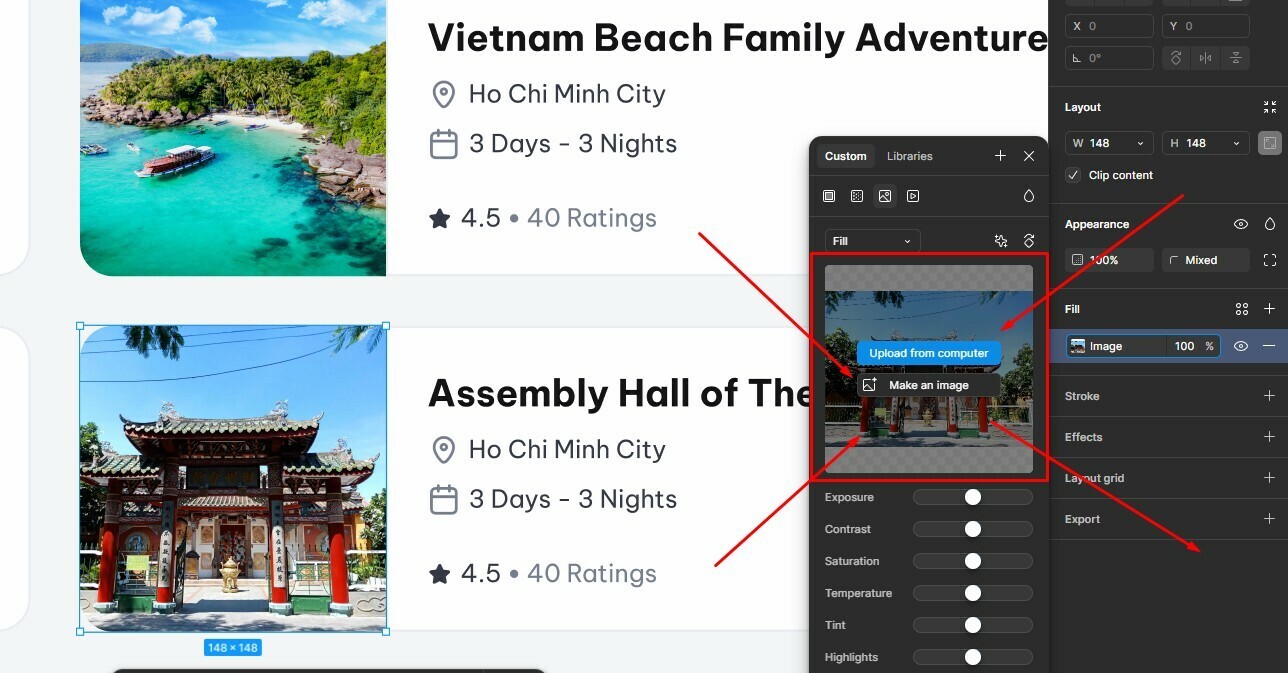


Best answer by Gayani_S

Hey everyone, quick update! The team has rolled out a fix for this 🎉

You should now be able to copy and paste images while the fill panel is open again. Please refresh Figma and give it a try.


Let me know if you’re still running into any issues!

59 replies

Jos_Pham
Jos_PhamAuthor
New Member
April 1, 2025

Anybody here?
Figma Support Team?
I need helppppppppppppppppp

Figmate
April 2, 2025

Hi ​@Jos_Pham,  Thank you for bringing this to our attention!


I just tried it out, and it seems to be working as expected on my end. Check out this video:

Here's the rundown of what I did:

1. Select an image frame.  
2. Open the modal for the frame from the Fill section.  
3. Copy other image.  
4. Paste the copied image into the frame. 


If you're still running into the same problem after trying these steps, could you give us a bit more info? Like:

  1. Is this happening only in the browser, or are you experiencing it in both the browser and the desktop app?  
  2. Does this occur with a specific file or with all files?
  3. Please try these quick fixes to see if that resolves the issue:  
  • Close any Figma tabs you’re not using.  
    • For the browser: Force-quit and reopen Figma in a new window.  
    • For the desktop app: Force-quit the Figma Desktop app and restart it.  

Once you've tried these and given us some more details, we can get you in touch with support if necessary.

Thanks again!

Jos_Pham
Jos_PhamAuthor
New Member
April 2, 2025

I've found the cause!

The issue happens when the image file you’re copying is too large. When I pasted it into an image component in Figma, it did replace the image, but very slowly. I waited a bit longer, and eventually the image appeared.

👉 So if you're pasting an image and nothing happens, try using a smaller file or just wait a little longer. Resizing the image beforehand can also help.

Hope this helps anyone else running into the same problem!

Greg23
New Member
April 16, 2025

@Junko3 this solution does not work for me. The video you showed illustrates you are able to do it from outside of Figma.. which is still the case. I can do that no problem.


But when copying an image that is already in Figma, it will not allow me to paste it directly into an image component.


I made a video to show you what I mean: 


Up until a week or so ago I was able to copy an image (as a fill) from another component, and then paste it onto/overwrite the fill of another image or shape. This is no longer working. It just keeps pasting the previously copied image. I think it’s more of a ‘copy’ issue. The image fill of a component is no longer something you can copy.


Please advise.

Thanks.

Jos_Pham
Jos_PhamAuthor
New Member
April 17, 2025

@Junko3 this solution does not work for me. The video you showed illustrates you are able to do it from outside of Figma.. which is still the case. I can do that no problem.


But when copying an image that is already in Figma, it will not allow me to paste it directly into an image component.


I made a video to show you what I mean: 


Up until a week or so ago I was able to copy an image (as a fill) from another component, and then paste it onto/overwrite the fill of another image or shape. This is no longer working. It just keeps pasting the previously copied image. I think it’s more of a ‘copy’ issue. The image fill of a component is no longer something you can copy.


Please advise.

Thanks.


Copy the original image and then click on this area of the modal containing the image frame, then paste it in.


Good luck!

Jazz_Ernest
New Participant
April 18, 2025

I’m running into this problem too and it’s frustrating! Unfortunately when i go to check for updates, it says i’m running the latest version

Nikki3
New Participant
April 22, 2025

THANK YOU!!! This has been driving me cray and slowing my workflow significantly for the last few weeks!

Why such an odd little change, no way anyone would know by any sort of intuition that you click the ‘fill’ container (that doesn’t visually show anyway) to do something you’ve always been able to do another way!

Figma I love you, but that is a strange decision - and no tooltip in app to show either

Michelle Duncalf
New Member
April 23, 2025

I still can’t get this to paste in to replace an old image tile :-(

I’m using a vector is this why?

Nikki3
New Participant
April 23, 2025

Yes probably due to the image format. You should be using .jpg .png etc. if you’re using an image fill

Just save your vector as a png/jpg and you’re good to go

Jazz_Ernest
New Participant
April 25, 2025

I noticed recently when I try to copy an image from the Fill panel and paste it on a different shape/instance it no longer works.

I use this workflow daily and while there are workarounds it’s driving me crazy how much it slows me down doing my job.
