Farzona
January 18, 2023
Solved

Changes published in library are not updating component instances in other files that use the library

  • January 18, 2023
  • 69 replies
  • 17581 views

Hi there,

We have a team library with components, and other project files using instances of these components. When publishing changes to the master component in the source file (library) we stopped receiving the “Review and accept library updates” notification in other project files and obviously component instances were not updating.

Yesterday (17.01.2023), this notification was appearing but the changes were still not applied in component instances in other files.

This is an important issue, as all our work relies on the libraries working properly. Urgent help would be appreciated.

Thanks.

UPDATE: I tried solution #3 from this thread and it is still not working.

This topic has been closed for replies.
Best answer by Manuela_Mesterhazy

UPDATE ⚠️

I spoke to Figma and they figured out what happend on my end, maybe it helps some of you.

If you have variants applied to a library component, all labels must have a unique name. Figma displays a conflict error if variants have the same value, but if you have a library component and the setting labels are called the same, this conflict error is not displayed. The system recognizes it as a conflict and therefore it won’t update the component until it is fixed, so it will never show up in your updates, even if you think you have published it.

Make sure all labels in your settings are unique.

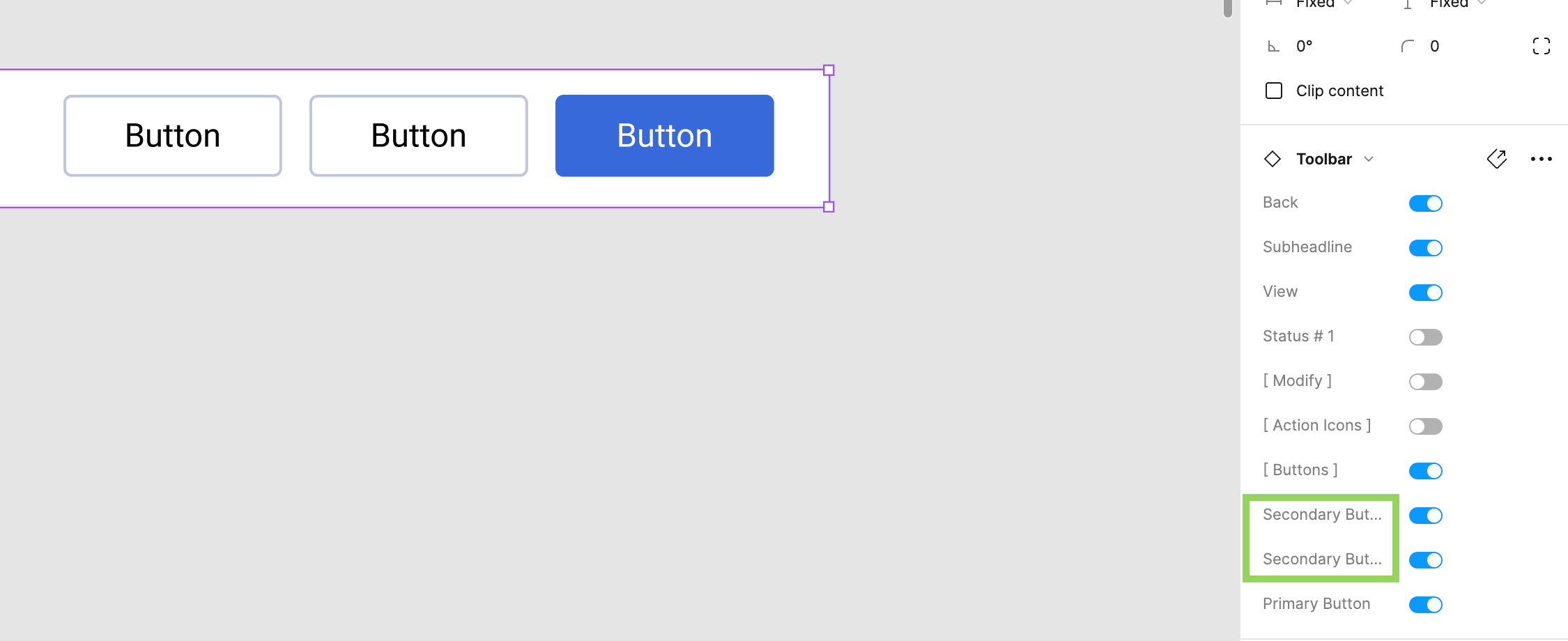
Here was my mistake to give you an example (see image attached). We have two secondary buttons in the toolbar library component. The value can be off/on, so no conflict there, but because there are two items called secondary button, the system cannot map it correctly and the “conflict” was never communicated to me, so I did not know this was the reason why my component would not update and be published.

69 replies

July 15, 2024

The only thing that worked for me to solve the same problem that everyone else in this thread had was to “Reset all changes” in the used components. This solution is frustrating because it means having to repopulate the components with content that is not part of the components library file, which takes extra time and effort.

And repopulating dozens of templates is incredibly frustrating…

Will_Jordan-Cooley
New Member
July 18, 2024

I’m having this same problem. Just bought a years license for this feature and it doesn’t work…

y_toku
Figmate
Community Support
July 19, 2024

Can you try this one ?

Will_Jordan-Cooley
New Member
July 19, 2024

I tried that with no luck. I had to make a new instance of the component to get the changes.

Even if those steps for fixing the issue did work in that instance, I’m struggling to see how the feature is meant to be used if changes to the master component consistently do not propagate via the “publish changes” action.

y_toku
Figmate
Community Support
July 22, 2024

Thanks for trying the steps. Then, could you submit a bug report detailing the steps that led to this issue? You can do so by following the link: https://help.figma.com/hc/en-us/articles/360041468234-Submit-a-bug-report?

Thanks,
Toku

Patrick-Plaggenborg
Active Member
July 23, 2024

I had a similar situation.

A component in the Library file was published.
Instances of that component in other Files were not updating.

It appeared that the component in the Library contained some invalid (old) Properties that were not in used anymore.

Although it appeared as if the latest changes in the Library file were published, the other files were still referring to an old version of the component from several hours ago.

Once I fixed the invalid Properties and Published the Library again, all instances of the component were properly updating in other Files as well.

July 24, 2024

Same here. Only solution is to start reset all changes and repopulate all the data. Try to fix it quickly please, this is tremendously impacting my productivity on Figma right now…
Thanks !

Simon32
New Participant
July 25, 2024

I have also faced this same problem and I have some thoughts on why it could happen.

We are using components built in a separate library file that we are using inside a file connected to this library.
The component (let’s call it component X) I am having problems with is using nested sub-components that are not being updated when changed. But when we make changes to the nested sub-components component X is added to the list of changed components that can be published.

The library is published and component X is updated (with changes to X) but the nested components within are still linked to an outdated variant of the sub-component.

Here are some thoughts I have that could cause this:

  1. Initially, the nested components used within component X were also published but later we added a “_” prefix since they are internal sub-components that shouldn’t be stand-alone. Could it be that in making the sub-components internal (not published) Figma is gets confused and points to a previously publically available caches variant?

  2. Since we have applied overrides to the properties of the nested components that later has been edited it might not take the changes due to the property changes?

2.1. We have updated the layer names of some of the texts in the nested component.
2.2 We have updated the names of the nested component set properties
2.3 We have removed some obsolete, unused properties for the nested component set.

TL;DR Maybe something is cached and then not updated when a change is published.

Chothuoctot_Design
July 29, 2024

I hve the same problem. Tried “Repair component connection” but nothing happen.
Please fix this asap. Thanks!

Glenn6
August 9, 2024

Same issue here. Here is an example recording of the problem: https://youtu.be/v5wj5DOSsYE

Please fix or provide a viable solution for those of us working on large projects that apparently can’t scale.