Farzona
January 18, 2023
Solved

Changes published in library are not updating component instances in other files that use the library

  • January 18, 2023
  • 69 replies
  • 17581 views

Hi there,

We have a team library with components, and other project files using instances of these components. When publishing changes to the master component in the source file (library) we stopped receiving the “Review and accept library updates” notification in other project files and obviously component instances were not updating.

Yesterday (17.01.2023), this notification was appearing but the changes were still not applied in component instances in other files.

This is an important issue, as all our work relies on the libraries working properly. Urgent help would be appreciated.

Thanks.

UPDATE: I tried solution #3 from this thread and it is still not working.

This topic has been closed for replies.
Best answer by Manuela_Mesterhazy

UPDATE ⚠️

I spoke to Figma and they figured out what happend on my end, maybe it helps some of you.

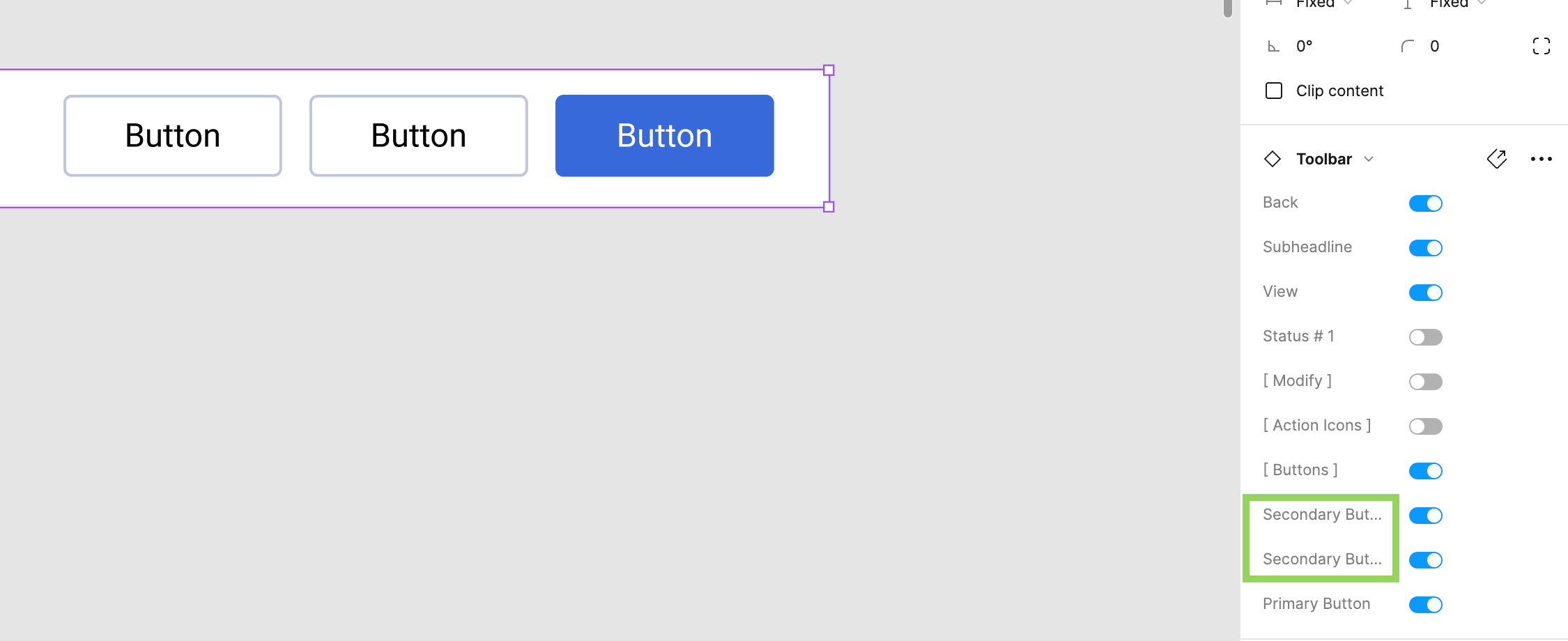
If you have variants applied to a library component, all labels must have a unique name. Figma displays a conflict error if variants have the same value, but if you have a library component and the setting labels are called the same, this conflict error is not displayed. The system recognizes it as a conflict and therefore it won’t update the component until it is fixed, so it will never show up in your updates, even if you think you have published it.

Make sure all labels in your settings are unique.

Here was my mistake to give you an example (see image attached). We have two secondary buttons in the toolbar library component. The value can be off/on, so no conflict there, but because there are two items called secondary button, the system cannot map it correctly and the “conflict” was never communicated to me, so I did not know this was the reason why my component would not update and be published.

69 replies

Glenn6
August 20, 2024

After working with the excellent Figma support team I learned how to accept the changes. In the video I posted I published the updates from the Assets file, but failed to accept the changes to the working file. Here was the fix for me:

"It appears that you did not accept the updates available on the subscribed file, indicated by the blue dot on the library icon on the top right corner:

Could you please click on this icon, go to the Updates tab, and accept all updates to the file?"

image

Tulsa_Daley
August 29, 2024

Yep experiencing the same problem… very patchy uptake of Published library updates in working files. Tried the ‘repair connection’ trick along with refresh/reboots

Slava_Bronevitskiy
Active Member
September 2, 2024

I am fighting this problem for years now. And reported this as a bug, but it is still not fixed.

I’ve found that Figma does not update instances with visibility turned off or nested within another hidden layer. This is the unfixed bug I’ve seen.

Sometimes the reason is that a to-be-updated component is nested within another component which contains outdated version. In that case Figma doesn’t update it as well. In this case rightfully.

impactby.design?ref=nI
Simon32
New Participant
September 6, 2024

I’ve found that Figma does not update instances with visibility turned off or nested within another hidden layer. This is the unfixed bug I’ve seen.

Could this bug also apply to components containing a hidden nested sub-component?

I have an instance of a component from a library containing text and a nested component (icon). The icon is hidden using a boolean property and the component will not update when I have made changes to it in the library.

Slava_Bronevitskiy
Active Member
September 6, 2024

Yes. Anything hidden is impacted by the bug.

impactby.design?ref=nI
Tane_Ross
September 11, 2024

FIXED for me. I was able to update changes from a library by clicking the open book icon in upper right corner of Figma. This icon also had a blue dot. It is the same feature as the previous text notification that there are changes to a library.

Carlos_Viciana
September 12, 2024

Hello community,

I have this issue: Update the library and publish changes. Then, I go to my file that’s using the library but I see not blue dot to update any changes. The weird thing is that if I search for the component in the list, it is updated! but the components that were already in the file (in the frames) are not…and that’s basically what I need… any idea? Thanks in advance, we’re currently losing a lot of time due to this broken workflow.

Yukiko
September 16, 2024

I resolved same issue. I had a boolean property that wasn’t used anymore by my component. In the library file, I selected my component and looked at the properties. The ! icon appeared next to a property that I didn’t use anymore.
Screenshot 2024-09-16 at 4.03.20 PM
After deleting that property and republishing, the component refreshed across my files correctly once more!

Prashanth_Ayesha
New Member
December 13, 2024

this truly saved my life! thank you so much!