Farzona
January 18, 2023
Solved

Changes published in library are not updating component instances in other files that use the library

  • January 18, 2023
  • 69 replies
  • 17581 views

Hi there,

We have a team library with components, and other project files using instances of these components. When publishing changes to the master component in the source file (library) we stopped receiving the “Review and accept library updates” notification in other project files and obviously component instances were not updating.

Yesterday (17.01.2023), this notification was appearing but the changes were still not applied in component instances in other files.

This is an important issue, as all our work relies on the libraries working properly. Urgent help would be appreciated.

Thanks.

UPDATE: I tried solution #3 from this thread and it is still not working.

This topic has been closed for replies.
Best answer by Manuela_Mesterhazy

UPDATE ⚠️

I spoke to Figma and they figured out what happend on my end, maybe it helps some of you.

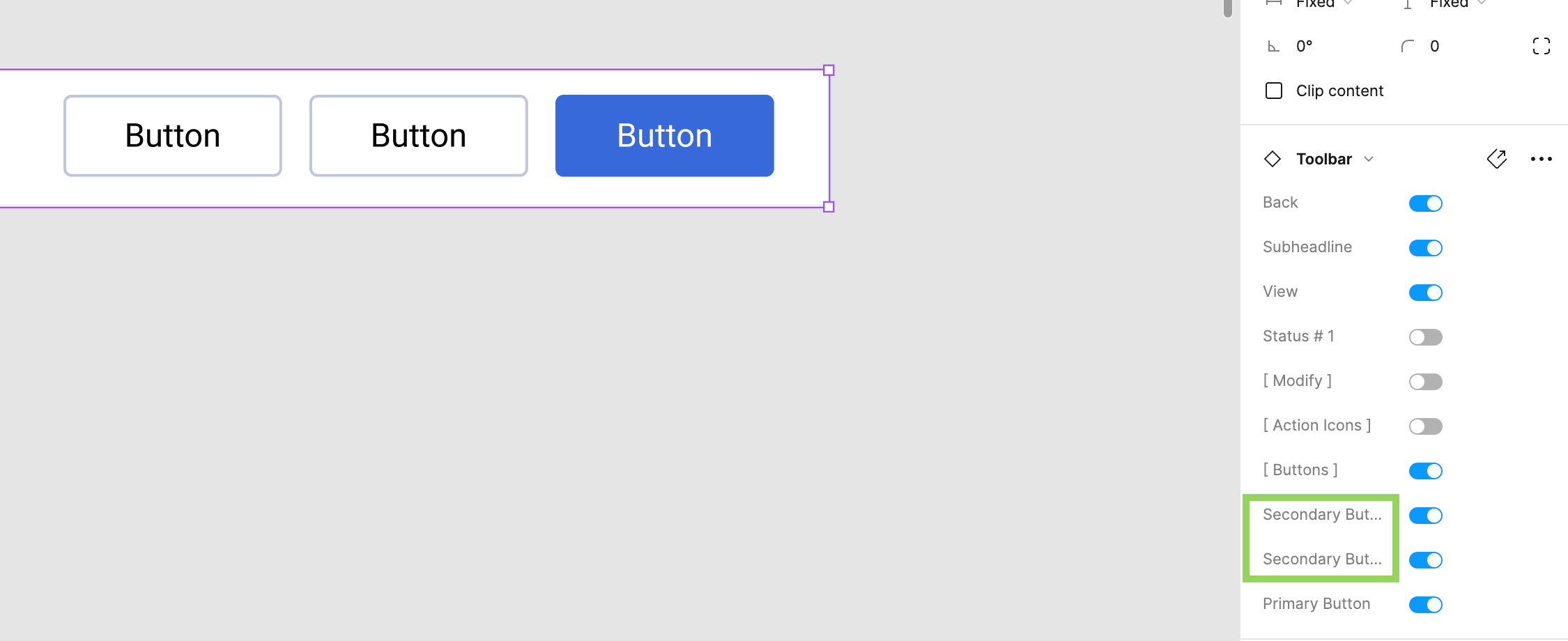
If you have variants applied to a library component, all labels must have a unique name. Figma displays a conflict error if variants have the same value, but if you have a library component and the setting labels are called the same, this conflict error is not displayed. The system recognizes it as a conflict and therefore it won’t update the component until it is fixed, so it will never show up in your updates, even if you think you have published it.

Make sure all labels in your settings are unique.

Here was my mistake to give you an example (see image attached). We have two secondary buttons in the toolbar library component. The value can be off/on, so no conflict there, but because there are two items called secondary button, the system cannot map it correctly and the “conflict” was never communicated to me, so I did not know this was the reason why my component would not update and be published.

69 replies

Cameron2
New Member
November 29, 2023

I’m having this same issue. Running the “Repair componant connection” does not fix it. Closing the file and reopening it seems to do the trick. Quite time consuming.

Joel_Berggren
December 7, 2023

Thank you!! This worked

SvennP
December 7, 2023

Faced this issue myself. Root cause for us: unused property error resulted in changes not being published from master. After deleting it, was able to publish again.

Something else to try if this doesn’t work for you: resetting individual props on instances in case they’ve been overridden.

Efrosina_Benova
December 13, 2023

Hello,
I have similar issue, but only in desktop app. When I made an update in a library and push it, and then try to pull the changes for instances - this does not work in the desktop app for some reason. In the web based version this works fine. So far I have a workaround with working only in the web version, but I will be great to be fixed in the desktop app

January 3, 2024

Had an issues, did not see an error in a component which said that the variable was not used. Check your components to have zero errors as it seems that it stops the update from happening.

Sean_Pyne-Moran
January 5, 2024

I have this same problem however my changes do get pushed but only if I ‘Reload the Figma tab’.

Is there something else going on that would make it so that message doesn’t get pushed until you reload the tab?

Alissa-Apollo
New Participant
January 12, 2024

I, too, am noticing this even with files saving during working hours. They are very slow but if I work after hours it seems to be better.

Alpesh_Karanpuria
January 16, 2024

I too have the same issue the properties are not getting reflected in the instances. I need to reset the component then only they are getting reflected

March 28, 2024

Just went through this.

“Reset all changes” worked for me.

Guess that specific instance of a component became rogue/dirty and Figma was persisting the original variants for it.

Hope that helps

Amira_Elbana
New Member
May 20, 2024

The issue that Figma doesn’t sense the component update in my design system library so when i insert the component in any other file from the design system it is not updated.