

Olga.p
May 26, 2022
Question

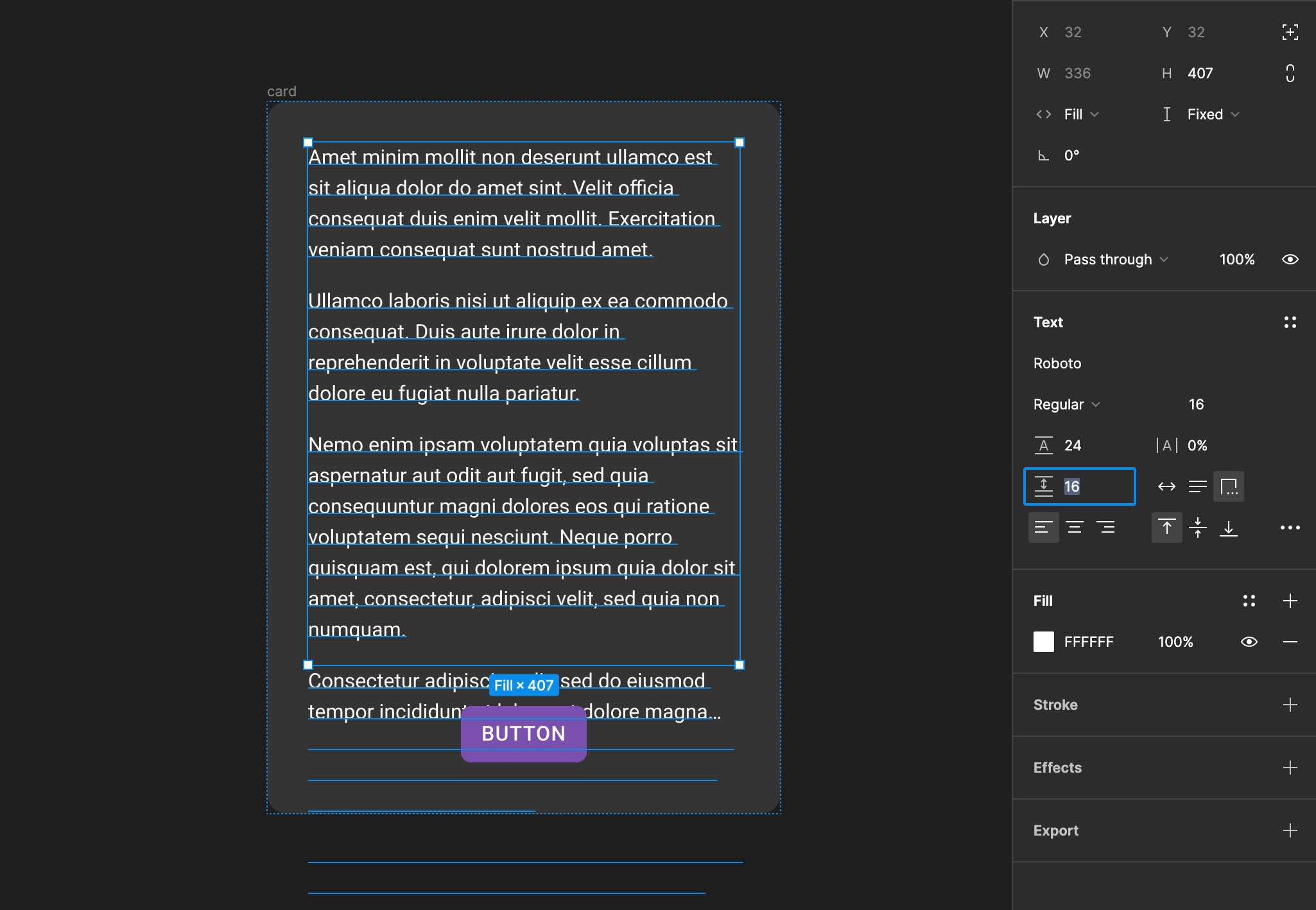
[Bug] Truncate text... does not work properly if paragraph spacing is used
  • May 26, 2022
  • 6 replies
  • 804 views

Hi, thanks to developers for the update and new features! 💛
Noticed a small truncate text error.
This feature works great as long as you don’t use paragraph spacing, which doesn’t seem to be taken into account. The text is cut off, but goes beyond the container (

This topic has been closed for replies.

6 replies

Oscar_Nilsson
Figmate
Figmate
May 27, 2022

Ohh this is definitely not working as expected. Thanks for the report 🙏 We’ll look into this!

AndreiNistor
February 26, 2023

This is still happening.

Harper2
New Member
September 25, 2024

This is still happening

y_toku
Figmate
Community Support
September 26, 2024

Hi there,

Thanks for flagging this! I’m not able to reproduce the issue on my end. Could you please share the file link with access granted to support-share@figma.com (it won’t affect your billing), or provide a video recording of the issue?

Thanks,
Toku

Zoe_Gomez
Active Member
April 9, 2025

This is still happening to me too 

Paragraph spacing 8 - truncation is happening below the frame as “interests t...” but should be happening in the line above as “remind of the...”

Paragraph spacing 0 - truncation happens at the bottom of the frame as expected


ksn
Figmate
Community Support
May 1, 2025

Hey ​@Zoe_Gomez - sorry for the trouble with this. Similar to Toku a while back, I tried to replicate but didn’t see the same issue. However, that doesn’t mean there isn’t one -- there may be particular instances in the file you’re using that’s surfacing this.


If you have a moment, could you please file a bug report here? Someone will look into this: https://help.figma.com/hc/en-us/requests/new?ticket_form_id=360001744374


When you file that ticket, if you can, please share edit access to the file from your screenshot with support-share@figma.com. You will not be charged for this, and our support team will be able to see what’s going on what you’re working on directly. Please also include the name of the file when you submit the ticket as well


Thank you! 😀