

Roxanne_G_UX
July 6, 2023

LAUNCHED: Include color variable alias in dev mode side panel

  • July 6, 2023
  • 50 replies
  • 5443 views

Hi. I have set up all my color variables in my design system “App_Usage_Collection.” But my devs use storybook and they call the colors by their primitive names, so I set up another collection of color variables called _Storybook. I alias the Storybook Primitives in the App_Color_Usage collection. BUT in dev mode I only see the app_color_usage collection variable name, not the alias. Can we also please see the alias listed? Thanks! 🙏
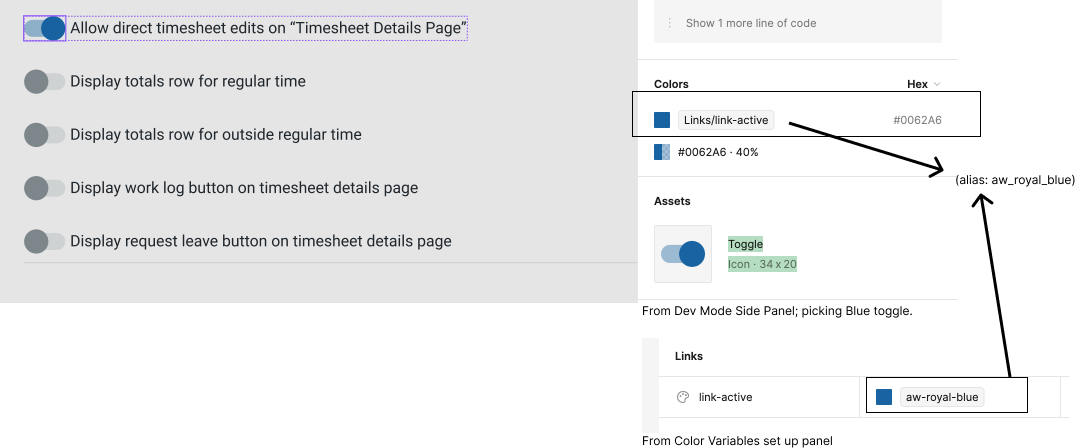
50 replies

Phiri_Thoko
July 6, 2023

Yes please!! Was looking for this and it would be immensely useful!!

kykoo
New Member
July 12, 2023

Really… wanted to fix…

Roxanne_G_UX
July 13, 2023

Tell your friends who agree to upvote this please!

Kolodziej_Ashley
Active Member
July 19, 2023

I need aliases for my use case as well.

Polyandra_Cazuza
August 18, 2023

pleaseee, we need this!

Blagovirnyy_Roman
New Participant
August 25, 2023

I’ve created root variables for all of my root colors. Then, for each component I am creating alias variables for colors of specific elements (e.g., text, background, border) in different states (default, hover, active, disabled) and configurations (e.g., default, error, selected). The alias variables link back to specific root variables. However, in dev mode all I see is the HEX code, not the name of the root variable that the developer should assign as the value to the alias variable for the specific element of the component in a specific state and configuration. I think this is a big oversight, as the developer would need to find the correct root variable that needs to be assigned to each alias variable for each component for each theme when creating the themes in CSS by matching up HEX codes.

TL;DR; if a variable is getting its value from another variable, please give us the option to see this relationship in Dev Mode.

Here is a basic example:

/* Global CSS ------------------*/

/* root colors */
/* --[name space]-[var type]-root-[name] */
--ns-color-root-light: #AAAAAA;
--ns-color-root-neutral: #808080;
--ns-color-root-dark: #111111;


/* alias colors for Button component */
/* --[name space]-[var type]-[component]-[configuration a...n]-[state]-[element] */

/* light theme */
.light {
    --ns-color-button-primary-default-label: var(--ns-color-root-dark);
    --ns-color-button-primary-default-background: var(--ns-color-root-neutral);
    --ns-color-button-primary-default-border: var(--ns-color-root-dark);
}

/* dark theme */
.dark {
    --ns-color-button-primary-default-label: var(--ns-color-root-light);
    --ns-color-button-primary-default-background: var(--ns-color-root-neutral);
    --ns-color-button-primary-default-border: var(--ns-color-root-light);
}

/*----------------------*/
/* Button component CSS */

color: var(--ns-color-button-primary-default-label);
background-color: var(--ns-color-button-primary-default-background);
border-color: var(--ns-color-button-primary-default-border);
/* When I inspect the Button in dev mode,
I want to see the names of the variables that these three
variables are getting their values from, NOT the HEX. **/
RizePoint_Product
August 25, 2023

I’m having the same issue. My devs need to see the values that are feeding the semantic components, but there’s no way to do that in dev mode. The unfortunate workaround is that I need to manually define the underlying primitive values using Code Syntax, which is going to be a time consuming task for 250 variables. Please introduce this feature!

Stephan_de_Oliveira1
August 31, 2023

I have THOUSANDS (really) of aliased variables. I need this feature. Let’s do it, Figma! 🔥 🔥 🔥

Stephan_de_Oliveira1
September 1, 2023

Hey, @Josh ! How are you doing?

It would be great to get some feedback on this issue here, so I can know how I should use aliased variables for now… If Figma is going to implement something in the next few days, I’ll keep my semantic-to-component-tokens scheme, otherwise, I will only use semantic aliased variables for now… Could you help us, please?

Thanks a lot!

Stephan_de_Oliveira1
September 1, 2023

Hey, @RizePoint_Product , did you find any plugin to help?