

Seferidis
May 12, 2022 8:48 AM UTC

Right Panel Resize [Design, Prototype, Inspect]

The new properties feature is great.
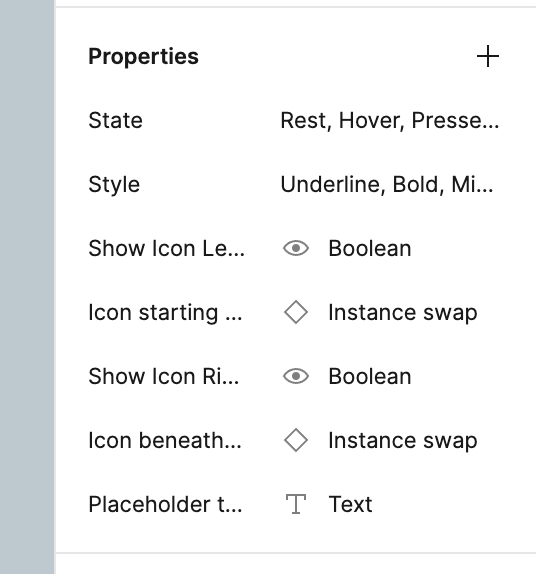
However giving it a name past some character length feels crowded and the ellipses do not help.

I can scale the UI as documented in here but that does not help us laptop users.
So I wish I could resize the panel to better see the name of the property, similar to how I resize the left (layers) panel.
14 replies

Chris28
May 16, 2022 3:48 PM UTC

Yes to this! or if resizing is hard to do, wrap the titles to multiple lines. Hovering over the title to read the full label works but feels like it takes to long.

Aug 14, 2022 3:49 PM UTC

This topic was automatically closed 90 days after the last reply. New replies are no longer allowed.

Peter45
Jun 16, 2023 11:21 AM UTC

Screenshot 2023-06-16 at 6.19.11 PM
how the f i’m gonna know what the color is this with the fix and unresizable right f panel figma

Amanda_Page
Aug 31, 2023 5:09 PM UTC

Right pane (Design/Prototype) needs to be resizable.

When working with colors or tokens with any degree of nesting, it’s impossible to see the state names and I have to click in to each one to see what it is.

Nov 24, 2023 11:21 PM UTC

This is really essential if you are using tokens, particularly if they are in collections. Not being able to see a variable/variant’s hierarchy and name at a glance really slows you down, breaks your concentration, and thereby increases the risk of errors.

tim.guest
Feb 5, 2024 10:37 AM UTC

Hi - is there any news on making the right panel resizable? It’s currently making it really difficult to see properties properly

Feb 5, 2024 10:03 PM UTC

Any info on when this will be fixed? All of our custom property names are cut off making it hard to read them.

I ended up creating a bookmarklet to resize the panel in the browser:

Create a new bookmark with this as the URL. When the bookmark is clicked on it will cycle through panel sizes:

javascript: (() => {const el = document.querySelector(‘[data-onboarding-key=“properties panel”]’).parentElement; const curWidth = parseInt(el.style.width.split(‘px’)[0], 10); curWidth > 450 ? el.style.width = ‘0px’ : el.style.width = ${curWidth + 50}px;})()

This is not a great solution but better than nothing.

Mikka_Wild_adesso
New Participant
Feb 26, 2024 9:29 AM UTC

How is this still a topic after almost 2 years? So annoying to work with libraries when you can’t see the names…

djv
Figmate
Community Support
Feb 27, 2024 12:36 AM UTC

Hey All, thank you for your feedback!

This is already on our radar for improvement. We’ll continue to pass your feedback along to the team for future consideration.

KieranN
New Participant
Feb 27, 2024 3:20 AM UTC

Is there any workaround to see long token / style names without resizing the right panel?