

Riho_Kroll
January 28, 2021

Fully Editable Component Instances

  • January 28, 2021
  • 70 replies
  • 27922 views

One common problem I run into, as well as others is adding things to component instances, or changing things like auto-layout direction for a given instance.

Right now, in order to achieve for example a tree structure that can grow would be to make sure that the tree items are not in a component, and handle the nesting manually by resizing the tree nodes. This can get pretty bothersome when you also need to worry about other layout constraints, or need to change the spacing for example. Another way would be to have all of the possible tree nodes you want already pre-created in the master component, but this makes it quite annoying to manage, because you’d need to always hide and unhide each tree node and it pollutes your layer view with unnecessary items.

I think a solution to this problem, and also likely other common issues with component instance management would be to just allow instances to be modified completely without restrictions, including being able to add items into the hierarchy of an instance. These items would be clearly marked as foreign. Something along these lines:
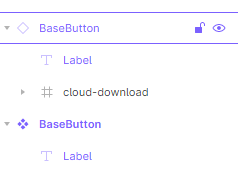
image

This would also make it possible to compose elements together out of other components without using variants. An example could be a base button component, which has only a label, but you could add an icon to the button either by drawing directly inside the button instance, or placing an icon component inside the instance.

Then to solve the “tree problem”, one would just have an empty auto-layout “children” frame in the tree node master component, and when you create an instance of it, you can then just add any number of tree node instances into the children frame, and nest them however deep is necessary. Then if you decide to change the padding of the child nodes for example, you just change it in the tree node master and everything will automatically update.

70 replies

dfeldman
March 31, 2023

If I could have one significant new feature in Figma, this is it: container components. This is basically the Figma equivalent of the children property in React, or media placeholders in Keynote.

I’d like to define one or more “parent” frames in a component into which I can place one or more non-component objects that behave as they would if the parent frame weren’t part of a component. So if the parent frame is just a regular frame, I can, say, put a rectangle in it and drag it anywhere. If the parent frame uses autolayout, I can put three rectangles in and they line up and size themselves accordingly. And so on. You do get some of this with instance swaps but only some.

djv
Figmate
Community Support
March 31, 2023

Thanks for the feedback, @dfeldman!

We’ll pass this along to the team for consideration. Don’t forget to also Vote, so we can get an accurate gauge of interest from the community! ☝️

Pavel_Kiselev
Power Member
April 1, 2023

I’m wondering how many votes is the right number for your team to start looking into it?

ramnes
April 14, 2023

I’m just passing by to reference that other thread, that’s quite related: Variable Content Containers for Components (Replace/Reorder Layers in components) - #14 by Thomas51

Etienne4
New Member
April 18, 2023

I have this problem with a table. So i created a component with 8 column and 10 rows. In our application we work with allot of data tables and for designing screen in need to adjust the table component top more or less columns/rows. But after making it a component it’s not possible. So i need to detach the component to make it work. I think it’s pretty annoying.

Haley_Perkins
May 19, 2023

I feel like I face this problem all the time. I make use of Figma’s variants for prototyping purposes so I don’t want to detach an instance because then obviously the prototyping function will disconnect as well. To make things worse, I don’t typically want to make huge changes on instances, I typically just want to add on to them. For example, the component I am working with at the moment displays a dropdown list. When you activated, the list is displayed, when disabled, the list is hidden. I used auto layout to create everything and I simply want to add items on the list to one of the instances. If there is a better way to do this now, I would love any advice. I feel like the best solution would be if I could simply add to the instance while retaining prototype function…

Chee_Seng_Sim
May 30, 2023

Upvote this.
To maintain the consistency of a design system, designers should have the ability to determine which auto layout can be moved. This is particularly helpful in list-type components, such as navigation, steppers, data lists/tables, etc. Requiring users to detach a component due to changing the order of an auto layout goes against design system maintainability.

Alx1xlA
New Member
July 4, 2023

Even the Sun can rise in the West. I will never have a solid component.

Nico10
New Member
July 18, 2023

I know I’m late to the party but that is exactly what I think is needed.
That’s one of the only steps missing from Figma’s goals of bringing design and dev teams closer together.

+1 man!

Travis12
New Participant
July 24, 2023

I agree that looking at it from the dev side is what makes sense here.

For example, comparing Figma components and React components, this issue is one of the big differences.

In React, it is common to pass “children” into a component. Child components can be both your custom components and natively supported “components” (html tags).

This is what I think is missing in Figma. You can only pass custom components using “instance swap” properties. It isn’t possible to pass Figma’s natively supported “components” (frame, group, autolayout, etc.) to a component.