

Riho_Kroll
January 28, 2021

Fully Editable Component Instances

  • January 28, 2021
  • 70 replies
  • 27922 views

One common problem I run into, as well as others is adding things to component instances, or changing things like auto-layout direction for a given instance.

Right now, in order to achieve for example a tree structure that can grow would be to make sure that the tree items are not in a component, and handle the nesting manually by resizing the tree nodes. This can get pretty bothersome when you also need to worry about other layout constraints, or need to change the spacing for example. Another way would be to have all of the possible tree nodes you want already pre-created in the master component, but this makes it quite annoying to manage, because you’d need to always hide and unhide each tree node and it pollutes your layer view with unnecessary items.

I think a solution to this problem, and also likely other common issues with component instance management would be to just allow instances to be modified completely without restrictions, including being able to add items into the hierarchy of an instance. These items would be clearly marked as foreign. Something along these lines:
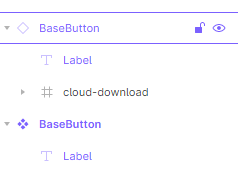
image

This would also make it possible to compose elements together out of other components without using variants. An example could be a base button component, which has only a label, but you could add an icon to the button either by drawing directly inside the button instance, or placing an icon component inside the instance.

Then to solve the “tree problem”, one would just have an empty auto-layout “children” frame in the tree node master component, and when you create an instance of it, you can then just add any number of tree node instances into the children frame, and nest them however deep is necessary. Then if you decide to change the padding of the child nodes for example, you just change it in the tree node master and everything will automatically update.

70 replies

Derek_Rudel
January 20, 2022

I actually found this in another post (Fully Editable Component Instances - #17 by Hossein_Boroji) but a plugin exists for this thanks to @Mr.Biscuithttps://www.figma.com/community/plugin/913055393462842774/Instance-Utils

I would personally LOVE to see this become native functionality within Figma.

Justin_Rockmore
January 23, 2022

Just chiming in myself here. I tried AdobeXD a few weeks back, much prefer Figma still - but to everyone in this thread saying Fully Editable Instances isn’t logically possible - XD has this option.

That is, by far, the one pro XD has over Figma. You can fully edit component instances.

adobe.com

@FigmaTeam - you guys have to make this an option (and add native spell check!)

Praveen_Nalakurthi
January 27, 2022

When creating components I often feel Code has much more flexibility than what we can design in terms of components. For instance if I wanted to design a popup design, I know the style of the Title, action buttons, but I never know what the contents of that popup will be.
In many such cases I need to create the content outside the component when actually it should be inside the component.
My proposal is when the Frame is created as a component then any from inside the component should have a option to mark it to accept children. That way in the instance the marked Frame will work like a regular frame which will accept any elements we put in there. This will be helpful Header designs, Card designs, List Item designs and much more.

Zhihao_Cui
February 3, 2022

You can actually do this at the moment.

  1. Create a placeholder component, and put it inside your Card component within the library. Adjust the spacing, scale etc.
    2.Then in the project, create the content of your custom card. Make a component, then use “Instant swapping” to be used in the card “placeholder” area.

Enjoy 🙂

Silke_Macco
March 16, 2022

Need!

We are currently creating a listBox component in the library. And since this component can have any amount of items, the workaround I have is to just clutter the component with an ample amount of items (groups incl.) and just annoy the designers by deleting (hiding) those that they do not need.
OR they can copy the component, edit it themselves, and hope that we do not re-do the component anytime soon. 🤣

ReneLopez
April 21, 2022

have you considered using slots for your lists? you can create auto layout components that contain various slots so you can vary the number of items on a list without creating a specific list component. So instead of creating a List component with variants for each amount of ListItems, you can create column components containing slots, and create variants of that component for columns with 2 items, 3, 4, 5, 6, etc. That way you’ll also have a general component for column layouts.

Chris_Stevens
May 9, 2022

As an experiment, I have been trying to move from Adobe XD to Figma and this one really bothers me quite a bit. I’m so used to having the freedom to do whatever I want with instances without restriction in XD (changes just become overrides). You can do literally anything, E.g. extreme example: completely change a vector’s shape in an instanced component and still change the colour of the same vector with the master component.

I hope Figma give designers the freedom to choose what can and can’t be overwritten within variants. 😦

PavelKiselev
May 9, 2022

I made it this way

Made a component to render an icon, multiple different sizes

Each variant use hug contents for auto sizing

And there is a fixed size placeholder that I swap with another instance like icon, image etc

It works like this, I use top level icon component instance to set a size and then swap the icon that sits inside

I found this method quite flexible, but at a cost of more complex layer/component structure

Andri
June 8, 2022

This is a good suggestion that would make components more powerful and useful. For example: you could make templates for things like a modal or wizard style UI that can have replaceable or customizable content.

Connor_Hansen
New Participant
September 27, 2022

In the case of tables, dropdowns and lists, even a component property that accepts a number input like “Number of Rows” or “Number of Columns” would be helpful.