

Riho_Kroll
January 28, 2021

Fully Editable Component Instances

  • January 28, 2021
  • 70 replies
  • 27922 views

One common problem I run into, as well as others is adding things to component instances, or changing things like auto-layout direction for a given instance.

Right now, in order to achieve for example a tree structure that can grow would be to make sure that the tree items are not in a component, and handle the nesting manually by resizing the tree nodes. This can get pretty bothersome when you also need to worry about other layout constraints, or need to change the spacing for example. Another way would be to have all of the possible tree nodes you want already pre-created in the master component, but this makes it quite annoying to manage, because you’d need to always hide and unhide each tree node and it pollutes your layer view with unnecessary items.

I think a solution to this problem, and also likely other common issues with component instance management would be to just allow instances to be modified completely without restrictions, including being able to add items into the hierarchy of an instance. These items would be clearly marked as foreign. Something along these lines:
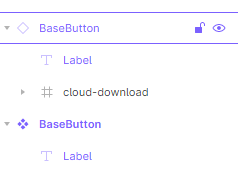
image

This would also make it possible to compose elements together out of other components without using variants. An example could be a base button component, which has only a label, but you could add an icon to the button either by drawing directly inside the button instance, or placing an icon component inside the instance.

Then to solve the “tree problem”, one would just have an empty auto-layout “children” frame in the tree node master component, and when you create an instance of it, you can then just add any number of tree node instances into the children frame, and nest them however deep is necessary. Then if you decide to change the padding of the child nodes for example, you just change it in the tree node master and everything will automatically update.

70 replies

Gavin
Active Member
June 1, 2021

Hi Damian,

Hope you are well. If you post your question as a separate post or in Slack you might get more responses. Otherwise, feel free to message me directly if it’s a question related to the Table Creator plugin.

From my experience, the only way to create rounded corners on the whole table is to apply a corner radius to the table container.

Stina_Bjurstrom
June 16, 2021

When I turned a list (for exemple) that I’ve created with auto layout into a component and then make an instance of this component it’s no longer possible to move the list items up and down. This means that every time I want to swop place of two list items I have to copy paste text inside the instance. This feels extremely old school and is time consuming.

Nor is it possible to or copy past to create a new item. To solve this I add more list items than necessary to the component and hide them. Then I can show them in the instance when I need more.

To sum it up: It would save a lot of time and effort if the instances would work like the way a a component or a non component auto layout do.

I know it bugs my collegues, but does anyone else experience this? Is anyone using a plugin or workaround to help solve this?

Sous
July 8, 2021
  1. Describe the problem: Icon tokens that are used in main components are locked in instances.

  2. We are attempting to create components with an icon yet allow other designers to swap variable sizes in conjunction with the right line height of different typefaces when using component instances.

  3. Does anyone else experience this?

Icon_tokens

Fabrice
August 19, 2021

I love auto-layout and the way overrides are implemented in Figma.

But when an auto-layout (eg. a stack of list items) is made a component, then all you can do in the instances of the component is hide some items. You cannot add items in the instance nor can you reorder items. I guess the former might be difficult, but I don’t see why you couldn’t at least change the order of existing items.

In other words, I often need to “override” the order of the original list, but I don’t have a easy way to do that, other than overriding item 1 so that it looks like item 2, and vice-versa.

Anyone knows why it is not allowed to reorder or even add items to an instance of an auto-layout?

Micah_Horvat
August 24, 2021

If I create a component that is a collection of other objects (list, menu, table, etc), then the instances of that component don’t allow me to add objects (list items, menu items, table rows) - I’d have to detach the instance in order to add items, which negates the benefit of being able to propagate component changes to my designs. It does allow me to delete objects from the collection that are already included in the component, so I suppose a work-around is to make collection components that have many members and just delete members from the instances. Still this doesn’t seem like a great workflow.

Harun_Alikadic1
New Participant
August 27, 2021

Is there any way to customise the fixed width of the placeholder component inside an instance? I struggle to resize swapped components to the width I need …

marizmelo
October 1, 2021

Provide a way to share components that I can add elements to it?

example:
Table component… I need to add more rows to the table
List of users
Form fields
etc

With the addition of variants if could be super powerful and I could share them as a component in my library (instead of having to detach and add more items, what it defeats the point to be honest).

I think if would be super handy… what do you think?

marizmelo
October 2, 2021

A lot of good info here… what I would like to see:

If a component have autolayout on it I could:

  1. Copy the elements in autolayout and add more of them
  2. Insert any group of elements into the autolayout

From that point on I could create a variant for the original component more easily.

cmo
January 6, 2022

Just piling on here:

I am suffering from the same limitations here as everyone else. Someone else mentioned perhaps designating a frame or container inside of a component that could be “unlocked” to allow for content to be arranged or inserted. This would solve a lot of the issues I am having. There is currently no easy way, for example, to make an accordion component without detaching the component instance to edit the content inside.

If there was a way to designate an area within these components as editable in an instance we would be able to accomplish this, which would really eliminate some issues we are trying to work around.

Derek_Rudel
January 20, 2022

I’m creating component variants of containers (popovers, cards, accordions, etc.) where the content/layout can’t be determined at the master level. I need the flexibility to build content layouts within the “body” area of individual instances without detaching my instance and breaking my design system. Once I detach my instance, any updates to my libraries will no longer flow through to these components. Does anyone know how to achieve this result?