

leopechansky
January 26, 2021

Customizable shortcuts

  • January 26, 2021
  • 203 replies
  • 51010 views

The main source of inspiration for this idea was to match the keyboard shortcuts themselves to different keyboard layouts. Right now, users who don’t use US keyboards have to memorize the location of the keys, rather than to use the actual character location to be able to use the shortcuts. Those involving this region are primarily the case:
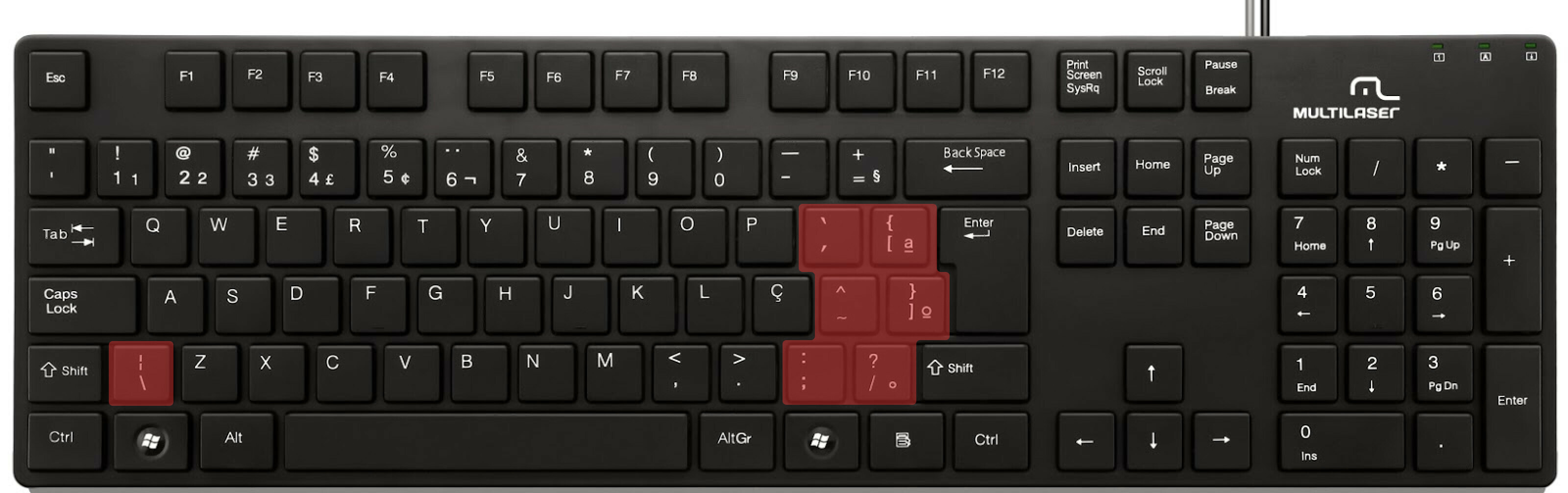

ABNT2 layout (Brazil).

And here’s an example of confusing shortcuts:
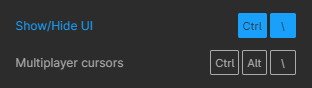
image

Although this problem could be solved by just rebinding the shortcuts to the actual character and not the location on the keyboard, I’ve noticed there are some other issues concerning key bindings.

On this forum post, a member of the community asked for help on backing one layer level with a different shortcut from what Figma has right now. This makes the user adapt their workflow to the tool, and not the other way around — and that hinders efficiency. It would be nice if the tool itself provided some sort of customization on this regard.

Although being a workaround, Mac users can customize keyboard shortcuts by application, but it is a bit limited. It’s also not a possibility for Windows users.

I think this could be a game-changer, as i’ve seen people who refused to migrate from other tools to Figma because they couldn’t customize shortcuts. It would also give the user more control over the tool and their workflow.

What do you guys think about it?

203 replies

CoderMatching
April 6, 2022

+1 for German keyboard

Romio
New Member
April 21, 2022

Eagerly waiting for this feature to roll out.

Julius1
April 26, 2022

To add to the confusion a little bit, there do seem to be correctly labeled shortcuts within the drop down menus themselves. Notice how the adjust font size shortcuts are different between the menu at the bottom and the menu at the top.

XavierV
Active Member
May 3, 2022

As it is a product for designer we are close to the infamy ! 🙂 Localisation please !

Josh
Former Community Manager
May 10, 2022

As always thanks for all of your feedback here. We just launched the International Keyboard Shortcuts beta for German (QWERTZ), Japanese (Kana), and French (AZERTY). Learn more here on how you can participate

This is just the start in working on improving this area, but we hope this helps. 🙂

Greg_Hadley
May 10, 2022

As someone just learning Figma moving from Adobe, I initially thought to myself how fast it must be to build a design with Figma, since its streamlined for that purpose, but the lack of hotkeys and hotkey customization means a lot of my commonly used tasks are now multiple clicks away.

Boris_riskine
May 11, 2022

As a power user on both Mac and Win, in Austria, I bizarrely was forced to use a Win/US external keyboard, and make a AutoHotKey script just to be able to use Figma relatively fluently.
I also use it for changing the default mouse wheel action to zoom.

New feature of adding QWERTZ and other keyboards as a solution seems like adding an insult to the injury as it really only circumvents the real issue of allowing custom keyboard shortcuts.

Otherwise I am a huge fan/early adopter/proponent of Figma and its UI.

Ghaith_Ayadi1
May 12, 2022

Worked like a charm. Thanks

11162
May 19, 2022

I’m wondering if these shortcuts that aren’t able to customize would be improved in the future someday.

  • Return to Instance
  • Copy/Paste as → Copy link
  • Component Property commands in general
WrYBiT
May 30, 2022

Hey, could you Export/Share you List? Greez Jens