

leopechansky
January 26, 2021

Customizable shortcuts

  • January 26, 2021
  • 203 replies
  • 51013 views

The main source of inspiration for this idea was to match the keyboard shortcuts themselves to different keyboard layouts. Right now, users who don’t use US keyboards have to memorize the location of the keys, rather than to use the actual character location to be able to use the shortcuts. Those involving this region are primarily the case:
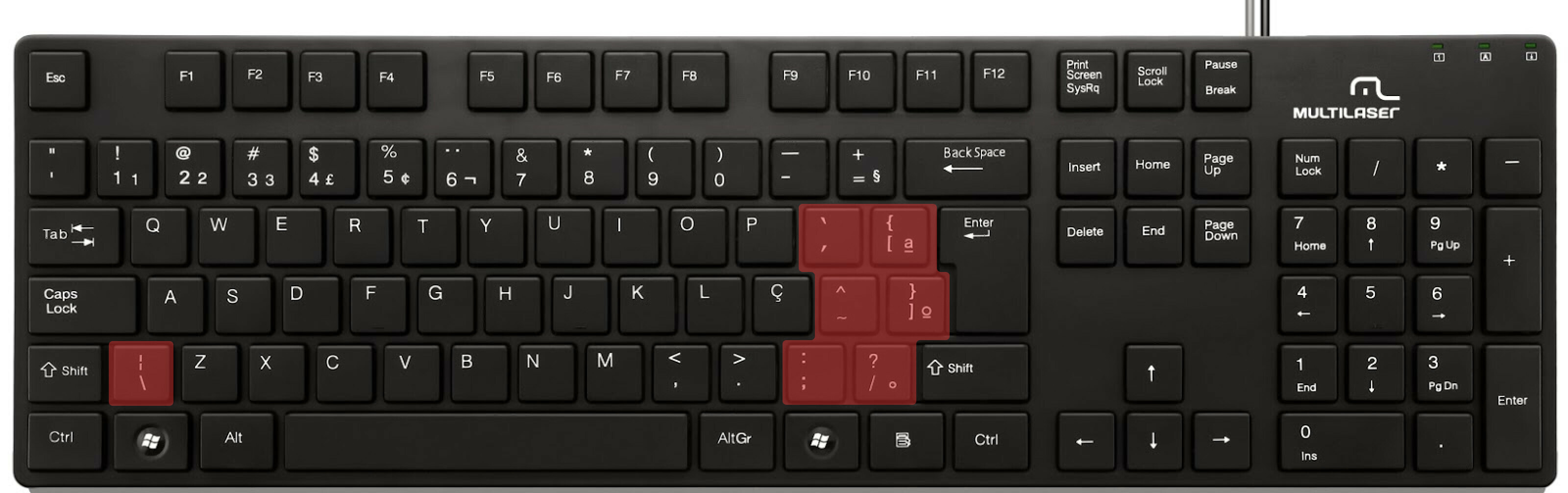

ABNT2 layout (Brazil).

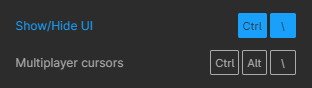
And here’s an example of confusing shortcuts:
image

Although this problem could be solved by just rebinding the shortcuts to the actual character and not the location on the keyboard, I’ve noticed there are some other issues concerning key bindings.

On this forum post, a member of the community asked for help on backing one layer level with a different shortcut from what Figma has right now. This makes the user adapt their workflow to the tool, and not the other way around — and that hinders efficiency. It would be nice if the tool itself provided some sort of customization on this regard.

Although being a workaround, Mac users can customize keyboard shortcuts by application, but it is a bit limited. It’s also not a possibility for Windows users.

I think this could be a game-changer, as i’ve seen people who refused to migrate from other tools to Figma because they couldn’t customize shortcuts. It would also give the user more control over the tool and their workflow.

What do you guys think about it?

203 replies

Leo_DURAND
New Member
November 20, 2024

4 years and still nothing… lol

Ron_Frank
Active Member
November 20, 2024

Your comment inspired me to look at the beginning of this thread, with only 660 votes. But below the initial comment, you can see that 46 other threads have been merged with this one, with a total number of votes exceeding 5,500. So there’s no way that Figma doesn’t know it’s a desired feature. Again, I just wish they would come out and say: “We will never do this, so stop asking.” Then we can all stop wasting our time on this. And stop hoping for a change that will never happen.

Or even better, of course, would be some official response saying they’re working on it and hoping to release it by Qx of 2025. Or whatever.

Iya
Active Member
November 29, 2024

yes some of the shortcuts are extremely awkward to use or understand because they were designed for MacBook laptops instead of desktop or Windows system. Giving some freedom to diverse user is a great idea. Please add the user discretionary shortcuts. Figma is a much larger compony than 6 years ago and it’s important to realize they have various users operating on different systems/ keyboards.

B_o_Tr_n_Gia1
New Member
January 16, 2025

Blease remove ctrl B if the selected layers are not text. 

one-one
New Participant
January 17, 2025

I don’t understand why to block users from customising their workflow. If it’s too complicated to implement in the Figma app itself – no problem. People can use native functionality of MacOS or third-party apps. 
I have been using specific shortcut for Align objects. I don’t know what is MORE frequent action than that. Now, out of nowhere Figma decided to assign some unknown feature to that shortcut. And I cannot even find that shortcut in the list of Figma’s shortcuts. When I tried to assign that shortcut with System Preferences on MacOS – it won’t work.. Only option I’m given – being FORCED to LEARN the shortcut Figma wants. Frankly speaking = ruining my workflow and wasting my time.
This is a bit mental.

one-one
New Participant
January 17, 2025

I cannot emphasize it more – it is MUST! I could understand why Figma wouldn’t have change shortcuts in Figma app. I could understand why for new users default Figma shortcuts would be useful. But I DO NOT understand why not allowing to use an existing functionality of System Preferences of MacOS or third-party apps.
People use different apps, people have different regional keyboard layouts, people use different OSs. It is just common sense to allow people change default shortcuts to what they want.

As an option, support / upvote / comment this topic too:


Andor Nagy
New Member
January 18, 2025

So this has been requested 3 years ago, still not working. Isn’t this supposed to be a basic feature?

Marja
New Member
February 3, 2025

I’m here just to upvote – I would need an option to disable some of them – like Cmd+W. To me it’s a terrible one, I keep reopening the app 🙈

Joseph_Niet
New Participant
February 10, 2025

I keep accidentally triggering the ‘select next sibling’ shortcut (tab) when trying to switch between apps on windows (alt-tab). It’s rather annoying & I’d like to be able to disable or remap that shortcut.

Iya
Active Member
February 21, 2025

Although there are numerous great feedbacks in this thread, I want to highlight a few things: 

  1. not allowing users to customize hotkeys is a horrible product decision. No flexibility, US first and clearly lazy.
  2. a lot of your hotkey poses significant accessibility issue by pretty much randomly scattering thing across the board. like what on earth do you think I can type control+option +t with one hand? and if I have to let go of mouse every 3 seconds why do i even need hotkeys? totally loses the point here
  3. Adobe is not a good company. I have used its product for a decade and decided to switch. do let its weird culture change you please.