

leopechansky
January 26, 2021

Customizable shortcuts

  • January 26, 2021
  • 203 replies
  • 51017 views

The main source of inspiration for this idea was to match the keyboard shortcuts themselves to different keyboard layouts. Right now, users who don’t use US keyboards have to memorize the location of the keys, rather than to use the actual character location to be able to use the shortcuts. Those involving this region are primarily the case:
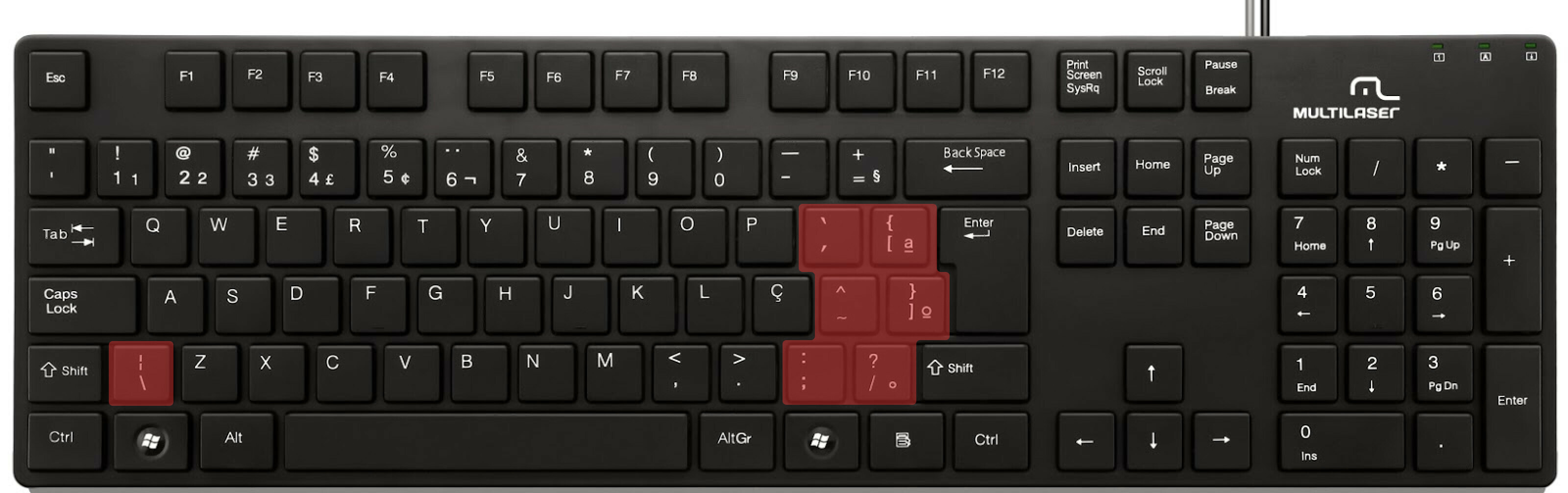

ABNT2 layout (Brazil).

And here’s an example of confusing shortcuts:
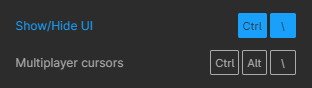
image

Although this problem could be solved by just rebinding the shortcuts to the actual character and not the location on the keyboard, I’ve noticed there are some other issues concerning key bindings.

On this forum post, a member of the community asked for help on backing one layer level with a different shortcut from what Figma has right now. This makes the user adapt their workflow to the tool, and not the other way around — and that hinders efficiency. It would be nice if the tool itself provided some sort of customization on this regard.

Although being a workaround, Mac users can customize keyboard shortcuts by application, but it is a bit limited. It’s also not a possibility for Windows users.

I think this could be a game-changer, as i’ve seen people who refused to migrate from other tools to Figma because they couldn’t customize shortcuts. It would also give the user more control over the tool and their workflow.

What do you guys think about it?

203 replies

Iya
Active Member
February 21, 2025

A post was merged into an existing topic: UI3 – Feedback – Call me oldschool, but

any idea about the progress of implementing this feature?

MaximeO
New Member
May 23, 2025

I don’t even have a dedicated “\” button on my keyboard, for example, and my keyboard config is not in the list. So any shortcut that uses “\” I can’t use.

We need to be able to customize these.

LaitEau
New Participant
July 1, 2025

Hello.

I was so fed up with this problem that I created a native macOS app to map custom shortcuts. It works perfectly for me. It's available in both French and English.

You can download it for now at https://www.leodurand.com/_autres/CustomShortcuts.zip
(There is a chance that I will add the app to the App Store soon)

Let me know if you have any issues with the app. I only tested it with a AZERTY keyboard.


MaximeO
New Member
July 2, 2025

I’m on PC LaitEau 😉

At any rate, the solution would be for Figma to use a small portion of that 1 billion they got from Adobe and give us the very basic option to customize shortcuts. You know, like any good app does.

LaitEau
New Participant
July 3, 2025

I’m on PC LaitEau 😉

At any rate, the solution would be for Figma to use a small portion of that 1 billion they got from Adobe and give us the very basic option to customize shortcuts. You know, like any good app does.

Of course it should be Figma to fix this (btw Adobe didn’t bought Figma 2 years ago) and everybody know that... The app I made was only to fix this temporary (I hope) problem.

But there are a lots of Figma users on Mac, si I’m sure it would be interesting for a few of them.

Tenaya
New Member
July 13, 2025

Can we have an ability to customize our own keyboard shortcuts in Figma please ?

Like Affinity Designer: 👇


Like Adobe illustrator 👇


But we can even do it better in Figma.
Thank you ☺

How was this said 4 years ago, and still isn’t a thing. We don’t need FigPals and even more complex prototyping that we don't have time to use anyway, give us the fundamentals!!!!

antler-hat
New Participant
July 14, 2025

It’s not the same thing, but I made this plugin to enable more keyboard control, which is kind of like opening up a whole bunch more shortcuts:

https://www.figma.com/community/plugin/1510266761765016786/lazer


Keyboard shortcuts are crucial for speed and efficiency, but Figma offers a pretty limited set and you can't customize them.


Lazer proposes a decent workaround inspired by command line interfaces. It includes a number of common adjustments, each with a short code (see below). When you bring up the Actions input with command + K or command + / and then type a shortcode (eg. w.h), the fuzzy search will be ready to select that action.


These aren’t customizable but there is some flexibility because it just uses fuzzy search results to do stuff.

heartjesusart
New Member
August 14, 2025

Please kindly add custom-assignable keyboard shortcuts within the Desktop App. I currently cannot add any custom keys and our workflows would be greatly improved with this essential feature. Thank you! 🙏🏼🌊

Computer: Mac Studio M1 | OS 15.3.1

Nathan Woods → heartjesusart.org | @heartjesusart
Lam Lu
New Member
September 2, 2025

lol 4 years ago

Kevin_Gutowski1
New Member
November 18, 2025

Please let me override the “keyboard box selection mode” keyboard shortcut (option + space). I accidentally press it at least 50 times a day.