

leopechansky
January 26, 2021

Customizable shortcuts

  • January 26, 2021
  • 203 replies
  • 51013 views

The main source of inspiration for this idea was to match the keyboard shortcuts themselves to different keyboard layouts. Right now, users who don’t use US keyboards have to memorize the location of the keys, rather than to use the actual character location to be able to use the shortcuts. Those involving this region are primarily the case:
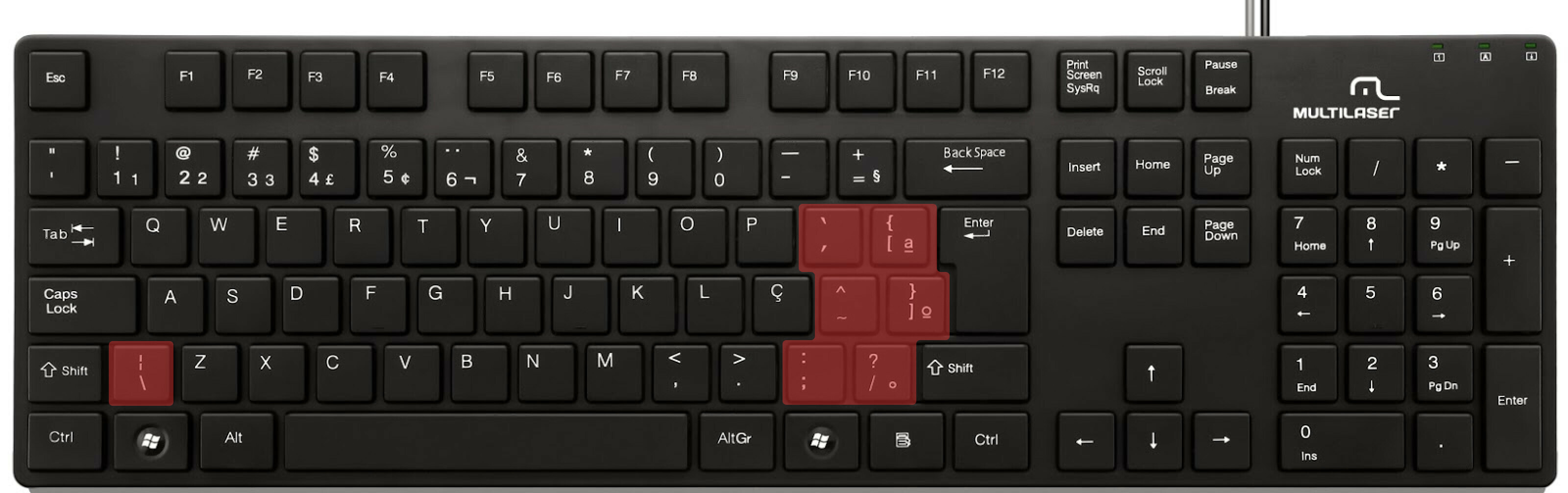

ABNT2 layout (Brazil).

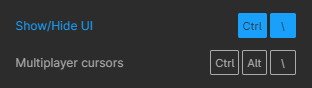
And here’s an example of confusing shortcuts:
image

Although this problem could be solved by just rebinding the shortcuts to the actual character and not the location on the keyboard, I’ve noticed there are some other issues concerning key bindings.

On this forum post, a member of the community asked for help on backing one layer level with a different shortcut from what Figma has right now. This makes the user adapt their workflow to the tool, and not the other way around — and that hinders efficiency. It would be nice if the tool itself provided some sort of customization on this regard.

Although being a workaround, Mac users can customize keyboard shortcuts by application, but it is a bit limited. It’s also not a possibility for Windows users.

I think this could be a game-changer, as i’ve seen people who refused to migrate from other tools to Figma because they couldn’t customize shortcuts. It would also give the user more control over the tool and their workflow.

What do you guys think about it?

203 replies

dumpling
September 24, 2024

How is this not solved yet…? Its been 4 years.

Ron_Frank
Active Member
September 25, 2024

Hello Guy,
I appreciate your idea to help people learn the Figma shortcuts. But that is not addressing the vast majority of the issues described in this years old thread. The various needs for customization simply go far beyond merely memorizing them.

I really wish someone from Figma could just tell us where this stands. Like, near the top of being worked on? Is it being worked on? Q4 release? Q3 2025? What are some of the blockers (like, making it a true application?). Are there blockers? Why hasn’t this been done already? Why wasn’t it done in the first place? Why is it so challenging?

Simply answering many of those questions would go along way to alleviating the immense frustration of folks in this thread. 46,000 views is a lot!

Joep
September 26, 2024

This is reminiscent of what Adobe does: post ticket, Adobe resonds that it has been put on the backlog somewhere; sets ticket to solved. You don’t want to be Adobe, do you @Josh ?

Isabel11
October 10, 2024

How can this issue still not be solved! PLEASE SEND HELP !!!

brother_frost
October 14, 2024

“its not issue if its intended”

Luciana3
October 21, 2024

While using the German keyboard, the cmd + Z is just besides cmd + T, which opens a new tab, and completely interrupts me workflow 🙃 pls fix thissssss

Ksasa
October 23, 2024

I get used with ALT/OPTION key + mouse wheel for zoom in & out in most of design industry’s apps. It’s so hard to adapt with CTRL/CMD key here in Figma.

And when I get used to the CTRL/CMD and have to switch back to other design applications, I have to adapt back to the ALT/OPTION again. So it’s frustrating me twice, and I am sure this bothers other users too.

I wish Figma dev team consider a way to customize keyboard shortcuts, but since that almost 4 years have passed since this thread has been created, it discourages my hopes.

Dennis30
New Member
November 5, 2024

Greetings,

I’m a frequent shortcut user, and there is so many important actions which doesn’t have shortcuts. It would be great to have ability to make custom shortcuts.

Same comes to MacBook with Touchbar, it would be grate to include custom buttons to the Touch bar! Simple in development, so much usage.

Thank you.

Elisa_Sampaio
New Member
November 5, 2024

Figma does not allow me to edit the keyboard shortcuts, yet it would be very useful to do so. Mainly in the case of the “Actions” shortcut: [Command + ,] is not as straightforward as having [Command + K]. Despite of knowing the correct Figma shortcut, I always end up doing the latter because it’s such an ingrained behaviour acquired from working with other softwares/apps. This is the most painful case, but others would also benefit from the ability to edit.

Sarah35
November 6, 2024

This should be a standard feature. Come on Figma team, this is an easy win for accessibility. Also it would be good to have shortcuts organized the way we prefer for our workflows. (For example, the P key is the Pen tool but the V key is the move tool; for my workflow I want them to be close to each other. My brain keeps wanting C to be the shortcut to tweak the bend in the vectors and it brings up Comments instead, which I only ever use at the very end.)