

leopechansky
January 26, 2021

Customizable shortcuts

  • January 26, 2021
  • 203 replies
  • 51013 views

The main source of inspiration for this idea was to match the keyboard shortcuts themselves to different keyboard layouts. Right now, users who don’t use US keyboards have to memorize the location of the keys, rather than to use the actual character location to be able to use the shortcuts. Those involving this region are primarily the case:
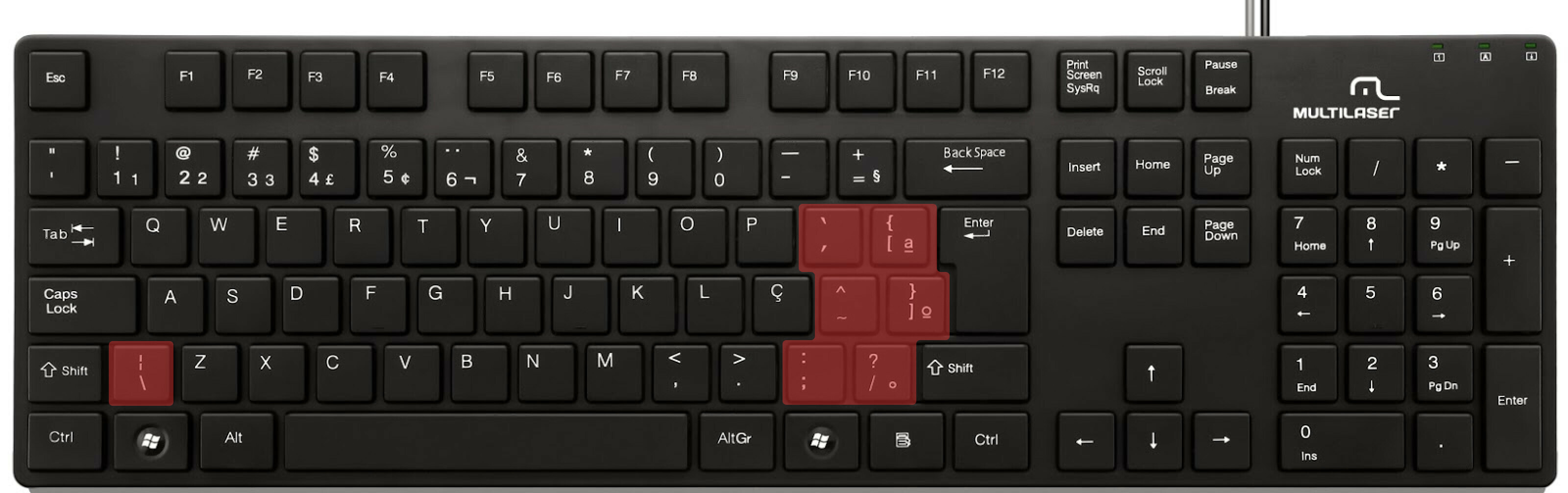

ABNT2 layout (Brazil).

And here’s an example of confusing shortcuts:
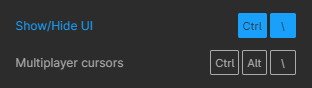
image

Although this problem could be solved by just rebinding the shortcuts to the actual character and not the location on the keyboard, I’ve noticed there are some other issues concerning key bindings.

On this forum post, a member of the community asked for help on backing one layer level with a different shortcut from what Figma has right now. This makes the user adapt their workflow to the tool, and not the other way around — and that hinders efficiency. It would be nice if the tool itself provided some sort of customization on this regard.

Although being a workaround, Mac users can customize keyboard shortcuts by application, but it is a bit limited. It’s also not a possibility for Windows users.

I think this could be a game-changer, as i’ve seen people who refused to migrate from other tools to Figma because they couldn’t customize shortcuts. It would also give the user more control over the tool and their workflow.

What do you guys think about it?

203 replies

Tawney_Kegan
June 14, 2024

Hello!

I’m sure others have requested the ability to customize keyboard shortcuts in the past, but here’s one more reason why it’d be really nice to have it:

As many know, when you hit Cmd + B with one or more frames selected, it bold all of the text in those frames. I’ve occasionally done this without realizing it and continued on working for a while, only to then realize I’ve bolded everything and breaking my applied styles. I then have to either back out all of the work I did since that point, or re-apply all of my styles.

If I could change or disable that shortcut, it’d solve this problem for me!

Or maybe I should just always be working in branches?

Gleb
Power Member
June 18, 2024

Using apps like BetterTouchTool you can set Cmd + B to no action.

June 26, 2024

It would be very helpful if we could edit our own keyboard shortcuts for any item in the menus, now especially that the toolbar is now on the bottom of the page. Such as allowing us to set shortcuts for actions such as “Create multiple components” or “Set default properties”.

Kyle25
New Participant
July 8, 2024

Premiere pro does it best IMO!

Ron_Frank
Active Member
July 10, 2024

That may be good for seeing what shortcuts exist, but I find Adobe InDesign’s UX better for creating shortcuts. For example, you can select an item in a panel menu that does not have a shortcut and assign one to it. And also see what shortcut may exist for the item, as well as what feature may have your shortcut already assigned to it (see below). You can also show the set and search for any aspect of the shortcut — the key it uses, or the function.

djv
Figmate
Community Support
July 11, 2024

A post was merged into an existing topic: UI3 – Feedback – Call me oldschool, but

Zach_Coffin
July 30, 2024

I can’t believe they’ve overridden the universal Windows command for quitting an app and replaced it with the MacOS one. I’m not using a Mac, why do you force me to use Mac hotkeys?

July 30, 2024

BRILLIANT!!! I have been plagued by this for the past 2 years. You saved the day!

Kyle25
New Participant
August 13, 2024

It’s cut off in the screenshot but the Premiere UI also has this functionality!

Guy_Morita
September 12, 2024

Lots of chat about shortcuts here 🙂 I’m a Figma user / Engineer. I built a product that helps you learn shortcuts in Figma (and other apps) faster. Pre-Release currently, but feedback has been good. Happy to share if folks are interested: https://reiden.ai/ ⌨️